


Whether you are filing a warranty claim, want to get your Pixel repaired in the official service centre or buy a used Pixel phone, you will eventually need to locate the Google Pixel serial number. Fortunately, Google gives you several ways to find it, even if your phone won't turn on. Here are all the most reliable methods.
Check Google Pixel Serial Number Using Settings App
If your Google Pixel is functioning as intended and you can unlock it, the software settings are the quickest way to find your phone's serial number. All you need to do is:
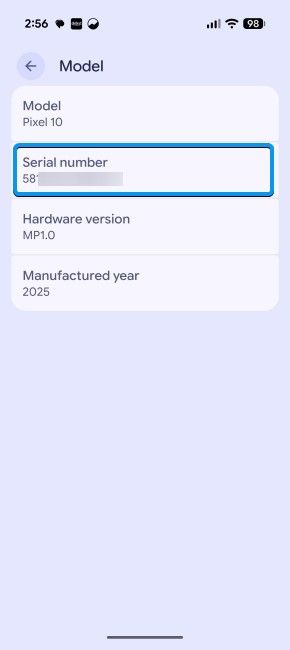
- Open the Settings app on your Pixel, go to About Phone > Model.

- Your Pixel's serial number should be displayed right below the model name, alongside the hardware version and the manufacturing year.
Related Articles

View Google Pixel Serial Number Using the Phone App
Just like OnePlus codes (Link), Android has a universal code to instantly pull up your phone's identity credentials:
- Open the Phone app on your Pixel phone and go to the Keypad tab at the bottom right.
- Dial *#06# and a screen will automatically pop up displaying your phone's IMEI, EID and the Google Pixel serial number.

Related Articles

Find Pixel Serial Number on Google Store
If you bought your Pixel from the Google Store, you can find the serial number directly on the orders page of the website.
- Head over to the Google Store website and click on your account picture at the top right.

- From the drop-down menu, select Orders to see all of your orders.

- On your Pixel order, hit View order to see additional details.

- You should see the serial number of the phone just below its SKU and storage option. You may note it down.

If you are trying to set up an official repair or file a warranty claim, the IMEI is usually enough. It's another unique identification number used by the Global System for Mobile Communications Association (GSMA). While the serial number is managed by the brand, the IMEI is managed by a higher authority. Similar to how you can find IMEI on OnePlus, you can do the same on a Pixel by using the same *#06# code.
And those were all the ways to check the serial number on a Google Pixel smartphone. To reiterate, a serial number can come in handy when claiming or refuting a warranty or to check if the seller is speaking the truth about its existing remaining warranty. Besides, it can also be used for trade-ins or repair-related purposes.
Related Articles


