


Google has started rolling out the stable Android 17 QPR2 update to Pixel phones, a full month earlier than expected. The update, released on November 10, 2026, arrives alongside the November 2026 Pixel Drop and the November security patch.
Android 17 QPR2: What's New
Google's Android Community Manager, Mishaal Rahman, took to the subreddit r/ Android to list out all the changes with the latest Android 17 QPR2 stable update.
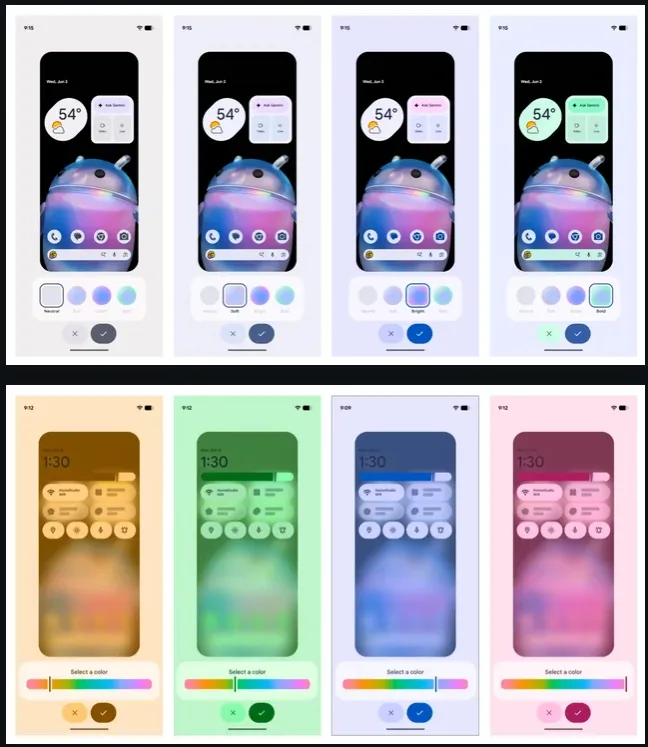
The biggest visual change is custom system colours. Instead of picking from Google’s preset colour schemes, you can now use a rainbow hue slider to choose any accent colour you like.
There are also four intensity styles to choose from: Neutral, Soft, Bright and Bold. Compatible wallpaper collections can now also switch automatically between light and dark versions to match your system theme.
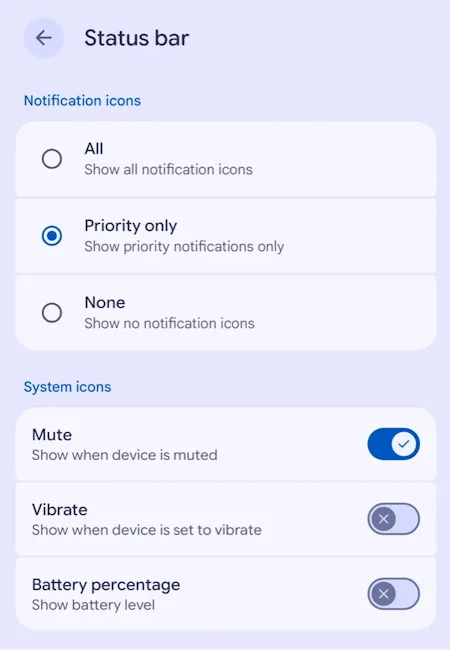
Next up, you get more control over the status bar. A new settings page lets you choose whether to show all notification icons, only priority ones, or none at all. You can also hide individual indicators like battery percentage, mute and vibration.
Google has also fixed a long-standing annoyance where some apps could lock screen brightness at maximum, so you can now adjust brightness from Quick Settings regardless.
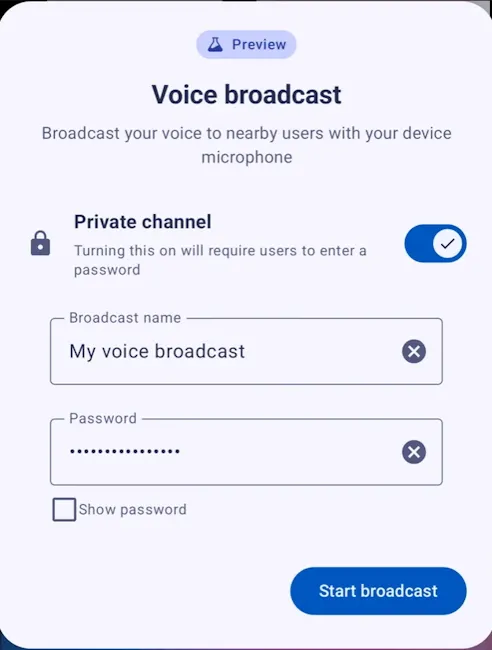
Audio gets a big upgrade with Auracast Voice Broadcast. Using a new Quick Settings tile, you can broadcast your voice through your phone’s mic or a wired headset, and anyone nearby with compatible Bluetooth LE Audio headphones, hearing aids or Android phones can tune in.
Private broadcasts can be password-protected, and listeners can join via QR codes or NFC. This builds on the Auracast Audio Streams tile that arrived with the Android 17 QPR2 Beta 5 update.
Foldable and tablet users get a new window handle at the top of apps, making it easier to switch between full-screen, split-screen and floating bubble layouts.
On the security front, sideloading apps now brings up a cleaner install dialogue that lets you grant temporary or permanent permission.
Android 17 QPR2 also blocks certain risky actions during calls with unknown contacts, such as enabling Developer options. It also prompts you to confirm before running call-forwarding codes.
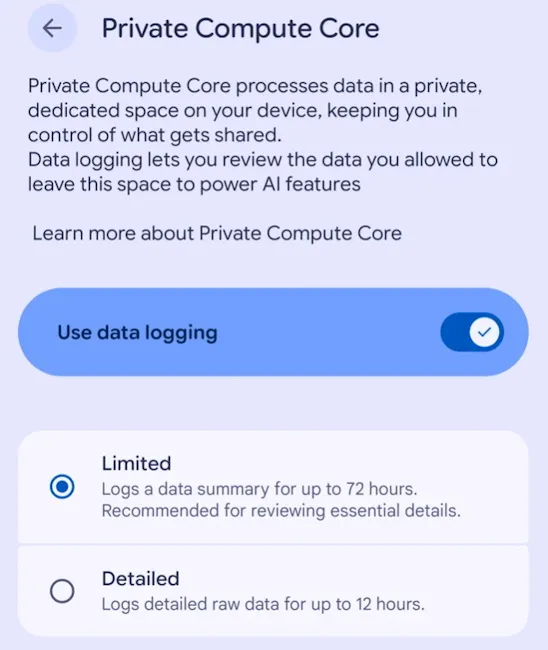
A new Private Compute Core log shows what data is shared with on-device AI features.
Other additions include file sharing between the Linux Terminal and Android’s file manager, customisable keyboard vibration, better hearing device controls and a home time zone option.
Related Articles

Android 17 QPR2 Bug Fixes and Security Patch
The update also brings over 30 Pixel-specific bug fixes. Some of the notable ones include:
- A fix for occasional stuttering while scrolling through apps
- A fix for the keyboard sometimes not appearing in search fields
- A fix for media volume unexpectedly increasing when using voice commands
- A fix for the charging indicator appearing when no charger is connected
- A fix for photos occasionally not saving on the Pixel 11 series
- A fix for background battery drain related to sensors on the Pixel 11 series
- A fix for the notification shade sometimes not expanding with a swipe down
Alongside these, the November 2026 security patch resolves 232 Android vulnerabilities across two patch levels, plus 166 additional fixes specific to Pixel phones.
Related Articles

Android 17 QPR2 Eligible Pixel Phones
The Android 17 QPR2 stable update is available for the following Pixel devices:
- Pixel 6a
- Pixel 7, Pixel 7 Pro, Pixel 7a
- Pixel Fold and Pixel Tablet
- Pixel 8, Pixel 8 Pro, Pixel 8a
- Pixel 9, Pixel 9 Pro, Pixel 9 Pro XL, Pixel 9 Pro Fold, Pixel 9a
- Pixel 10, Pixel 10 Pro, Pixel 10 Pro XL, Pixel 10 Pro Fold, Pixel 10a
- Pixel 11, Pixel 11 Pro, Pixel 11 Pro XL, Pixel 11 Pro Fold
The Google Pixel 6 and Pixel 6 Pro are missing from the list, since they reached end of life with Android 17 QPR1. Most phones get build number CP4A.261105.040.A1, while the Pixel 11 series gets CP4A.261105.040.D1.
Google had been testing the update through several betas and the Android 17 QPR2 Beta 4 release was expected to launch in stable in December. That makes this early release a pleasant surprise.
Related Articles

How to Install the Android 17 QPR2 Update
To install the update, head to Settings > System > Software updates on your Pixel phone. If you’re enrolled in the Android 17 QPR2 beta, make sure to opt out of the Android Beta Program first. That way, you’ll get the stable build without having to wipe your data.
Related Articles


