


Google is testing a major layout redesign for Google Messages, aiming to prioritise one-handed usability and a more context-aware search experience.
Discovered by Android Authority in the latest Google Messages build 20260917_03_RC00, this is a feature flag that completely rearranges the app's primary navigation controls. The upcoming redesign shifts the Gemini icon to the top header, replacing the old Search icon.

For those unaware, the current layout houses the Start Chat and Gemini buttons in the bottom-right corner, with the search icon tucked away at the top right. Meanwhile, the Start Chat button is moving from the bottom right to the bottom centre of the screen.
The most notable change, however, is how these newly placed buttons adapt to user behaviour. When the app is launched, the Start chat button remains at the bottom centre. However, as a user starts scrolling, the button collapses and is replaced by a Search button that expands alongside it at the bottom of the display.
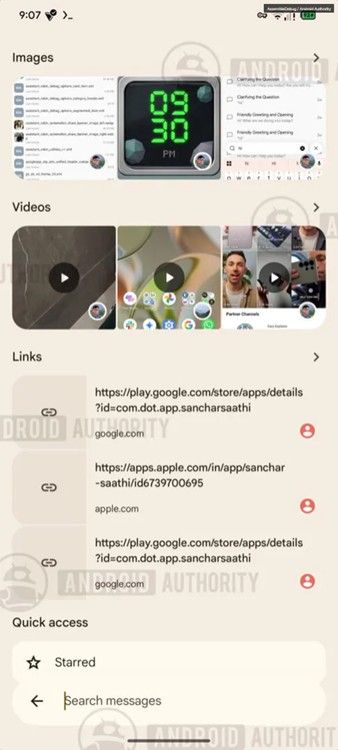
This change aligns with a larger, previously uncovered Search overhaul that introduces a bottom-anchored search bar and replaces standard category filters with large visual previews for images, links and videos. Besides, it also promises a redesigned results page that separates messages from broader chat histories.
Additionally, the development team is testing visual tweaks for pinned conversations. Future stable builds may feature larger contact avatars for pinned chats and introduce live text previews whenever a new message arrives in those specific threads.
While there's no concrete launch date for these features yet, considering these are already locked behind feature flags, Google could roll these changes out relatively soon. Until then, stay tuned.
Related Articles


