




Google introduced Connected Cameras on Pixel phones last year to switch between two camera angles while live streaming. However, it was limited to a handful of apps. Now Google is expanding it to many more apps, including the ones you use every day for video calls.
First spotted by Android Authority, the latest Pixel Camera Services update has expanded Connected Cameras support to 11 more apps. This includes:
- WhatsApp Business
- Skype for Business
- Google Meet
- Gmail
- Zoom
- Microsoft Teams
- Slack
- Telegram
- Discord
- Facebook Messenger
This brings the total number of supported apps from 5 to 16. Until now, Connected Cameras was mostly useful for live streaming on social media. With WhatsApp, Google Meet, Zoom and Teams now supported, it becomes much more useful for everyday video calls and work meetings too.
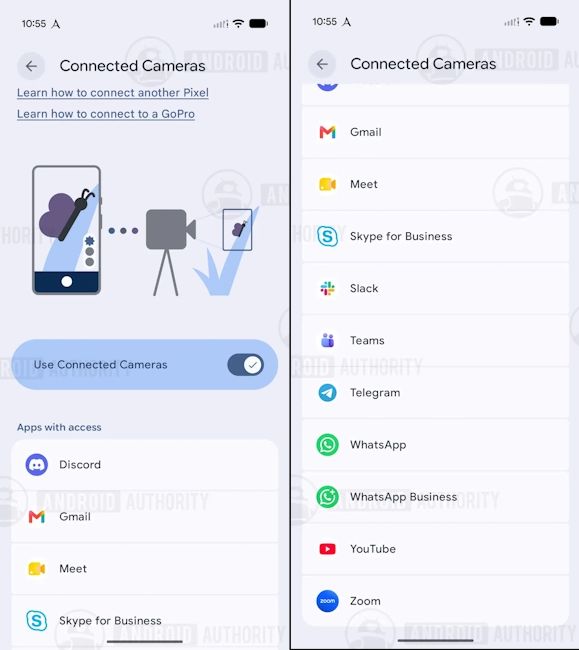
What Is Connected Camera on Pixel Phones?
For those unaware, Connected Camera lets Pixel phones use a second camera during video calls and live streams. That second camera can be another Pixel phone or a GoPro.
For example, users can keep their primary Pixel phone in front of them for a face-to-face view and place a second Pixel across the room for a wider shot. Then they can switch between the two angles during their call or stream.
At the time of writing, Connected Cameras works on the Pixel 9 series, Pixel 10 lineup and newer Pixel models like the Pixel 11, Pixel 11 Pro and the Pixel 11 Pro Fold. Do note that both Pixels used for this feature will need to be signed in to the same Google account.
Related Articles

How to Use Connected Cameras on Pixels
Setting up Connected Camera is fairly easy, and here is a step-by-step breakdown on how to use Connected Camera on Pixels:
- On your main Pixel, go to Settings > Connected devices > Connection preferences and turn on Connected Cameras.
- Open a supported app, like WhatsApp or Google Meet, and start a video call.
- A small floating button will appear on the screen. Tap it to open the Camera Picker.
- Tap Add Pixel to see nearby Pixel phones signed in to your Google account.
- On the second Pixel, tap Grant access and choose the front or back camera.
- Once connected, you can switch between the two cameras from the Camera Picker.
If you want to use a GoPro, pair it first in Settings > Connected devices > Pair new device. It will then show up in the Camera Picker automatically. Keep in mind that you can connect only one extra camera at a time.
That said, the expanded app support for the Connected Cameras update is rolling out through the Google Play Store as Pixel Camera Services version 4.1.977867365.00. It should install automatically on supported Pixel phones. However, it may take a few days to reach everyone. So, stay tuned.
From the latest tech news to expert reviews, Beebom Gadgets brings you tech that matters every day. Want help with your next phone purchase? Explore the latest phones and see which upcoming phones you should wait for.
Related Articles


