




Earlier this week, Apple released the iOS 27 stable update globally for all eligible iPhones. Now, the Cupertino brand has added a new security feature that is targeted at combating fraudulent calls and online scams and it is a very handy feature, especially in India.
Impersonation Risk Detection Can Save You from Fraudsters
As per a new Apple Support page, the iOS 27 update brings a new security feature dubbed Impersonation Risk Detection. The primary objective of this feature is to analyse Apple iPhones and Apple Accounts for signs of an active scam in progress, behavioural pattern inconsistencies, or real-time fraudulent transactions.
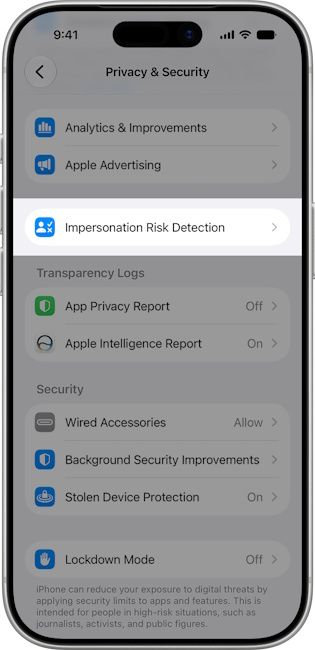
Based on that analysis, Impersonation Risk Detection assigns a risk level to the app that is being installed and used on an iPhone. They are primarily assigned as follows:
- Unknown: No evidence of suspicious activity detected
- Medium: Some signs of suspicious activity detected
- High: Significant signs of suspicious activity detected
Apple says that Impersonation Risk Detection works on-device and the targeted app only receives the risk-level threat assessment. The underlying data used to calculate it stays stored entirely on iPhones.
If any app falls under the Medium or High bracket, it might ask users to verify their identity, introduce a delay before completing the transaction, or display a scam warning.
Related Articles

How To Enable Impersonation Risk Detection?
By default, Apple has confirmed that Impersonation Risk Detection stays off on iPhones. Users will need to manually enable it for the feature to work. The process to do so is fairly simple:
- Open Settings
- Go to Privacy & Security
- Click on Impersonation Risk Detection
- Toggle on Share with App Developers
One important thing to note is that Impersonation Risk Detection only works in supported apps and Apple has not published a list of which apps support it. So enabling it today might not mean that the feature will work right away.
However, as it is with Apple, we can expect a wider net of app developers to support the Impersonation Risk Detection API and it could soon cover each and every app that you use and can be targeted for social engineering scams.
This is an important security feature for iPhone users in India since the country accounts for the third-largest market targeted by scammers and fraudsters. Impersonation scams involving people posing as bank officials, telecom representatives or law enforcement have grown steadily, and most Indians fall prey to such malpractices.
Related Articles


