


Beebom
Rating8
The Pova 8 Pro is a slim, lightweight device trying very hard not to be just another slab phone. The rear Alive Matrix display seems derivative but comes in quite handy. Its cameras produce great results in daylight, and the battery can get you through a day with ease. The phone performs everyday tasks without a hitch and doesn't break a sweat when gaming. It is swimming in AI features, but not all of them come for free. Overall, it’s a slick, dependable mid-range phone for anyone looking to stand apart from the crowd.
Pros
- Distinctive design with IP69K/69/68/66 rating
- Customisable rear display and One-tap button
- Highly capable main camera
- Full-day battery
- Decent performance for daily tasks
- Loud and balanced audio output
Cons
- AI features require subscriptions
- Ultra-wide camera can be better
Pova 8 Pro doesn’t look like any other phone in its category. It has a funky garage-punk aesthetic, a distinct camera island, and a stylish rear display that is out to charm. But is there any substance to its style?
During my two-month testing period, the Pova 8 Pro surprised me on multiple fronts, though not always for the right reasons. While I was most eager to find how the Alive Matrix worked, I was equally curious about the little changes that differentiate the Pro version from the more modestly priced Pova 8 before it. With that, let’s jump into this Pova 8 Pro review.
Pova 8 Pro Unboxing

The Pova 8 Pro provides all the necessary accessories that you need from a smartphone today, and then some. Here’s a complete list of what you get in the box:
- Pova 8 Pro smartphone
- 45W charger
- USB-A to USB-C cable
- Phone Case
- SIM ejector tool
- Pre-applied screen protector
- Paperwork
- Stickers
Before we move on, here are the key specs of the device that you should keep in mind.
Tecno Pova 8 Pro Key Details


Note: Our testing, opinion, and rating for this review are based on the phone's launch price. We recommend checking the current price before making a purchase decision.
Related Articles

Design and Build
- 7.39 mm thickness, 189 grams weight
- IP69K/69/68/66 dust and water resistance
- Polycarbonate build
Pova 8 Pro comes in three colours – Tundra Green, Graphite Black, and Arc White. I had the Tundra Green variant, arguably the best of the lot. Its back design gives the impression that there are actual screw holes and flowing lines that you can trace with a finger. But it is nothing more than a skin, which bummed me out.

Pova 8 Pro is quite a lightweight phone. The weight distribution is well on point, which made it easier to hold in one hand. It's also surprisingly durable. The hard plastic back protects against dust, debris, and splashes. Although I didn’t put it to an extreme test, a couple of accidental drops on the floor of the cab and some late August showers didn’t seem to bother it.
Even with raindrops sliding down the screen, the screen worked perfectly fine. A screen guard already comes pre-applied, thankfully.
Nevertheless, the back feels smooth to the touch. Pova calls this the Interstellar Spaceship Design. But to my eyes, the aesthetic is more in the vein of garage punk.

The raised camera module, which the brand calls the Prism Trinity, doesn’t stick out too much. The rectangular design looks slick and indulgent. And fortunately, there’s no table wobble to take anything away from its style.
The sides, surprisingly, have a smooth matte feel that makes it quite grippy when holding the phone. I would have preferred if this same texture was extended to the back as well.

All the physical buttons are on the right side, with just enough space between the Power button and the One-Tap button to rest the thumb. This made things a little too cramped for my preference.
But my fingers soon adjusted, and it stopped being an annoyance. It just takes some getting used to, though I do foresee this being an issue for those with the dominant left hand. The buttons themselves are quite tactile and clicky, and you get both physical and aural feedback when you're pressing down on them.

Speaking of the One-Tap button, its placement suggests it is best suited as a dedicated camera button, which it is. But as it can be customised to open any specific app, I kept it set to the dictionary app, which I cannot do without.
Also, the One-Tap button is a misnomer. Because it requires a long press to activate, not a tap. It feels like this extra button could do more than just open an app or take pictures. Perhaps a single tap and double tap gesture could be added via a future software update. Here’s to hoping!
Related Articles

Display and Audio Quality
- 6.78-inch (1208 x 2644) 1.5k 144Hz AMOLED display
- Corning Gorilla Glass 7i protection, HDR 10+ supported, 10-bit panel
- 1,600 nits in high brightness mode, 4,500 nits of peak brightness
Pova 8 Pro has a huge AMOLED display. That means the blacks are true and the colours are vivid. The 1.5K panel is sharp, with room enough for most content.

It’s definitely not the best screen I’ve come across. But it’s not too shabby either. The 144 Hz refresh rate keeps scrolling smooth and lag-free, and the screen remains bright even under the afternoon sun. Our in-house Luxmeter showed a peak brightness of 2,800 nits, which is pretty good, even if it's nowhere close to what the brand claims.

The Pova 8 Pro gets quite loud, without muddying the sound. The dual speakers have Dolby Atmos speakers built in, along with support for Hi-Res. I was also glad to find that the speakers were on the top and bottom, which ensures the stereo audio image is well separated and balanced. To a budding audiophile like me, this was a big plus that put the Pova 8 Pro in my good books.
Related Articles

Alive Matrix Overview
Now on to the good stuff! The Nothing-inspired dot matrix rear screen isn’t just eye candy. Pova calls it the Alive Matrix Display, and it’s actually very useful, besides being a whole lot of fun!
Nested inside the rectangular camera island, the Alive Matrix is made up of 177 LED beads, all of which can be independently controlled. That means you can draw anything you want and have that as your custom notification or call light.

The feature came in pretty handy, especially for when I received calls from unknown numbers. With the phone turned over, I could tell at a glance if I needed to attend to the call. I set a separate light effect for my friends, family, and colleagues, which made my life so much easier.

There are a couple of basic Alive Matrix games thrown in to keep things interesting. But these are not the life of the party. What’s more useful is when Alive Matrix indicates the charging status, timer countdown, file transfer, and the photo timer.
All in all, I’m not so much blown away as I’m quietly satisfied with this mini screen.
Related Articles

Performance Tested
- MediaTek Dimensity 7400 Ultimate, TECNO P1 Graphics Chip
- 8 GB LPDDR4X/5 RAM + 256 GB UFS 2.2 storage
- 5000 mm² Vapour Chamber cooling
Under the hood, the Pova 8 Pro is powered by the MediaTek Dimensity 7400 chipset. Although it doesn't top our list of phones with the fastest processor, it handles most things like a champ. Here are the benchmark results for reference:
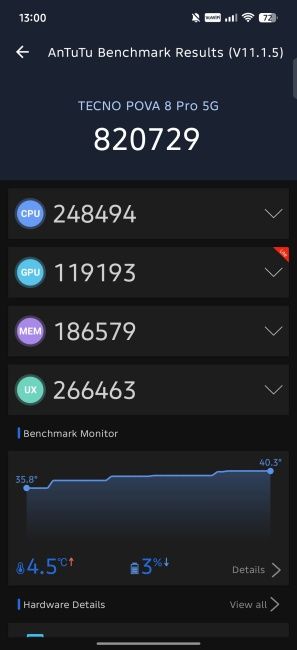
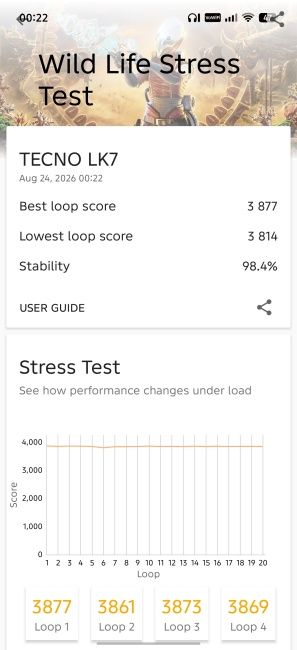
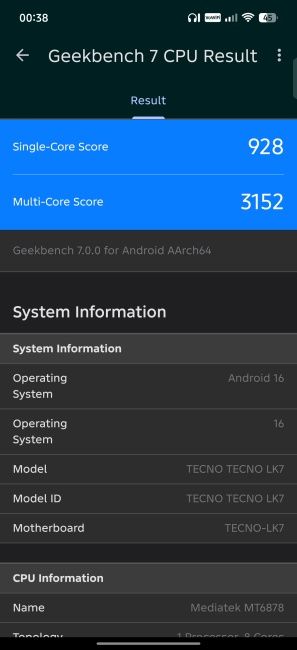
It's not blazing fast. Apps do sometimes feel a little slugging and lazy to open. Switching between them isn't all that snappy either. But they remain stable, and I didn't experience any random crashes. The Pova 8 Pro comes in 8 GB and 12 GB RAM variants. I had the former, which proved sufficient for most tasks.
But what deserves special mention is the dedicated Tecno P1 graphics chip. This co-processing chip turns the Pova 8 Pro into a very capable gaming smartphone.

Playing BGMI at Smooth/Extreme settings, I was constantly getting 90 FPS. For Call of Duty: Mobile at Very High/Max settings, this dropped to 60 FPS. Games like Wuthering Waves played at High settings managed to hover between the 60–90 FPS marks. But thanks to vapour chamber cooling, the thermals never went out of control, even after hours of gaming.
Overall, Pova 8 Pro is a reliable performer. At its price, it does seem a little on the slower side. But gaming-wise, it is punches well above its weight.
Software and Updates
Pova 8 Pro comes with HiOS that is based on Android 16. It isn’t the cleanest OS out there. In fact, it comes with a bunch of bloatware, including a variety of games I'd never heard of before. Unlike the offline Android games I usually turn to, these out-of-the-box titles didn't impress me in the least. Fortunately, they can be removed easily.
The only thing I couldn't remove was the App Center. As Pova would have it, that one app remains uninstallable, and it annoyed me to no end.

In terms of AI features, the Pova 8 Pro throws everything but the kitchen sink at you. They include AI Call Summary, Flare Remover, Reflection Remover, Shadow Remover, Noise Cancellation, AI Studio, Call Assist, and LightMaster 2.0. The Tecno AI setting lets you control all these from a single page, fortunately!
Unfortunately, several of these AI features, such as voice, caption, and call translations, require a subscription once you run through the trial credits.

I found myself playing a lot with the AI theme generator, which generates themes based on pictures and text prompts. The results get quite fancy, even if there are some icons that do not follow the theme. There’s also a dedicated theme app that lets you pick from dozens of non-AI themes to spruce up the device.
Cameras Reviewed
- 50 MP (Main), f/1.8, 1/1.56”, OIS, video recording up to 4K @ 30 FPS, 84.1 degrees
- 8 MP (Ultra-wide), f/2.2, 111.4 degrees, video recording up to 2K @ 30 FPS
- 13 MP (Selfie), f/2.2, video recording up to 4K @ 30 FPS
Pova 8 Pro has the Sony LYT 700C as its main camera sensor, the same lens that is on the Nothing 4a Pro. The native camera app has a dedicated Pro setting that lets you control the ISO, WB, EV, shutter speed, and the whole kit and caboodle that professional photographers like.

And thanks to the dedicated One-Tap button, taking pictures and shooting videos is a blast. Let’s see how each camera fares.
Main Camera
The primary camera can capture some very high-quality photos, even at night or in low light conditions. The colours are generally vibrant for daytime shots with fairly good detailing. I was glad to see that the shots weren't overexposed, nor were the edges sharp to the point of artificiality. There's a good balance between light and shadow which naturally gives a fullness to the colours.


Zoom shots work well, but only up to a point. You can push the camera zoom up to 15x, like in the zoomed-in photo of the truck below. However, I couldn’t bring myself to go beyond 4X. Anything beyond this, and the image starts to come apart.


Night shots appear slightly noisy, and as natural light wanes, the details take a hit. In such situations, the camera overcompensates a touch too much, especially when a bright source of light enters the frame. But the images are not unsalvageable.
Image stabilisation works fairly well. Consider the image of the Tecno building below. Despite my shaky hands, I was able to zoom in and capture the logo while inside a speeding cab.

For the most part, the images were fairly consistent. But every now and then, some shots came out subdued and off-colour, like the image of the coconuts below.


There is an interesting effect called the Sky Shop that is worth mentioning. This effect improves your landscapes by adding wisps of clouds in a blue sky, you know, for when there’s nothing but grey smoggy skies outside.
Ultrawide Camera
The ultrawide camera is a mixed bag. It really doesn’t want to play at night. It's hard not to notice the noisy haziness that smears everything that is captured on the ultrawide sensor at night. Without the necessary light information, the edges blur together, the colours just feel off, and you'll notice wandering streaks of light that cannot stay composed.


But when there’s sufficient light, it reawakens and captures stunning photos. In the daytime, ultrawide shots also tend to have a warmer hue that feels closer to what's being captured. For this reason, I tended to prefer the ultrawide to the main camera for afternoon shots.
Front Camera
The selfie camera is done right here. Most portraits and selfie shots are bright and vibrant and come out social media ready. There’s a good amount of detailing and the skin tones appear true.
I felt the colours on the front camera were quite close to what the main camera produced. In Portrait mode, you'll get a good amount of background blur, and the edge detection works fairly well too.


Pova 8 Pro is just as capable in recording videos as it is shooting photos. Both the main and front camera boast 4K/30FPS video recording. Still, there is a slightly perceptible off coloring that subdues the videos sometimes. Beyond that, I didn't have many complaints.
Battery Life and Charging
- 6,500mAh battery
- 45W fast charging, 10W reverse charging
Compared to its younger cousin, the Pova 8 Pro has a slightly diminished battery capacity. Where the Pova 8 boasted a massive 8,000mAh battery, the Pro trims the battery down to 6,500mAh. Clearly, in the quest for a slimmer device, some sacrifices had to be made.
But it rarely ever mattered. Even with moderate to heavy usage that included gaming, streaming episodes, watching YouTube, listening to music, and evening photography, the Pro kept going. In total, I got around 8.5 hours of screen-on time, which is quite respectable considering how much I pushed it. And only while doomscrolling at night did I remember the charger.

Speaking of the charger, there’s a 45W brick included in the box, which is always nice to see. Charging speeds are fairly rapid. It takes about 1 hour and 40 minutes to go from 1–100%. In clutch moments, a quick 20-min top-up juiced it from 25–55%. Other than this, the inclusion of 10W reverse charging is more than welcome.
Pova 8 Pro Review Verdict: Should You Buy It?
Pova 8 Pro excels in many departments. It’s a slim, stylish smartphone with decent gaming and camera capabilities, an Alive Matrix rear display that adds more than just aesthetics, good stereo speakers, full-day battery, and all-round protection from the elements.

The UI can be a mixed bag, with bloatware cluttering up the space, and only a few useful productivity features. There's the subscription-based AI features that I don’t see myself using at all, and a questionable choice of a chipset.
Despite its shortcomings and my initial impressions, the Pova 8 Pro grew on me after two months. I foresee this to be the case for most who end up going for it too. So if you’re looking for a stylish, rugged device that looks nothing like anything else on the market, the Pova 8 Pro could be for you. But if a better deal is what you’re after, they’re really not hard to find.


