


Your Samsung Galaxy Watch 8 is getting its biggest software update yet. The stable One UI 9 Watch update, based on Wear OS 7, is now rolling out to Galaxy Watch 8 units in India. It brings a fresh design, deeper health insights, better outdoor navigation and simpler watch face customisation, so it’s well worth installing.
The India rollout was first spotted by tipster Tarun Vats (@tarunvats33 on X), who shared a screenshot of the update on a Galaxy Watch 8. The update carries build number L320XXU2BZJ7, weighs in at around 2 GB and includes the October 2026 security patch.
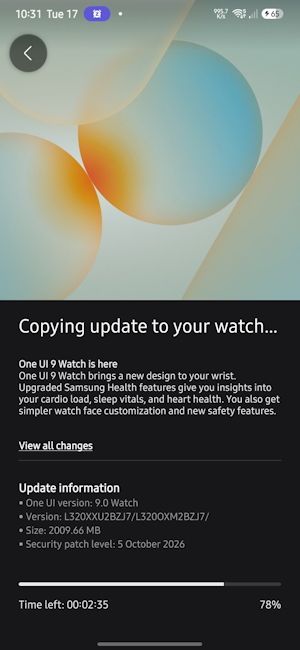
The update first rolled out in the US and South Korea, where Samsung ran its One UI 9 Watch beta programme, about a week ago. It’s now reaching Europe, India and several other regions, and it’s available for both the Galaxy Watch 8 and Galaxy Watch 8 Classic.
Samsung One UI 9 Watch Features
Samsung’s changelog sums up the update as bringing "a new design to your wrist", with upgraded Samsung Health features, simpler watch face customisation and new safety features.
Health tracking gets the biggest upgrade. The update introduces Daily Cardio Load tracking, which shows how hard your heart has been working during exercise.
There’s also sleep vital signs monitoring, which tracks your heart rate, heart rate variability, respiratory rate, skin temperature and blood oxygen levels while you sleep.
Samsung has also redesigned the health metric screens, with clearer charts and colour-coded health statuses, so it’s easier to understand your data at a glance. Workout controls and heart rate zone indicators have been improved too.

If you like hiking or outdoor workouts, the new compass experience will come in handy. You can now save waypoints and use Track Back to retrace your route to your starting point.
The watch face gallery in the Galaxy Wearable app now has better previews, categories and personalised recommendations. Customisation has also been split into separate tabs for styles and complications, so it’s simpler to tweak your watch face exactly the way you want it.
The Galaxy Wearable app’s settings have also been refreshed.
The Camera Controller app now supports more shooting modes, including Food, Portrait Video, Slow Motion and Hyperlapse, and lets you adjust camera settings straight from your wrist. You can also customise the font size on tiles, and the layouts automatically adjust to match.
Related Articles

How to Update Your Galaxy Watch 8 to One UI 9 Watch
To check whether the update has reached your watch, follow these steps:
- Open the Galaxy Wearable app on your connected phone
- Go to Watch settings
- Tap Software update, then Check for updates
Since the update is about 2 GB, make sure your watch has enough charge and is connected to Wi-Fi before installing it. The rollout is happening in stages, so if you don’t see it yet, check back in a few days.
Samsung hasn’t shared an official timeline for other models yet. However, the Galaxy Watch 7 series and older models are expected to receive the update in the coming weeks, as both the Watch 7 and Watch 8 took part in the One UI 9 Watch beta programme.
Related Articles


