


Nothing has released Nothing OS 5.0, its next major software update based on Android 17, bringing a substantial refresh to the overall experience. From a redesigned setup process and new visual elements to smoother animations, revamped system controls, and a much deeper focus on Essential AI, there’s quite a bit to unpack this time around. Here’s a look at all the Nothing OS 5.0 features you need to know about.
Nothing OS 5.0 Features
The Nothing OS 5.0 update is certainly more feature-packed than what we got with Nothing OS 4.1. There are several experience-enriching touches spread across the latest UI, which add up to make this an important release. Here's a complete rundown of the Nothing OS 5.0 features:
Related Articles

Transparent Lucent Theme and Wallpaper-Adaptive Colours
One of the biggest visual changes in Nothing OS 5.0 is the new transparent theme, which Nothing calls Lucent. It introduces transparent touches across widgets and Search to create more depth and layering, with the same material language extending into first-party apps such as Gallery.

App icons also pick up subtle colour tints based on your wallpaper. Even 1×1 Quick Settings widgets can now use colours drawn from your wallpaper, making more parts of the interface feel connected to your chosen background.
The transparent effect also carries over to home screen interactions, giving icons and widgets more visual depth as you move them around.
Related Articles

New Typeface and Refreshed Iconography
Nothing OS 5.0 introduces a new typeface called Geist, replacing Inter as the secondary font option alongside Roboto. Geist has already been used across other Nothing software experiences, such as Playground and it now brings that visual consistency to the phone.

The company has also refreshed the visual language throughout the system. Status bar icons and animations are more expressive, while the Settings app gets refreshed icons and a clearer layout that should make it easier to navigate.
Related Articles

New Homescreen and Lock Screen Widgets
Nothing OS 5.0 adds several new widgets focused on personalisation and digital wellbeing:
- Away Time: Instead of tracking how long you've been using your phone, Away Time focuses on the time you spend away from it. It shows your longest break and weekly trends, giving you a different way to understand your phone habits.
- Collector: This widget lets you capture something you love or select a photo from the Gallery and turn it into a visual collection. You can then organise and display that collection on both your home screen and lock screen.

- Glyph Timer: This widget lets you start a timer directly from the home screen, while the Glyph Interface on the back of the phone displays the remaining time.
Related Articles
-Featured-Image-showcase-1120w630h.webp "Nothing Phone 4b vs Phone 3a Lite Comparison: Which One to Buy? thumbnail")
Batch Editing on Home Screen
Nothing OS 5.0 finally makes it possible to rearrange multiple apps and widgets at once.
Long-press the home screen, select the new Arrange option, and you can select and move multiple items together. It's a relatively small addition, but a genuinely useful one if you frequently change your home screen layout.

Related Articles
-vs-Nothing-Phone-(4b)-featured-image-showcase-1120w630h.webp "Nothing Phone 4b vs Phone 4a Comparison: Which One to Buy? thumbnail")
A Dedicated Glyph App
The Glyph Interface is no longer buried inside Settings. Nothing OS 5.0 gives it a dedicated Glyph app that brings its features, sounds, ringtones, and schedules together in one place.

This gives users a clearer way to discover, manage and customise the entire Glyph experience. This also gives Nothing a more straightforward way to expand the feature set independently.
New Lock Screen Clockfaces and Improved Depth Effect
Nothing OS 5.0 introduces two new lock screen clockfaces. The Gooey clockface has a bold, playful design. Meanwhile, Micrographics takes a more hardware-inspired approach and can show the date, time, weather, and upcoming meetings without requiring you to unlock the phone.

You can also now choose clockface colours directly from your wallpaper.
Nothing has improved the Depth Effect as well, giving you more control over how the subject is positioned around the clock. Blur and transparency can extend the image around the edges for a more seamless result.
Split Quick Settings and Notifications
Nothing OS 5.0 finally gives users the option to separate Notifications and Quick Settings.
Once enabled, swiping down from the left side of the screen opens Notifications, while swiping down from the right opens Quick Settings. Both panels now support landscape orientation and feature smoother drop-down animations.

The Quick Settings panel has also received a substantial redesign. The media player sits at the top, while the brightness and volume controls have a look that's somewhat reminiscent of iOS. Individual elements can also be resized.
Bluetooth controls have been simplified, too. Tapping a connected device now disconnects it directly rather than taking you into another settings menu.

Smoother, More Responsive Animations
Nothing says that Nothing OS 5.0 makes everyday interactions more responsive, from app launches and scrolling to touch response and multitasking.
The biggest improvement is noticeable during gestures. Animations can now react immediately when you change direction rather than forcing you to wait for the previous animation to finish.
This makes actions such as opening folders, pulling down Quick Settings, navigating around the home screen and switching between apps feel considerably more fluid.
Nothing is also using on-device intelligence to learn which apps you use most frequently and keep them ready in memory. Overnight memory optimisation is designed to help maintain performance over longer periods.
Improved Multitasking
Background apps are designed to consume fewer system resources in Nothing OS 5.0, leaving more processing power available for the app you're actively using.
Nothing says this should reduce unnecessary app reloads and make multitasking more responsive. Floating windows also benefit from the smoother animations, making them feel more fluid when moved around the screen.
Gallery Gets New Organisation and Editing Tools
The Gallery app gets more attention in Nothing OS 5.0. Nothing adds new sorting, filtering, and album reordering options, making it easier to organise and find photos. The app also gets a refreshed editing experience and updated layouts for everyday photo management.

Camera Enhancements, Upgrades, and a Cleaner Interface
The Camera app gets a cleaner interface with refined controls and animations. More importantly, Nothing has fixed one particularly annoying part of scanning QR codes.
QR code results now stay fixed on screen instead of moving around with the viewfinder, making them much easier to tap.
The camera also includes a new Tuning feature that lets you apply and adjust 7 different effects.

Furthermore, the presets have been upgraded for easier editing, with richer cards and playground integration. There's also a new 2x2 preset widget that lets you access them faster.
Video creation also gets support for filters and tuning effects. A new Dual-view Video option has also been added, including support for H.265 encoding for better storage efficiency.

More generally, the camera enhancements include better recording, close-up shooting, an improved zoom function, Google Lens, and Motion Photo playback.
Essential Voice Gets Faster and Essential Key Is More Customisable
Essential Voice, Nothing's transcription and translation tool, gets several upgrades in Nothing OS 5.0.
Prompt processing is now faster, formatting has been improved, and transcribed results appear in real time as you speak. There's also Super Mic support for the Nothing Ear (3), providing another way to feed audio into Essential Voice.
The Essential Key is more customisable, too. You can assign different actions to a long press and a double-click, choosing between transcription and translation for each gesture. Transcription supports over 100 languages, while translation supports more than 70 languages.

Essential Space Gets Smarter
Essential Space gets some of the biggest changes in Nothing OS 5.0, with Nothing expanding its on-device AI capabilities in several ways.
- Smart Collections: Essential Space can suggest relevant content for an existing collection and recommend entirely new collections based on themes it detects in your saved content.

- Redesigned capture flow: The capture process now provides clearer feedback as content is captured, analysed and saved through the Essential Key. Quick Actions also let you immediately do something with a new capture.
- Model Context Protocol support: Compatible AI platforms can search and read selected information from Essential Space through MCP.
Build Essential Apps Directly on Your Phone
Perhaps the most interesting Essential AI addition is the ability to build Essential Apps directly on your phone.
Instead of needing a computer or traditional development tools, you can describe the app you want using natural language and have it built and launched to your home screen.
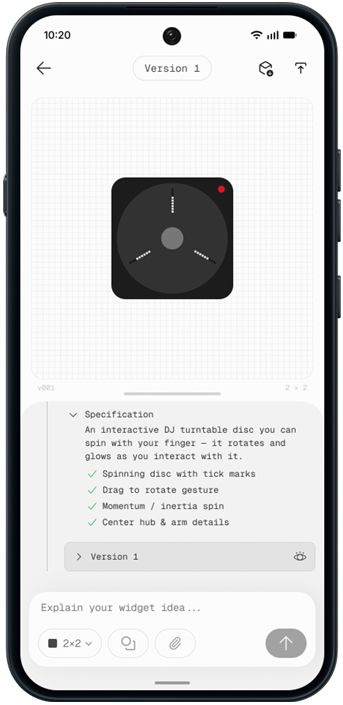
The Essential Apps Builder is currently in beta, with access gradually expanding to more users as development continues.
Android 17 Features
Since Nothing OS 5.0 is based on Android 17, it also brings several changes from Google's latest Android release:
- Better Quick Share: Quick Share now works across iOS and Android, including the ability to generate a QR code for transferring photos and files between platforms.
- Improved screen recording: A new floating action capsule provides easier access to recording controls, including options to edit, delete, or share a recording after you've finished recording.

- Noto 3D Emoji: Android 17 introduces Google's newer three-dimensional emoji design, along with the latest Unicode additions.
- Updated privacy indicators: New indicators make it easier to see when sensitive permissions, location sharing or AI processing are active.

- Redesigned Recents menu: Android 17 also makes it easier to access actions from the redesigned Recents interface.
- Independent Assistant volume: Assistant volume can now be adjusted separately from media volume.
- HDR brightness controls: Users get more control over brightness when viewing HDR content.
- Expanded Dark Theme: Dark Theme can be extended to more apps, including those that don't natively support it.
Overall, the Nothing OS 5.0 is certainly one of the most substantial software updates from the brand. The new visual language, lock screen customisation, new widgets, dedicated Glyph app, smoother animations and more give the core interface plenty of polish.
But the bigger story is arguably Essential AI. Essential Voice gets faster and more flexible, while Essential Space gets smarter collections and MCP support. Meanwhile, we also get the ability to build Essential Apps directly on the phone.
Nothing OS 5.0 is a more complete evolution of Nothing's software philosophy rather than being a simple Android 17-based skin.
The stable build of Nothing OS 5.0 is already available on Nothing Phone 3. Other Nothing OS 5.0 eligible devices are expected to get the stable update in the weeks to follow.


