


Google has begun rolling out Android 17 QPR1, the first Quarterly Platform Release for Android 17, alongside the September 2026 Pixel Feature Drop. The update follows an extended beta cycle (nine beta builds in all) and arrives as a stable release for supported Pixel devices starting today, September 15, 2026.
Details of the update were laid out by Google's Android Community Manager, Mishaal Rahman, in a detailed post on r/Android. He broke down the changes across digital wellbeing, system UI, multitasking, media controls and connectivity.
Android 17 QPR1: What's New
The most talked-about addition is Pause Point, a new Digital Wellbeing feature designed to interrupt "autopilot" phone use. When someone opens an app they've marked as distracting, Pause Point inserts a brief pause screen before the app loads, prompting the question of why they're really there.
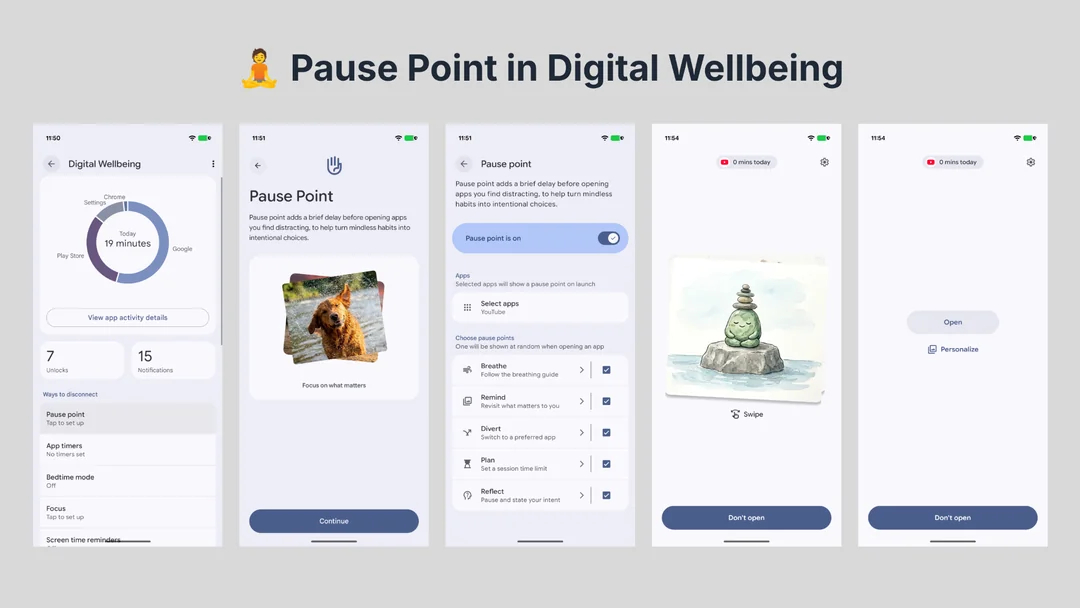
From that screen, users can do a short breathing exercise, look at a grounding photo, or jump to an alternative app, such as an audiobook, instead. Pause Point sits between Android's existing app timers, which are easy to dismiss, and a full app lockout, which Google felt was too heavy-handed.
It's designed to build more intentional app-opening habits rather than blocking access outright. The feature can be enabled under Settings -> Digital Wellbeing -> Ways to disconnect. It was first announced at Google I/O and had already debuted on the Pixel 11 series ahead of this wider rollout.
Related Articles

Android 17 QPR1 Brings More Blur and Smoother Animations
Android 17 QPR1 also continues Android's shift toward the translucent, layered look introduced with the Material 3 Expressive redesign in Android 16. Background blur effects, first extended to the notification shade and widgets picker in Android 17, now also apply to the volume panel, power menu, home screen context menu and app folders.
Other UI refinements include:
- A bouncier Quick Settings pulldown animation, matching the springier feel introduced elsewhere in Material 3 Expressive
- Predictive back animations for Quick Settings and the notification shade, previewing where a back swipe will land
- A redesigned home screen context menu, with tighter spacing and the "Wallpaper & style" label moved above the wallpaper carousel
- A modernised Settings gear icon
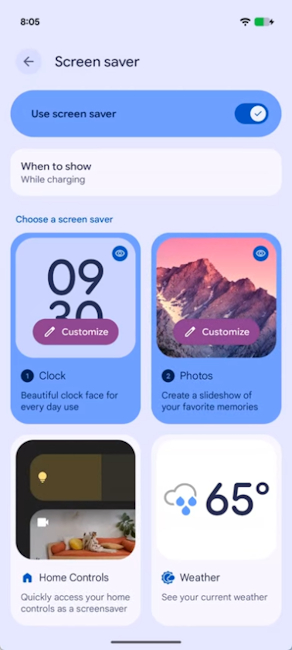
- Support for multiple screen savers, which can be reordered in Settings and switched between with an edge swipe or a long-press quick switcher
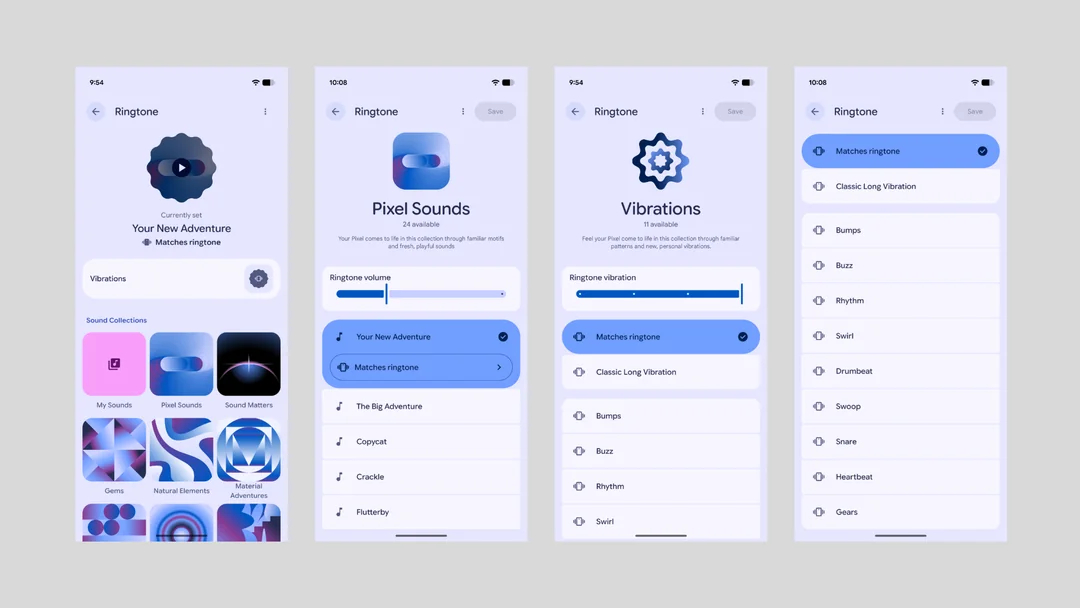
- Custom ringtone vibration patterns, letting users assign a distinct vibration, matched to the ringtone or independent of it, to individual ringtones
Related Articles

Android 17 QPR1 Multitasking and Productivity Updates
Google also used Android 17 QPR1 to polish multitasking, especially on tablets, foldables, and desktop-mode setups:
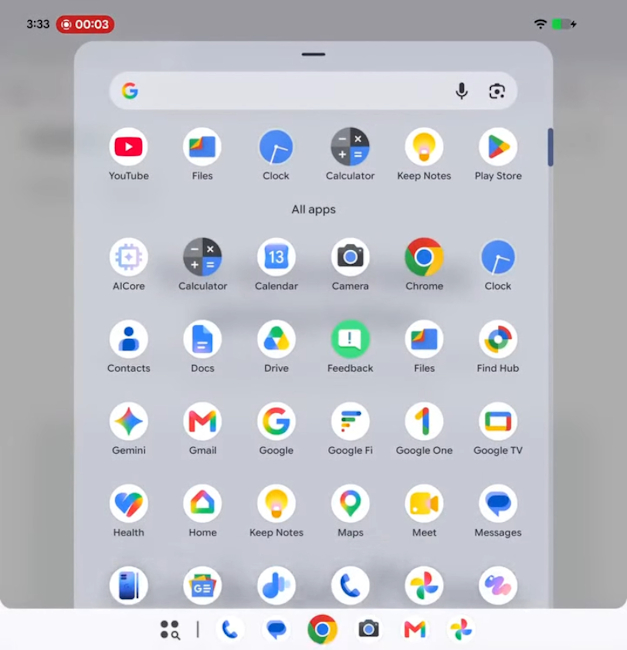
- On large-screen devices, the taskbar now shows recently opened apps instead of algorithmically predicted ones
- In desktop windowing mode, hovering over the maximise button surfaces shortcuts for fullscreen, split-screen and windowed layouts, while picture-in-picture windows can now float freely anywhere on screen instead of snapping to an edge
- Bubbles now support drag-and-drop, letting users pull content out of a floating bubble directly into the window underneath
- A new Quick Settings tile launches the default note-taking app instantly and mouse/touchpad users can map a corner shortcut to do the same
- The built-in Terminal app gains customisable fonts and colour schemes, remappable keyboard shortcuts and automatic port-forwarding for its Linux virtual machine
Apart from this, here are some other changes that the Android 17 QPR1 stable update brings to Google Pixel phones:
- The screen recorder now defaults to capturing only the most recently opened app rather than the whole screen, with an option to switch back
- The Photo Picker can now share location metadata from selected photos with apps if the user grants permission
- New HID APIs let apps directly connect with USB and Bluetooth devices, making it easier to create companion apps that can remap buttons and shortcuts without needing custom drivers
- USB device access prompts now offer a choice between one-time and always-allow permissions
- The keyboard switcher ("globe") button can be hidden from the navigation bar and a new Keyboard Quick Settings tile opens the switcher on demand
- The 24-hour time toggle has been replaced by a three-way Automatic / 12-hour / 24-hour selector
- Health Connect can now natively track distance and calories using a device's step counter
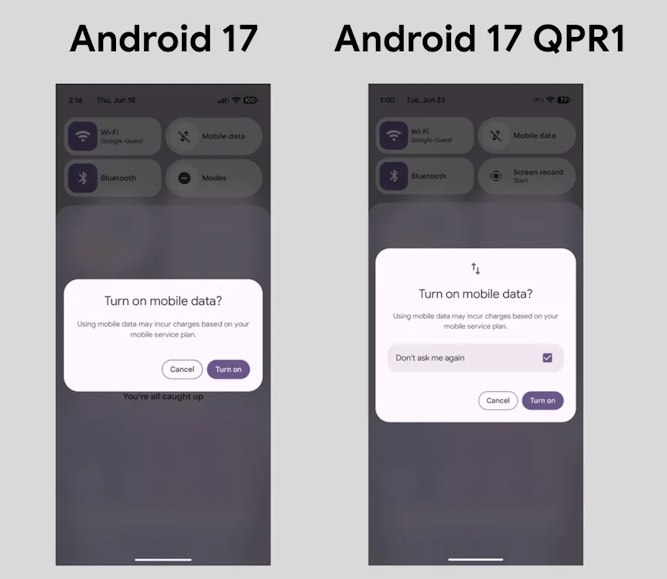
- Android can now skip the repeated warning that appears when turning on mobile data
Related Articles

Android 17 QPR1 Eligible Devices
Android 17 QPR1 is rolling out to Pixel devices going back to the Pixel 6 series, through the Pixel 11 lineup, including the Pixel Fold and Pixel Tablet, including their "a" and "Pro" variants.
Users can check for it manually via Settings -> System -> System update -> Check for update.
Those enrolled in the Android 17 QPR1 beta will receive a small update to the final build, and opting out of the beta program will not wipe device data.
These changes are now part of Android itself, so other phone makers can add them in their updates when they choose to do so. The next major update, Android 17 QPR2, is expected in Q4 2026.
Related Articles


