


Shortly after announcing iOS 27 at WWDC 2026, Apple has released the first developer beta for eligible iPhones. The iOS 27 developer beta 1 update marks the beginning of Apple's biggest AI push yet. From a redesigned Siri and AI-powered search to a Liquid Glass toggle and smarter Apple Intelligence features, the update has a lot up its sleeve.
What's New in iOS 27 Developer Beta Update?
The headline feature in the iOS 27 Developer Beta update is the all-new Siri app. Apple has transformed its voice assistant into a dedicated AI-powered app with a chat UI, persistent conversations and deeper integration across iOS.
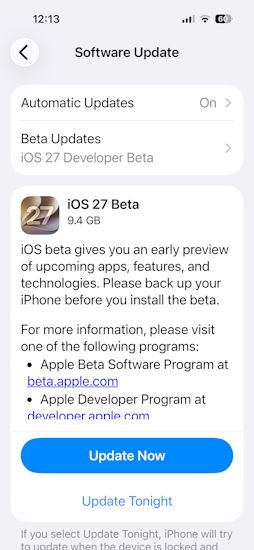
The first iOS 27 Developer Beta is already rolling out, and we have received it on our iPhone 16 Pro Max. The update size is 9.4 GB, and we cannot wait to test out the new features and bring our opinions to you.
The update also introduces AI-powered search, advanced writing tools, smarter photo editing features, natural language in Shortcuts and a new Extensions framework that allows compatible third-party AI services to work alongside Siri.
Unlike iOS 26, which largely focused on visual changes with the Liquid Glass redesign, iOS 27 is all about making the iPhone more AI-powered and smarter than ever before. iOS 27 also introduces a new Liquid Glass slider to take the aesthetics from completely opaque to fully clear. We also see sharper and more detailed app icons now, with some Liquid Glass sprinkled at the Dynamic Island as well.
Related Articles

What iPhones Will Get the iOS 27 Developer Beta Update?

Apple has revealed the iOS 27 eligible devices list, confirming that Developer Beta 1 is available for the iPhone 11 series and newer models. However, several Apple Intelligence features, including the new Siri experience, will remain limited to newer iPhone models with supported hardware. Here's a list of Apple Intelligence eligible devices if you're curious about them too.
It's important to prepare for iOS 27 Beta before installing the update on eligible Apple iPhones. Make sure to create a full backup of your iPhone, as Apple recommends. Developer beta software is often unstable and may contain bugs, performance issues and app compatibility problems.
Once your iPhone is backed up, head over to Settings -> General -> Software Update -> Beta Updates -> Choose iOS 27 Developer Beta. The installation process may take some time, depending on your internet connection and device model. It took us roughly 15 minutes.
Personally, unless you are a developer, have a secondary iPhone, or you enjoy troubleshooting software issues, I'd recommend waiting for the iOS 27 Public Beta update, which is expected to arrive next month. Apple typically irons out many of the most obvious issues by then.
That said, if you're eager to try the new Siri, AI search and Apple Intelligence upgrades before everyone else, the iOS 27 Developer Beta update is available to download right now.
Related Articles


