


Google rolled out custom icons for Pixel phones a couple of months ago, alongside the March 2026 Pixel Drop and the Android 16 QPR3 update. Now, the tech giant has added a new Disco icon pack for Pixel phones, sprinkling a lot more colours into the UI.
Disco Icon Packs for Pixel Phones Rolling Out
Sameer Samat, President, Android Ecosystem, Google, took to his official X account to share that disco icons are available on Pixel phones "as of today." For those wondering "why?", there's some context needed.
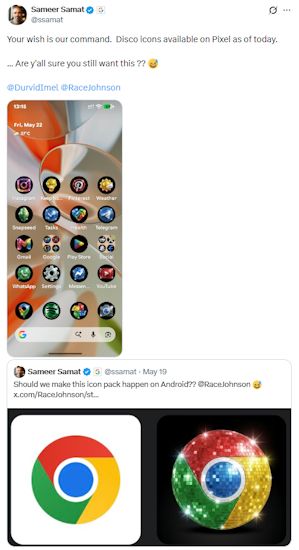
A while back, Race Johnson, founder of Pixly, an AI platform, showcased "discomorphism" in certain app icons, such as YouTube, Notion and Claude. To this, Sameer replied that an icon pack like this should be made official on Android.

Fast forward to today, the disco icon packs for Pixel phones are here and sit alongside the existing Scribbles, Cookies, Easel, Treasure and Stardust packs. Do note that all of these icon packs are AI-backed and can be modified with linear, guided prompts.
Thanks to folks over at 9to5Google, we also get a good look at how the new icon packs appear in the Pixel UI. There's a disco ball glimmer on each of the app icons, making things extra upbeat. If you are tired of the same old icon packs, the disco pack should certainly be fun for a while.

To get the new disco icon pack, users simply need to long-press the home screen -> tap on "Wallpaper & Style" -> hit the Create button -> select Disco -> tap on Download.
It also makes a lot more sense, especially since Google is testing out a range of customisation options with its next big Android update. Some interesting Android 17 features include forcing themed aesthetics into mismatched icons, something that Nothing has been doing for the longest time. Then there's also Lock Screen Widgets to bring more personalisations to Pixel users.
If you ask us, it's quirky additions like these that keep Android from getting stale and remind us why the platform has so many followers across the globe in the first place. Here's us hoping that we get to see more such icon packs and features to mess around with and make our phones truly our own.
Related Articles


