


Nothing released the Android 17-based Nothing OS 5.0 Open Beta last month and is now rolling out the stable update, starting with the Nothing Phone 3.
The brand took to its official X account to announce the general release. Our Nothing Phone 3 has received the update as well and it's 1.68 GB in size. We were already on the Open Beta, so if you're on the previous Nothing OS 4.1 version, the update size should be larger.

Nothing OS 5.0 Stable Update Changelog
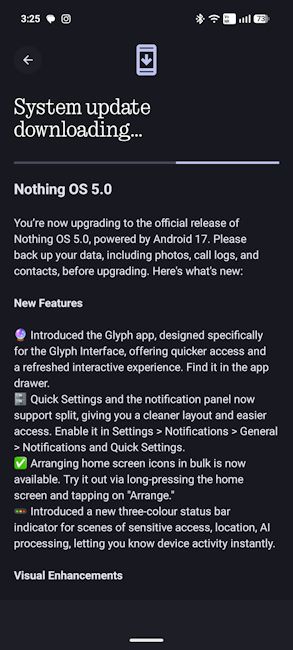
We reviewed the Nothing OS 5.0 Open Beta when it came out and well, all those features made it to the stable update as well. For the uninitiated, some key Nothing OS 5.0 features include a dedicated Glyph app for the Glyph Interface tech on Nothing Phones, which was previously only accessible through Settings.
Next up, the update also brings the ability to split the notification and quick settings panel. You can also bulk arrange home screen icons, which makes things extra convenient. Taking UI aesthetics seriously, the update also brings a translucent theme to add this iOS 27-like frosted-glass style to some sections of the interface.
On the AI front, Nothing OS 5.0 brings upgrades to Essential Space and Essential Voice, along with new tools designed to make saving information and interacting with AI features more convenient.
Related Articles

How to Download Nothing OS 5.0 on Nothing Phone 3
Nothing Phone 3 users can go to Settings -> System -> System Update to check for the stable Nothing OS 5.0 update. If it isn't available yet, you may have to wait for the rollout to reach your device.
Following the Nothing Phone 3, the stable update will reach more Nothing OS 5.0 eligible devices over the coming months. Nothing plans to begin rolling it out to the Phone (4a) and Phone (3a) series in early November, followed by the Phone (2a) series in mid-November.
The Nothing Phone (3a) Lite is scheduled to receive the update by late December. The rollout will then reach the Nothing Phone (4b) and CMF Phone 2 Pro in mid-January, bringing the update schedule to a close.
However, not every Nothing phone will make the cut. The company has confirmed that the Nothing Phone (1), Nothing Phone (2) and CMF Phone 1 will not receive Nothing OS 5.0, as all three have reached the end of their major software support period.
From the latest tech news to expert reviews, Beebom Gadgets brings you tech that matters every day. Want help with your next phone purchase? Explore the latest phones and see which upcoming phones you should wait for.
Related Articles


