





WhatsApp users on iOS who primarily prefer communicating via WhatsApp voice and video calls will be happy to know that a new Microphone Mode Controls tool has rolled out. The Meta-owned messaging platform is now rolling out a new audio processing menu, allowing users to toggle between different audio modes as per preference.
WhatsApp on iOS Gets Microphone Mode Controls
Spotted by WABetaInfo in the latest WhatsApp for iOS version 26.27.74 update via the App Store, the messaging platform is rolling out a new Microphone Mode Controls menu with four presets: Automatic, Standard, Voice Isolation and Wide Spectrum.
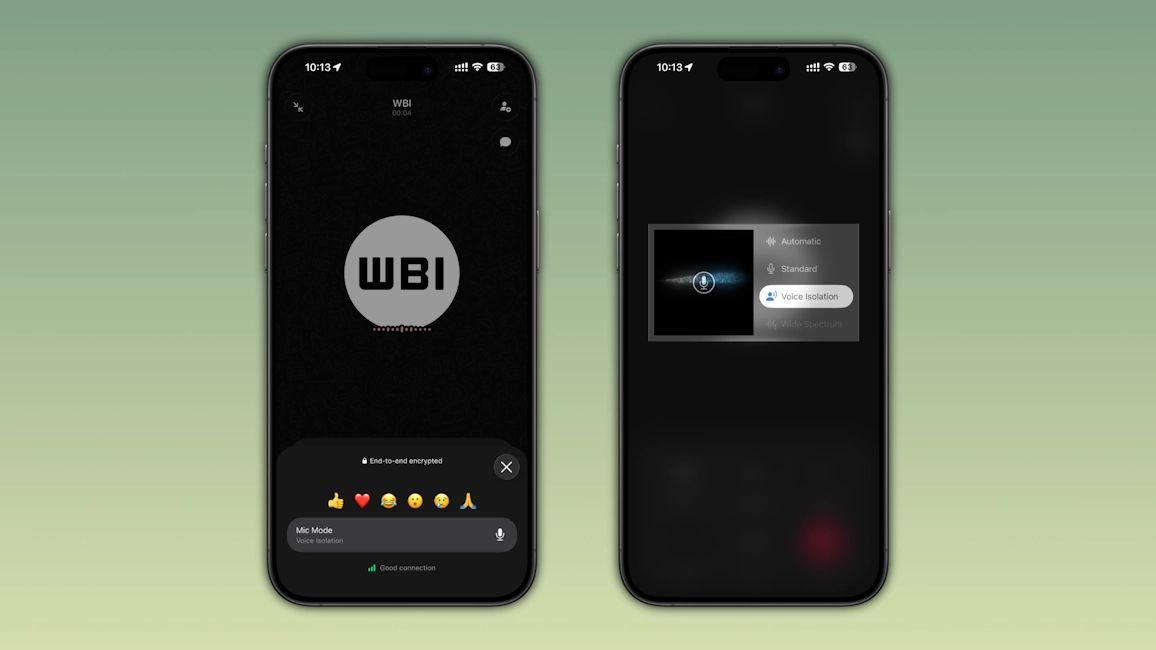
WhatsApp is leveraging the built-in voice processing algorithms of iPhones instead of adding a dedicated app-based toggle like the WhatsApp noise cancellation feature on Android. Users will be able to access this mic modes menu right within WhatsApp via a dedicated Mic Mode option on the call screen.
Do note that clicking on the Mic Mode option will open the iPhone voice processing system menu and the selected change will apply to WhatsApp calls only. For Standard Mode, WhatsApp calls will use the default voice processing of iOS.
With Voice Isolation toggled, WhatsApp calls will suppress background noises, creating a noise-cancelling audio experience. As for Wide Spectrum, it highlights the background audio, creating a more surround sound experience. Lastly, with Automatic, WhatsApp will let iOS decide which mode is best suited for active calls.
That said, Microphone Mode Controls is currently rolling out to some iOS users. Since this is a phased rollout, the feature will reach everyone gradually. So, in case the option is not live for you yet, it should arrive in the coming days. Make sure to update to the latest WhatsApp version from the App Store.
Related Articles


