


Oppo and OnePlus are now rolling out the stable ColorOS 17 update to their flagship OnePlus 15 and Oppo Find X9 series smartphones. Initially slated to arrive by the end of this month, the update's arrival has users excited to try out the brand-new UI improvements and features.
OnePlus 15, Find X9 Series ColorOS 17 Stable Update Is Here
The rollout was first confirmed by OnePlus yesterday, followed by reports across the OnePlus community and X. ColorOS 17 is rolling out to OnePlus 15 and Oppo's Find X9 series, including the Find X9, Find X9 Pro, Find X9 Ultra and Find X9s.

Users transitioning from the beta track are receiving patches that weigh around 500 MB. On the other hand, those transitioning directly from ColorOS 16 will need to download a hefty 3.4 GB package.
Users can get the update by heading over to Settings -> System and update -> Software update.
Those still waiting for the OTA notification to hit their device can try forcing the update manually. This can be done by navigating to the Software Update settings, tapping the three-dot menu, and selecting the "Release candidate" option.
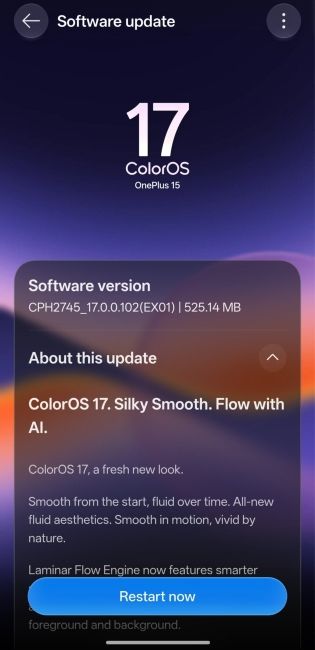
This method is specifically meant for those who can't wait for the stable update to naturally roll out to their phones. We would recommend waiting out the stable update to steer clear of any initial system-breaking bugs.
As for the features, the update completely changes the look of the operating system with a Liquid Glass-inspired user interface called the "Living Flow" design. Additionally, it introduces more fluid UI animations and design for better consistency across the UI.

The changes carry over to the control centre, which transitions into circular toggles, in addition to redesigned buttons and a media player experience.
Speaking of which, there are new Lock Screen clocks and Home Widgets and a completely tweaked Media Player experience, which brings Live Lyrics to the lock screen.

Lastly, the Luminous Rendering Engine in ColorOS 17 reduces the use of runtime memory by 25% and claims to deliver 55% better background retention compared to ColorOS 16. Then there's 50% faster scrolling and loading, alongside 15% faster app switching.
Other minor changes include status bar tweaks, new AI features and a redesigned Phone app experience with an AI Call Assistant feature and an AI Call Anti-Fraud feature. In fact, we were left in awe after trying ColorOS 17 on our Realme GT8 Pro and are sure it would also delight other users.
Related Articles


