


Beebom
Rating8
Google Pixel 11 delivers a refined flagship experience with a compact design, an excellent display, reliable cameras and a clean Android 17 software. Google's useful AI features and seven years of updates further strengthen its appeal. Performance is smooth for everyday use, although gaming remains a weakness, while slow charging and occasional call drops are disappointing. At Rs 89,999, it's certainly expensive, but for those seeking a compact AI and camera-focused Pixel experience, it remains a compelling choice.
Pros
- Stellar OLED display
- Good, reliable cameras
- Useful AI features
- Long-lasting battery
- Smooth performance for everyday use
- Clean Android experience and long-term updates
Cons
- Not the best for gaming
- Slow charging
- Some call drop issues
After I was done with the Pixel 11 Pro XL review, it was time to take the shrunk-down Pixel 11 out for a spin. The Pixel 11 is Rs 15,000 more expensive than its predecessor, so the ultimate question here is: is it worth an upgrade? Not to mention that if you have been looking to get into the Pixel experience as a new user, is the Pixel 11 a solid place to start your journey? I spent a good two weeks with the phone, and here's what I think in this detailed Pixel 11 review.
Pixel 11 Unboxing

In classic Google fashion, you don’t really get anything extraordinary in the Pixel 11 box. Here’s the starter kit:
- Google Pixel 11 smartphone
- USB-C to USB-C cable
- SIM ejector tool
- Paperwork
For charging, I’m using the Portronics 65W Adapto 65M GaN charger (priced at Rs 1,099 on Amazon, more on the speeds later).
With that out of the way, let’s take a quick look at its specifications:
Google Pixel 11 Key Details


Note: Our testing, opinion, and rating for this review are based on the phone's launch price. We recommend checking the current price before making a purchase decision.
Related Articles

Design and Build
- 152.8 x 72 x 8.6mm
- 197 grams weight
- IP68 rating for water and dust resistance
The Pixel 11 doesn't bring a major redesign, but Google has made a few changes that make the phone feel more refined than its predecessor. The biggest change is the camera bar, which is noticeably slimmer this time around.
Google says it has reduced the camera bar thickness by 40%, and I could definitely appreciate the difference when using the phone. It doesn't protrude quite as aggressively from the back, making the Pixel 11 feel a little more streamlined. The bar is also now covered entirely in glass, rather than having the metal element around the cameras that we saw on the previous generation.

I had the Hibiscus and Frost variants with me, and both look quite different in person. Hibiscus is easily the more eye-catching of the two. It's a vibrant pink tone that gives the phone quite a bit of personality, while Frost is much more understated, with a soft, almost lavender-blue appearance. If you ask me, I'd pick Frost, as it is the safer option.
The Pixel 11 has a glossy glass back, which looks particularly nice when the light hits it, although it is also quite reflective and can pick up fingerprints. The satin-finished aluminium frame provides a nice contrast to that glossy rear panel and makes the phone feel properly premium in the hand.

And this is still a relatively compact flagship. The 6.3-inch display, 197-gram weight and rounded edges make the Pixel 11 comfortable to hold, especially compared to the larger Pro XL. I could easily use it one-handed for most things, and the weight distribution is good enough that it doesn't feel particularly top-heavy despite the camera hardware.

All the buttons remain on the right side, with the power button above the volume rocker. The buttons themselves have a nice tactile click, and I didn't have any complaints about their placement during everyday use.

Build quality is also exactly what I'd expect at this price. You get Gorilla Glass Victus 2 on the front and back, an aluminium frame and an IP68 rating for dust and water resistance. So while I'd still recommend a case if you're prone to dropping your phones, the Pixel 11 certainly doesn't feel like a phone that needs to be babied.
One thing the standard Pixel 11 doesn't get is the HiLight system found on the Pro models. Honestly, I don't think I missed it. The smaller camera bar and cleaner rear design are much more meaningful changes to me, and the Pixel 11 retains the distinctive Pixel identity without trying too hard to look different.
Related Articles

Display and Speakers
- 6.3-inch Actua OLED display, 1080 x 2424 pixels, 422 PPI, 60 Hz to 120 Hz
- Up to 2,000 nits HDR brightness and 3,000 nits peak brightness
- Gorilla Glass Victus 2
The Pixel 11 gets a 6.3-inch Actua OLED display, and I think this is one of those areas where the standard Pixel doesn't feel like it's missing out on much compared to the Pro models.

The panel has a 1080 x 2424 resolution and supports a 60 - 120 Hz refresh rate, so everything from scrolling through social media to navigating the UI feels smooth. It's not an LTPO panel like the Pro, meaning it can't drop all the way down to 1 Hz, but I didn't really find myself thinking about that during everyday use.
What I did notice is how good the display looks. Colours are vibrant without being excessively punchy, blacks are properly deep and there's plenty of contrast when watching HDR content. Text also looks crisp at this size, so I never felt that the lower resolution compared to the Pro models was a meaningful compromise.

The real upgrade is brightness. Our individual tests using a Luxmeter have the Pixel 11 at up to 3,000 nits peak brightness and up to 2,000 nits in HDR, which makes a noticeable difference when using the phone outdoors.
Even under fairly harsh sunlight, I could comfortably see what's happening on the screen without constantly having to look for shade. This is particularly useful in India, where bright outdoor conditions can expose the weaknesses of otherwise good smartphone displays pretty quickly.
The 20:9 aspect ratio also works well with the phone's relatively compact body. I found the Pixel 11 comfortable for reading, browsing and watching videos, while the 6.3-inch size strikes a nice balance between having enough screen real estate and keeping the phone easy to handle.
The stereo speakers are another solid part of the experience. For a phone of this size, these speakers are deceptively solid for sure. They're loud enough for watching YouTube videos, listening to podcasts or casually playing music without immediately reaching for headphones. There's also support for Spatial Audio and the wider soundstage does make compatible content feel a little more immersive.
Related Articles

Performance Tested
- Tensor G6 chipset
- Titan M3 security coprocessor
- Up to 12 GB RAM and 512 GB Zoned UFS storage
Google's Tensor G6 isn't here to beat Qualcomm's Snapdragon 8 Elite Gen 5 chipset or MediaTek's Dimensity 2600 processor in benchmark charts, and if that's what you're looking for, you already know what the numbers are going to say. Here's a rundown of the tests:
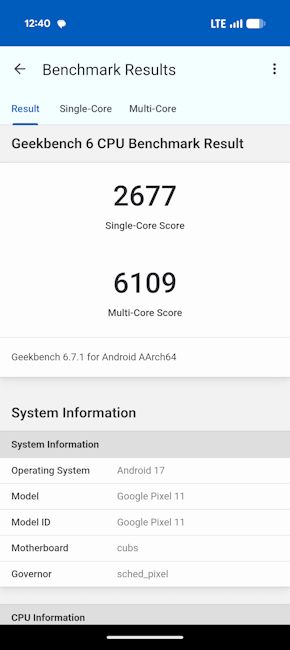
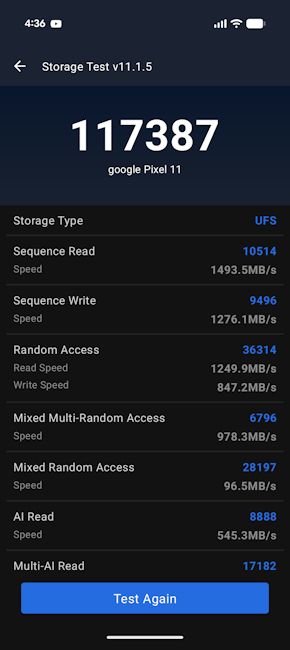
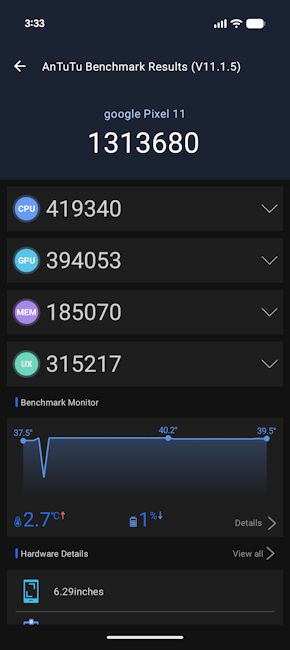
But after spending a week with the Pixel 11, I don't think those numbers tell the whole story. My usual workload is fairly predictable, with Chrome having an unreasonable number of tabs open, Gmail, WhatsApp, Slack, YouTube, Google Photos and constantly jumping between apps.
The Pixel 11 handled all of it really well. Apps opened quickly, animations remained smooth, and I never got that feeling of the phone struggling to keep up with me. Even when I was moving between several recently used apps, everything felt pretty effortless. Yes, there were some occasional stutters in the UI during extensive workloads, but nothing too alarming.
The phone's RAM management impressed me as well. I had around 30 or so apps sitting in the background at one point, and most of them reopened exactly where I had left them. I didn't have to keep worrying about apps refreshing every time I switched back to them, which made the Pixel 11 feel a lot more capable in everyday use than the benchmark scores might suggest.
Gaming is where the limitations of the Tensor G6 become easier to notice. BGMI and CoD Mobile ran well enough for the kind of casual gaming I do, and I didn't have any major complaints there. But Genshin Impact is a completely different story.
Because the game has dropped support for the PowerVR architecture used by the Tensor G6, optimisation is a mess. I ran into pink-screen issues (see in the image below) and stuttering, and the game was effectively unplayable.

This isn't the sort of performance I would expect from a flagship phone, although it's also worth pointing out that this is a fairly specific compatibility issue rather than something that reflects how the Pixel 11 performs across the board. Not to mention that in a Wired report, we got to know that Google is working with chipset makers to fix this issue.
There is one small but significant caveat, though. I did experience some call drops with the Pixel 11 during my testing, something I didn't face even once with the Pixel 11 Pro XL. It wasn't frequent enough to become a major issue, but it was certainly noticeable, especially since I had no such problem with the Pro XL.
Related Articles

Software and Updates
- Android 17 based on Pixel UI out of the box
- Seven years of software updates and security patches
The phone runs Android 17 out of the box, and as you'd expect from a Pixel, the experience is clean, familiar and pleasantly uncluttered. There is no unnecessary bloatware, duplicate apps or overly complicated interface to deal with. Everything feels cohesive, from the animations and widgets to Google's own apps, and the software doesn't get in the way of simply using the phone.

But the bigger story this year is AI. I've become increasingly sceptical of smartphone AI features because a lot of them feel like solutions looking for problems. Thankfully, some of Google's additions on the Pixel 11 are genuinely useful, while others are easier to ignore.
Rambler is easily my favourite. I frequently use voice typing when I'm trying to write something quickly, but traditional dictation usually gives me exactly what I said, including filler words, awkward pauses and sentences that sound more like speech than something I'd actually type.

Rambler takes a different approach. It understands natural speech, removes unnecessary filler words and cleans up the sentence as I speak. It can also handle corrections and changes in what I'm saying without making the resulting text look like a raw transcript. This is particularly useful for longer messages, notes and emails and is one of those AI features that I can actually see myself using regularly.
Pixel Search is another feature I really like. It essentially brings a Spotlight-like search experience to the Pixel, allowing me to look for things across the phone, including apps, settings and files. It is the kind of feature that becomes more useful the longer you use the phone, particularly when you have hundreds of files, photos and settings spread across Google's ecosystem.

Gemini is also much more deeply integrated into the Pixel 11 experience. Proactive Assistance can use context from supported apps to surface relevant information and actions. For example, if I'm discussing plans in Messages, Gemini can potentially pull relevant information from other Google apps and help me act on it without having to manually jump between applications. The idea is excellent, although its usefulness depends heavily on which apps and services are supported.
Google has also added several smaller AI and creator-focused tools throughout the software. Circle to Search can now be triggered directly from the camera viewfinder, while the camera app gets features such as Camera Coach and a built-in teleprompter.
There is also a Social Media Grid for creators, which helps keep important elements within a safer area of the frame when recording content for platforms such as Instagram.

The Tensor G6 also plays an important role here. Google has focused heavily on improving on-device AI performance and efficiency, and that shows up in things like faster AI processing, voice recognition and computational photography. The Pixel 11 isn't trying to compete with Snapdragon-powered flagships purely on raw performance. Instead, Google is clearly optimising the chip around the kind of software experience it wants to deliver.
And then there is Google's excellent long-term software commitment. The Pixel 11 gets seven years of Android and security updates, along with regular Pixel Drop feature updates. That's something I value considerably more than another year of incremental hardware improvements. If you're planning to keep the phone for four or five years, knowing that Google will continue supporting it makes the Pixel 11 much easier to recommend.
Related Articles

Cameras Reviewed
- 48 MP Quad PD wide camera, f/1.70 aperture
- 13 MP f/2.2 ultrawide camera, 10.8 MP Dual PD telephoto camera with OIS and 5x optical zoom
- Up to 4K @ 60 FPS video recording
Google has never been the company to rely solely on camera hardware to make its Pixels stand out, and the Pixel 11 is a good example of that approach. On paper, its camera setup is noticeably less ambitious than the Pro XL, with a 48 MP main camera, a 13 MP ultrawide and a 10.8 MP 5X telephoto.

However, after spending considerable time shooting with it, I found that Google's image processing does a lot of the heavy lifting to make this setup surprisingly capable.
The 48 MP primary camera is easily the camera I used the most and for good reason. In daylight, it produces images with plenty of detail, punchy but generally controlled colours and excellent dynamic range.
Google's HDR processing remains one of the biggest strengths here. Even when I was shooting scenes with a bright sky and darker foreground elements, the Pixel 11 was usually able to retain information in both areas without making the image look overly processed.
Images have that characteristic Pixel look, but they don't feel excessively saturated. Greens, reds and blues have enough punch to make photos look lively straight out of the camera. This makes the Pixel 11 one of those phones where I rarely feel the need to open an editing app before sharing a photograph.


The 13 MP ultrawide camera is where the compromises become more apparent. It has a 120-degree field of view, which is useful when I need to fit a large building, landscape, or group of people into the frame, but it doesn't match the primary camera's fine detail.
In good lighting, however, the ultrawide does a respectable job. Colours and exposure remain reasonably close to what I get from the main camera, which is important when switching between lenses.
Then there's the 10.8 MP 5X telephoto, which is probably the most interesting addition compared to a typical dual-camera setup. It has OIS and offers a native 5x optical zoom, making it particularly useful for distant subjects, portraits and situations where physically moving closer isn't an option.
At 5x, I was quite happy with the results. There is enough detail for the images to hold up well on the phone's display, and Google's processing does a good job of preserving textures without making them look excessively sharpened.


The Pixel 11 also offers Super Zoom up to 30x, with Google's computational photography stepping in as I move beyond the native optical range. Obviously, there is a point where the image starts losing fine detail, but 10x remains quite usable for situations where I simply want to capture something that's too far away to reach.
I wouldn't recommend pushing all the way to 30x unless absolutely necessary, but it's a useful option to have.
Night Sight remains another strength, as night-time photos have plenty of detail, with noise kept relatively well under control. Bright light sources are also handled nicely, so streetlights and other highlights don't completely overpower the rest of the scene. The ultrawide does see more detail loss and noise as expected.
The faster Night Sight processing is particularly useful when photographing people, as I don't have to keep the phone perfectly still for quite as long.


The 10.5 MP selfie camera is equally dependable. Selfies have good detail, natural-looking skin tones and well-controlled exposure. I could comfortably post most of them without making any edits. Portrait selfies are also quite good, with convincing background separation and generally clean edge detection.


The phone can record at up to 4K @ 60 FPS from both the front and rear cameras, and the video quality is pretty good. Videos come out stable, and it's always a good thing to be able to switch between the three lenses seamlessly while keeping the colour science consistent across.
Battery and Charging
- 4,985 mAh battery
- 30W fast charging support
- Qi2.2-certified wireless charging up to 25W
The Pixel 11's battery life turned out to be quite reliable during my testing. Across two battery-monitoring sessions, I managed around 5 hours 55 minutes and 6 hours 2 minutes of screen-on time, with 57% and 59% of the battery drained, respectively.

My usage included a mix of social media, messaging, Chrome, photography, YouTube and a combination of 5G and Wi-Fi, as well as Always-On Display turned on, so I was quite happy with the endurance.
The idle drain was also fairly reasonable. In the two tests, the phone recorded 1.46% and 1.66% drain per hour with the screen off, while deep sleep accounted for more than 83% of the screen-off period. In practical terms, the Pixel 11 comfortably lasted me through a full day without making me reach for a charger before bedtime.

Charging, unfortunately, is a different story. Using my Portronics 65W Adapto 65M GaN charger, the Pixel 11 took roughly 2 hours to go from 5–100%. That's painfully slow for a flagship in 2026, and I often found myself plugging it in earlier than I would with a phone that supports significantly faster charging.
Pixel 11 Review Verdict: Should You Buy It?
After spending two weeks with the Pixel 11, I came away genuinely impressed by how polished the overall experience is. The compact design is comfortable, the display is excellent, the cameras are reliable and Android 17 remains clean and intuitive.
Google's AI features, particularly Rambler and Pixel Search, add some genuinely useful functionality, while seven years of software updates make this a phone you can comfortably keep for years.

However, at Rs 89,999, the Pixel 11 isn't exactly inexpensive. It costs Rs 15,000 more than the Pixel 10, and while there are meaningful improvements, the overall experience isn't that different. The Tensor G6 handles everyday use really well, but gaming is still a weak point, its charging is painfully slow, and I did experience some call drops during testing. Considering the ongoing RAM crisis, though, these compromises are easier to overlook.
If you're buying your first Pixel and specifically want a compact flagship with excellent cameras, clean Android, useful AI features and long-term software support, the Pixel 11 is still a compelling option. Existing Pixel 10 owners, however, have fewer reasons to upgrade immediately and would be better off waiting for a price drop.
Meanwhile, for everyone else, the Pixel 11 is a very good all-rounder and, despite its higher price, remains one of the more distinctive compact flagship phones you can buy.


