


SIM Cards can be locked via smartphones for extra security. Once enabled, you will have to enter the PIN code every time you restart your iPhone. This prevents bad actors from using your numbers for malicious purposes, while also protecting your iPhone. Therefore, if you're wondering where to enable SIM Card PIN, here's how to lock the iPhone SIM card.
How to Lock SIM card on iPhones
While locking your physical SIM card doesn't go a long way, if you've set up an eSIM in your iPhone, there's no way for bad actors to get access to your SIM with the lock enabled, let alone your Apple iPhone. Regardless of whether you're trying to lock your physical SIM card or eSIM, the process of enabling SIM lock is common:
- Open the Settings app on your iPhone and tap on Cellular.
- If you have multiple SIM cards, select the specific phone number you want to lock and tap on SIM PIN.

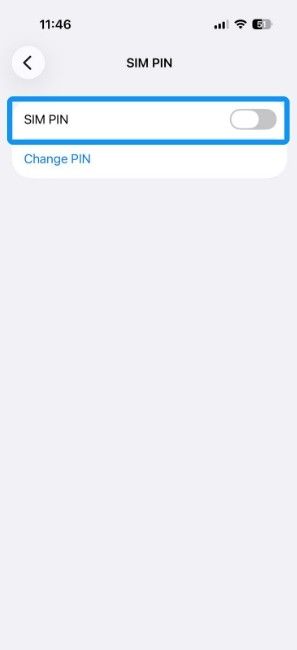
- Enable the SIM PIN toggle and enter the current SIM PIN. Every SIM comes with its default PIN, and it's either 0000 or 1234.

- Once done, the SIM PIN should now be active. To set your own PIN, tap on Change PIN and enter the PIN that you entered in the last step.

- Now enter a new PIN and confirm the same to set a new lock on iPhone SIM card.

Here are the default PINs for all operators in India, so you can easily set a new SIM card PIN on your iPhone. It's important to note that you only get 10 chances to enter the correct PIN, or your SIM card will be locked. Unlocking it will require the PUK code and may require visiting the carrier's office or a partner.
| Carrier | Default PIN |
|---|---|
| Jio | 1234 |
| Airtel | 1234 or 0000 |
| Vi | 1234 |
| BSNL | 0000 |
Related Articles

How to Unlock iPhone SIM Card Lock
iPhone SIM lock is triggered when you restart your smartphone. Your iPhone will show a SIM is Locked message every time you restart it or swap the SIM. If you want to disable SIM lock, you can easily do so. Here's how to unlock the SIM card or disable the SIM lock on an iPhone:
- Swipe up on the SIM is Locked notification and enter your 4-digit PIN.
- Tap on OK and your SIM card should be ready to use in no time.

- To disable the SIM PIN, head over to Settings > Cellular and select your SIM card.
- Tap on SIM PIN and disable the SIM PIN toggle. Then enter your 4-digit PIN to confirm.

- The switch will turn grey meaning the SIM lock is now disabled.
And that's how you can lock, unlock and disable SIM Lock on an iPhone. Locking your SIM card is one of the most underrated security measures that can prevent you from risking your contacts, data and passwords.
Related Articles


