


Beebom
Rating9
The Galaxy Z Fold 8 Ultra isn't a radical upgrade over its predecessor, but it finally makes Samsung's foldable formula feel mature. The hinge is better, the displays are easier to use, the battery lasts longer and the camera is more polished than ever. It still has its weaknesses, especially in the telephoto camera and speakers, but the Galaxy Z Fold 8 Ultra feels more like a complete foldable without the asterisks.
Pros
- Smoother, more satisfying hinge
- Bright displays for outdoor use
- Extended battery backup
- Great main and ultrawide cameras
- Excellent performance
- Well-optimised foldable software
Cons
- Telephoto camera requires some optimisation
- Speaker quality could be better
The Galaxy Z Fold 8 Ultra is Samsung's most ambitious foldable yet, and after a couple of weeks with it, I finally feel like the company has addressed some of the biggest concerns with the Z Fold series. The bigger battery, brighter displays, smoother hinge and upgraded ultrawide camera all make a real difference. But there also are some cons sneaked away, so is the Galaxy Z Fold 8 Ultra actually worth its Ultra price? That's what I'll answer in this Galaxy Z Fold 8 Ultra review.
Samsung Galaxy Z Fold 8 Ultra Unboxing

As is the case with Samsung flagships, the Galaxy Z Fold 8 Ultra arrives with the bare minimum in the box:
- Samsung Galaxy Z Fold 8 Ultra smartphone
- USB Type-C to Type-C cable
- SIM ejector tool
- Paperwork
Now, before we get into the detailed Galaxy Z Fold 8 Ultra review, here's a quick look at its specs:
Samsung Galaxy Z Fold8 Ultra Key Details


Related Articles

Design and Build
- 158.4 x 143.2 x 4.1mm unfolded dimensions
- 158.4 x 72.8 x 8.9mm folded dimensions
- 215 grams weight

When I first picked up the Samsung Galaxy Z Fold 8 Ultra next to the Fold 7, my immediate reaction was, "Wait, what actually changed?"
It weighs 215 grams, just like the Fold 7, and at 4.1mm when unfolded, it is only a tiny bit thinner than last year’s 4.2mm. I certainly couldn’t feel that difference in everyday use. But after using it for a while, I started noticing where Samsung has actually put in the work.
The biggest change for me is the new Armour FlexHinge. It feels smoother and takes noticeably less effort to open than the Galaxy Z Fold 7. The magnets also pull the two halves together as I close the phone, giving it a satisfying little snap at the end.
It’s a small detail, but I found myself enjoying the opening and closing motion more than I did on the Fold 7. With a foldable, that matters because I do it dozens of times every day.

Samsung has also softened the edges and corners slightly. It’s not something I would have noticed if I hadn't put the two phones side by side, but I can feel the difference during longer sessions.
The Fold 8 Ultra sits a little more comfortably in my palm, and I find it easier to get my thumb into the gap when opening it with one hand. That said, the cover screen still has fairly sharp edges, and I can feel them digging into my palm when I hold the phone one-handed for a long time.

The build itself feels extremely reassuring. Samsung has upgraded the cover screen to Gorilla Glass Victus Ceramic 3, while the back gets Gorilla Glass Victus 2 and the frame uses Advanced Armour Aluminium.
After carrying the phone around and using it as my daily driver, it feels like one of the most solid Folds Samsung has made. The outer display and frame also feel better equipped to deal with the occasional knock.
The inner display is a different story. It is still a flexible panel with a softer protective layer on top, so I’m still more careful with it than I would be with a conventional phone. I wouldn't treat the Fold 8 Ultra like a rugged phone just because Samsung has strengthened the rest of the chassis.
My slightly bigger disappointment is the IP48 rating. The phone is well protected against water, but it isn't fully dust-tight. I didn't run into any issues during my time with it, but I think Samsung could have done better here. For something carrying the Ultra name, this feels like one area where I expected more.
Related Articles

Display and Audio Quality
- 8-inch Dynamic AMOLED 2X inner display, 120 Hz, 2504 x 2256 resolution
- 6.5-inch Dynamic AMOLED 2X cover screen, 120 Hz, 2520 x 1080 resolution
- Around 3,000 nits peak brightness on both displays
The inner display is probably where I noticed the biggest difference between the Galaxy Z Fold8 Ultra and the Fold7. Not because of the resolution bump or the numbers Samsung puts on the spec sheet, but because the screen is simply easier to live with.
I noticed that almost immediately when I took the Fold 8 Ultra outside one afternoon. I unfolded it around 2 PM to reply to a message, expecting to do the usual foldable dance of tilting the phone around and shielding the screen with my hand. I didn't have to.

Samsung's anti-reflective coating, which has been one of my favourite things about its Galaxy S Ultra phones, finally makes its way to the foldable display, and it makes a huge difference. Whether I was reading a message, checking Maps, or scrolling through an article, the screen stayed remarkably easy to see in direct sunlight.
I was watching a trailer near a west-facing window one evening with the sunlight coming straight through, and the Fold 8 Ultra managed to keep the image looking punchy instead of turning into a washed-out mess.
Samsung claims a peak brightness of around 3,000 nits on both displays, and our Luxmeter recorded an HDR peak brightness of around 2,700 nits, which is solid.
I spent a couple of evenings watching The Witcher on Netflix, and the deep blacks immediately stood out. Dark scenes didn't look grey or washed out. Moreover, the black bars around the video practically disappeared into the edges of the display in a dark room.
At night, with the lights in my room turned down, the contrast was particularly impressive as well. The highlights also had that punchy OLED look without making everything else look unnaturally oversaturated.
The display also does a great job with HDR content. Watching darker scenes in The Witcher, I could make out details in shadows while the brighter parts of the scene still had plenty of punch.
That's something I particularly appreciate on a foldable because the huge inner display makes movies and shows feel much more immersive than they do on a conventional phone.

The biggest surprise for me, though, was the crease. Samsung's new Flex Titanium construction has clearly made a difference. On the first day, I ran my finger down the centre of the display and actually had to look for the crease.
It felt significantly flatter and less noticeable than what I've experienced on previous Folds. For a few hours, I genuinely wondered whether Samsung had finally cracked it.
A few days later, I had to eat my words slightly. While scrolling through a long article under a desk lamp, I caught the faint shadow of the crease again. Running my finger across it slowly, I could still feel a shallow dip. But the important thing is I wasn't actively noticing it during normal usage anymore.
The cover screen is a different story. Samsung has essentially carried it over from the Fold7, with the same 6.5-inch, 21:9 panel. Personally, I don't hate the narrow format as much as some people do.

I actually found myself replying to longer messages on it without unfolding the phone because the extra width compared to older Folds gives my thumbs enough room to type comfortably.
But the narrow shape becomes much harder to justify when I start watching videos. I tried watching a short YouTube video while waiting for coffee, and the actual video ended up looking tiny in the middle of all that unused space. It's fine for messages, quick searches and notifications, but I wouldn't choose it for watching content.

But if you want to use the cover screen as your main display and only unfold occasionally, I'd seriously consider Samsung's regular Galaxy Z Fold 8 (more details in our Galaxy Z Fold 8 review) with its wider cover screen before spending more on the Ultra.
The speakers were a bit of a surprise for me, and unfortunately, not in a good way.


Samsung has changed the speaker setup on the Z Fold 8 Ultra, but after spending time listening to podcasts and music through it, I actually preferred the sound of the Fold 7. I noticed it casually one morning while getting ready. The voices in my podcast sounded slightly muffled, almost as if they were sitting behind the bass.
Music made the difference even more obvious. There's more weight in the low end, which initially sounds impressive, but the bass can overpower the mids, making vocals and instruments feel a little buried.
I noticed the same thing while watching Netflix, and although the speakers have enough punch for sound effects, dialogues don't have the same clarity that I was expecting.
Related Articles

Performance Tested
- Snapdragon 8 Elite Gen 5 for Galaxy chipset
- Up to 16 GB RAM and 1 TB storage

The Galaxy Z Fold 8 Ultra uses the same Snapdragon 8 Elite Gen 5 chipset found inside the Galaxy S26 Ultra, with Samsung giving it the usual “for Galaxy” treatment and pushing the prime cores up to 4.74 GHz. On paper, that makes this one of the fastest Android phones you can buy.
Everything I threw at the Z Fold 8 Ultra felt instant. Apps opened quickly, switching between multiple apps was effortless, and running three apps side by side on the massive inner display didn't make the phone feel like it was working particularly hard. I could have Slack, Chrome and YouTube open at the same time and jump between them without any noticeable slowdown.
Those benchmark numbers are also a testament to the top-tier performance you get here:
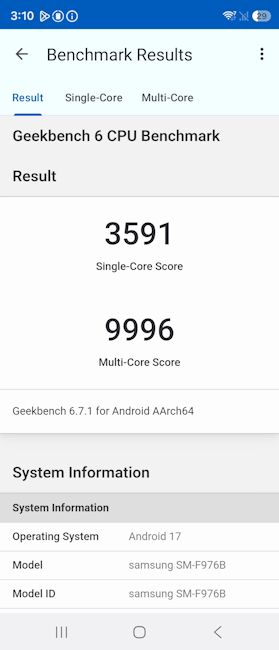
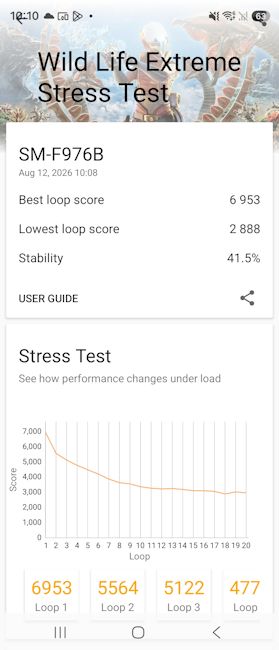
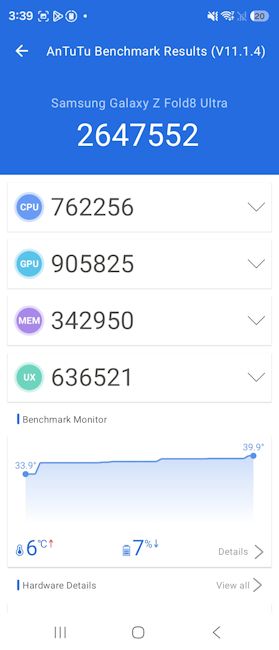
Gaming is where I had more fun with the Fold 8 Ultra. Games like PUBG Mobile and CoD Mobile ran beyond comfortably at their highest settings, and even during longer sessions, the phone never became uncomfortably hot.
The large inner display also makes a surprisingly big difference here. Having that much screen real estate makes games feel more immersive, although I still preferred using the cover screen for quick gaming sessions rather than unfolding the phone every time.
Things get a little more interesting with heavier games. I played Genshin Impact and Wuthering Waves at their highest settings, and while both looked fantastic, I could notice occasional dips after around 15–20 minutes of sustained play.
They weren't severe enough to ruin the experience, but they were a reminder that there's only so much thermal headroom you can squeeze into a phone this thin.
The important thing is that I rarely felt this limitation during normal use. I wasn't sitting there waiting for apps to open or watching the phone struggle with multitasking. Even when I was bouncing between demanding apps, the Fold 8 Ultra remained fast and responsive.
Related Articles

Software and Updates
- Android 17-based One UI 9
- Seven years of major OS updates and security patches
- Features include Call Brief, new Bixby widgets, Now Nudge and Gemini Notebook

The Galaxy Z Fold 8 Ultra runs One UI 9 based on Android 17 out of the box, and the foldable optimisation here is impressive, as always. Samsung doesn't treat the inner display like a regular phone screen that's simply been stretched out, and instead, One UI feels like it was actually designed around the Fold.
I had Slack open on one side of the inner display while looking through Gallery on the other, and I could simply drag a screenshot across and drop it into the conversation. The process is super seamless and felt completely natural.
I also noticed how well the software handles moving between the two displays. On one occasion, I started watching a video on the inner screen and switched to the cover screen without losing where I was or having to set things up again.

Samsung has also packed One UI 9 with AI features, although my experience with them has been a lot more mixed.
The one I kept coming back to was Now Nudge. If I'm typing something like "let's meet Thursday" in a conversation, it can suggest pulling up my calendar alongside the chat so I can check my schedule without leaving the conversation. I used it several times while making plans with friends, and it genuinely saved me a few taps every time.
Then there's My FanCam, which is a much more ambitious idea. It can automatically track a person in a video, crop the footage and keep them in frame as they move around.

I tried it with a video of a colleague walking in our packed office, and I was actually impressed by how well it kept up with them as they moved around and people briefly passed in front of the camera.
But then I tried it with a video of a dog running around a park, and that's where the limitations became obvious. It currently focuses on people, so it couldn't track the dog at all.
Gemini Notebook is probably the AI feature I can see myself using the most over time. I dropped a few screenshots and PDFs into it and asked it to pull out important dates across all of them. It got the answer right on the first try, and I didn't have to manually dig through each file.
That's the kind of AI integration I find genuinely useful. I can throw a bunch of information at it and let it make sense of everything for me. My only hesitation is that I don't think this will remain exclusive to the Z Fold 8 Ultra forever, so I wouldn't buy the phone specifically for this feature.
Call Brief is where I'm a little more cautious. It can listen to a call and surface relevant information while you're talking. For example, if someone mentions an event that's already on your calendar, the details can appear on the screen without you having to leave the call.

I can absolutely see the usefulness here, and I appreciate that Samsung requires explicit opt-in rather than quietly enabling something this sensitive. But this is also one of those features I'd need to use for much longer before I'd trust it with important conversations and actually build it into my daily routine.
The Galaxy Z Fold 8 Ultra gets seven years of Android and security updates, putting it right up there with Samsung's flagship Galaxy S phones and among the longest-supported Android phones around. It does make the Fold 8 Ultra much easier to recommend as a long-term purchase.
Related Articles

Cameras Reviewed
- 200 MP Samsung ISOCELL HP2 main camera
- 50 MP Sony IMX 858 ultrawide, 10 MP Samsung ISOCELL 3K1 3x telephoto
- 10 MP 24mm cover screen selfie camera, 10 MP 18mm inner display camera

The Z Fold8 Ultra has three rear cameras and two selfie cameras, giving you five cameras in total. After using all of them for a couple of weeks, my takeaway is that the ultrawide is the big upgrade, the main camera is still excellent and the telephoto remains the weak link.
Main Camera
The 200 MP main camera continues to be the camera I reached for most often. In daylight, it captures plenty of detail and handles bright skies and darker areas well. Shots of Tower Bridge and the surrounding buildings looked sharp, with good colours and enough detail to crop into the frame later.


The main camera is also quite capable at night. A busy street scene with plenty of shop signs and streetlights retained a good amount of detail without turning the whole frame into a noisy mess. Bright lights do bloom a little, but the overall exposure remains well controlled.
Where things get less impressive is when you start pushing the zoom. The main sensor can produce usable 2x shots, but fine details don't hold up as well once you crop in heavily. This is especially noticeable when shooting distant subjects such as building details.
Ultrawide Camera
The new 50 MP ultrawide camera is probably the biggest camera upgrade on the Z Fold 8 Ultra. It captures much more detail than I would normally expect from an ultrawide, especially in daylight.
My shots of Tower Bridge and the surrounding architecture, as well as shots of trees, show this well. There is plenty of detail across the frame, while the colours and exposure stay fairly close to what the main camera produces. That makes it much easier to switch between the two cameras without getting a completely different-looking image.


It also handles night scenes surprisingly well. The shots of the busy road and illuminated signs retained good brightness and colour, while the darker parts of the frame didn't completely fall apart. There is some softness when you look closely, but the overall results are very usable.
The wider field of view is also genuinely useful for architecture and large scenes. I found myself using it more often than I expected, particularly when capturing buildings or trying to fit an entire structure into the frame.
Telephoto Camera
The 3x telephoto is where the Fold 8 Ultra still feels a bit behind. It is useful for getting closer to distant subjects, but the results aren't as consistently sharp as those from the main camera.
My shots of the architectural details and a street clock in Noida show that the camera can still capture a good amount of information, but fine textures can look a little processed when you zoom in.
The higher you push the zoom, the more obvious this becomes, with distant details eventually turning soft. It only gets more blurry and noisy at night.


It works better for portraits. The 3x perspective gives people a more flattering look than the main camera, and Samsung's processing produces a pleasing background blur. However, I would still avoid pushing the zoom too far unless you really need the extra reach.


Selfie Cameras
The selfie cameras are perfectly usable, although they aren't the reason to buy the phone. Daylight selfies have good detail and natural skin tones, while portrait shots do a decent job separating the subject from the background.


The cover-screen camera is the one I used more often simply because it is quicker and more convenient. In low light, however, both cameras start to lose detail and produce softer results.
One of the biggest advantages of the Fold 8 Ultra is that you can also use the rear cameras for selfies, with the cover screen acting as a viewfinder, using the Cover Screen Preview feature in the camera app. This gives you a much better option when image quality matters more than convenience.
Video Recording
The video experience is similarly strong, particularly when using the main and ultrawide cameras. Footage is generally smooth, with good exposure and consistent colours when switching between the two lenses.
The main camera is the one I would use for most video recording, while the ultrawide is useful when shooting larger scenes or walking around. The telephoto is less convincing in low light, where footage gets noticeably softer and noisier.
While the rear camera setup can record up to 8K @ 30 FPS videos, the front is limited to UHD @ 60 FPS.
Battery Life and Charging
- 5,000mAh battery
- 45W fast charging support, 20W fast charging support
- Qi 2.2 wireless charging standard supported
Battery life is probably the upgrade I appreciate most on the Galaxy Z Fold 8 Ultra. Samsung has finally moved the Fold from its long-standing 4,400mAh battery to a 5,000mAh silicon-carbon cell, and I could actually feel the difference in my day-to-day use.
On one of my heavier days, the Fold 8 Ultra managed 5 hours and 37 minutes of screen-on time. That included the kind of mixed usage I would normally put a phone through, like always being connected to 5G, messaging, browsing, social media, watching videos and generally jumping between apps throughout the day.

The standby performance was also surprisingly good. In one usage cycle, the foldable spent almost 22 hours with the screen off and consumed 41% of the battery, while the screen-on time accounted for another 53%.
That worked out to an active drain of around 9.4% per hour and an idle drain of roughly 1.9% per hour. For a foldable with two displays and this much hardware running in the background, I was quite happy with those numbers.

Charging is another area where I finally feel like Samsung has brought the Fold up to speed. The move from the Fold 7's 25W charging to 45W doesn't sound particularly exciting next to some of the 80W, 100W or even faster charging phones on the market. But it's good enough in practice and took me about 1 hour and 30 minutes to charge from 5–100%.
Samsung Galaxy Z Fold 8 Ultra Review Verdict: Should You Buy It?

With the Galaxy Z Fold 8 Ultra, Samsung has finally brought some major upgrades this lineup needed. The larger battery, faster charging, better displays, improved hinge and upgraded ultrawide camera – all make a noticeable difference in daily use. It still feels like a premium foldable, but now with fewer compromises than before.
It isn't perfect, though. The telephoto camera remains the weakest part of the camera setup, and the speakers are a slight step back. While battery life is better than its predecessor, it still doesn't match the ones on cheaper rivals like the Motorola Razr Fold. The reduced crease is also an improvement, but it's not quite the dramatic change Samsung's marketing makes it sound like.
If you want the most polished foldable software experience, long-term updates and Samsung's ecosystem, the Z Fold 8 Ultra is easy to recommend, of course, if you can digest the Rs 1,99,999 starting price. It doesn't redefine the foldable category, but it finally feels like Samsung is bringing the Z Fold lineup up to where it should have been.


