


At WWDC 2026, Apple finally unveiled iOS 27 and, with it, the Siri AI, a new version of Siri that's enhanced by Apple Intelligence. After years of delay, it now looks like the more powerful version of Siri will be available from the get-go. In this guide, we'll explain how to get the new Siri AI on iOS 27 on your iPhone.
How to Get iOS 27 Siri AI on Your iPhone
The new Siri AI will be available for developers enrolled in Apple's beta programme. Since the first developer beta of iOS 27 is now out, eligible users are only one step away from getting access to the Apple Intelligence-powered Siri. Developers are required to join a waitlist after they install the iOS 27 Developer Beta on their iPhone.
Here's how you can join the Siri AI waitlist in iOS 27:
- Open the Settings app on your iPhone and tap on Siri.
- Here, tap on Try New Siri.

- You'll now see a Siri with Apple Intelligence (Beta) banner on the screen. To proceed, tap on Join Waiting List.
- To confirm your action, tap on Continue.

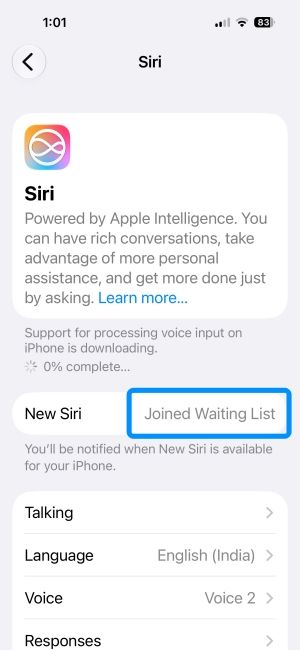
That's it. When you successfully enrol in the new Siri AI waitlist, you'll see the "Joined Waiting List" message inside the New Siri section. The Siri screen inside Settings notes that you'll be alerted when the new Siri AI will be available on your iPhone.
As long as you own an iPhone that supports Apple Intelligence, you're good to go. We've enrolled our iOS 27 eligible devices in the waitlist, but we're yet to get access to Siri AI. We'll update this guide once the new Siri is available.
Related Articles


