


Vivo's recently launched Origin OS 7 update is one of the biggest OS updates to come out in recent times. It builds on the success of OriginOS 6 with a slew of new features and important upgrades alongside the core Android 17 upgrades. From visual improvements and deeper AI integration to improved UI optimisations and new additions, here are all the significant OriginOS 7 features coming to Vivo and iQOO phones.
Aesthetics, Animations, and Effects
The most noticeable changes on the OriginOS 7 are aesthetic in nature.
For starters, there's a new Dynamic Glow animation that gives the UI a modern glow-up. With it, the levels of light and dark animations adjust automatically as they respond to interactions. They even reflect changes in environment and time. As such, the icons appear bright and poppy in the daytime, while at night they get softer and deeper.

OriginOS 7 also applies a new Dynamic translucent material to the UI. It borrows heavily from iOS 27, which was also the case with last year's Liquid Glass-inspired OriginOS 6. But thankfully, you can choose from three texture levels – Real, Natural, and Soft – to customise your experience.

Additionally, a liquid kinetic effect is applied to all interactions in OriginOS 7. Depending on whether you're tapping, sliding, or dragging, you'll see liquid effects that separate, merge, bob, and bounce. There's also a system-wide spring animation that deforms and springs back as you move between apps with gestures. The combined look of all these moving liquid animations and spring effects creates a dynamic and lively effect that makes everything look more pleasing.

Related Articles

Stickers, Stickers, Everywhere!
StickIt is now the one-stop shop for all your sticker creation and editing on OriginOS 7. Be it images or videos, you can create stickers out of any media type and stick them on your screen.
The stickers can be freely customised, combined, layered, and stylised, with support for AI sticker creation as well.
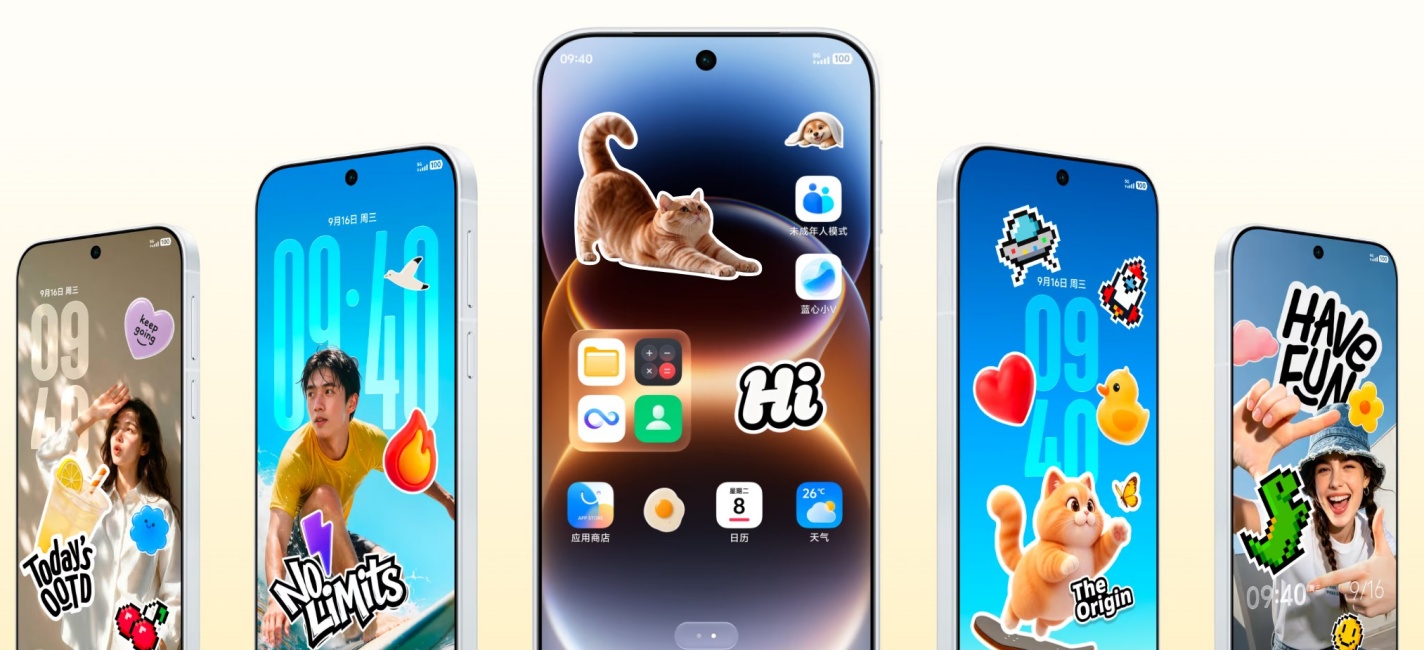
It's similar to the Collector widget that's part of the new Nothing OS 5.0 features list but with more stylistic features and AI adjustments.
Related Articles

Dynamic Liquid, Glint, and Pet Pals Themes
Themes on the OriginOS 7 get really funky. One of these lock screen themes makes the elements bounce, wiggle, or simulate a jelly-like movement when the phone moves.
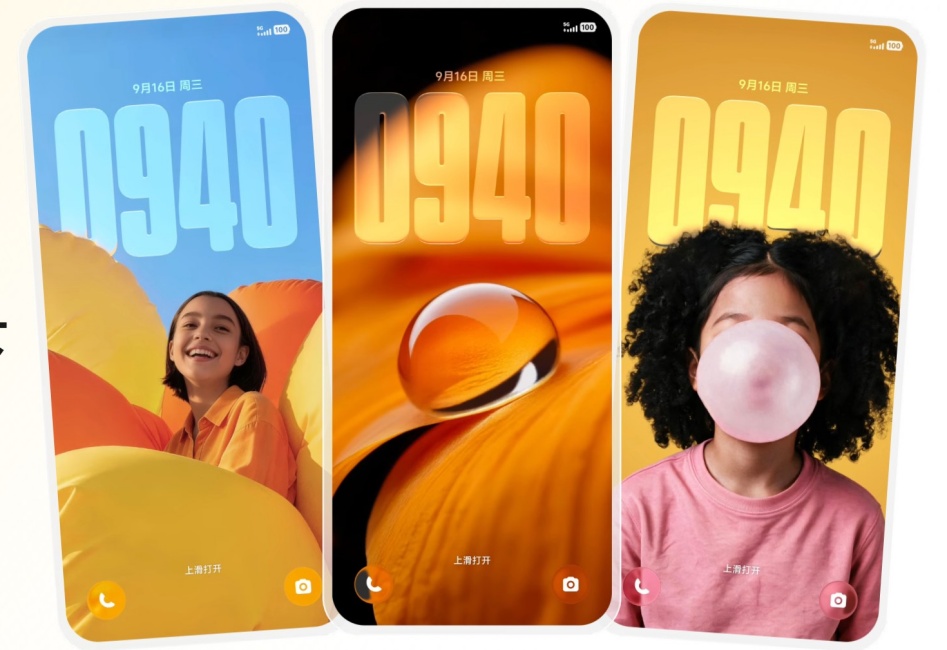
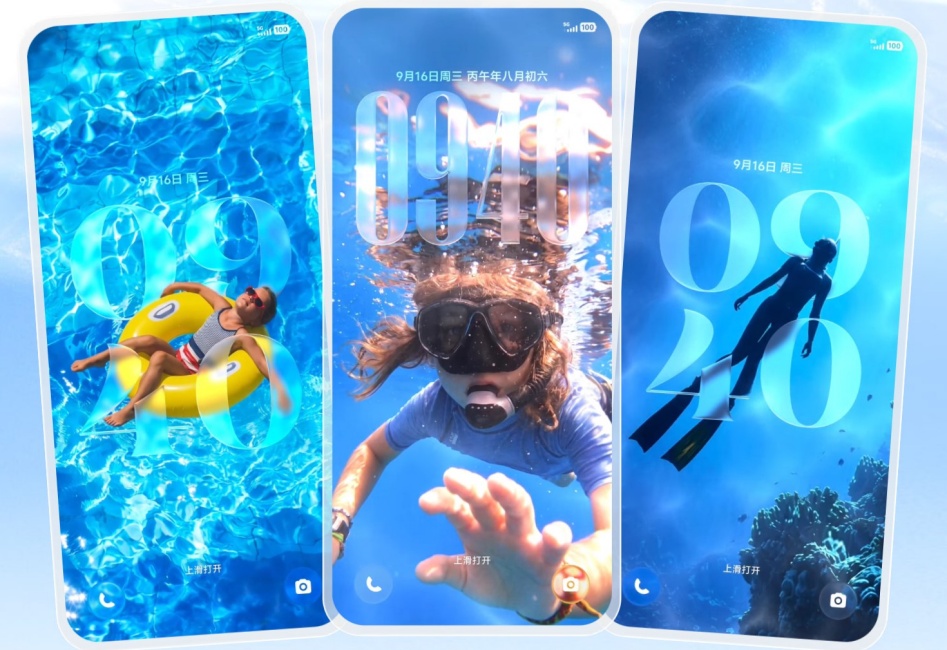
And with Liquid themes, if your wallpaper has an image of water, you'll notice waves, ripples, and refraction effects on the water's surface. Wallpaper images and animation can be customised if you want to limit or enhance the effect.
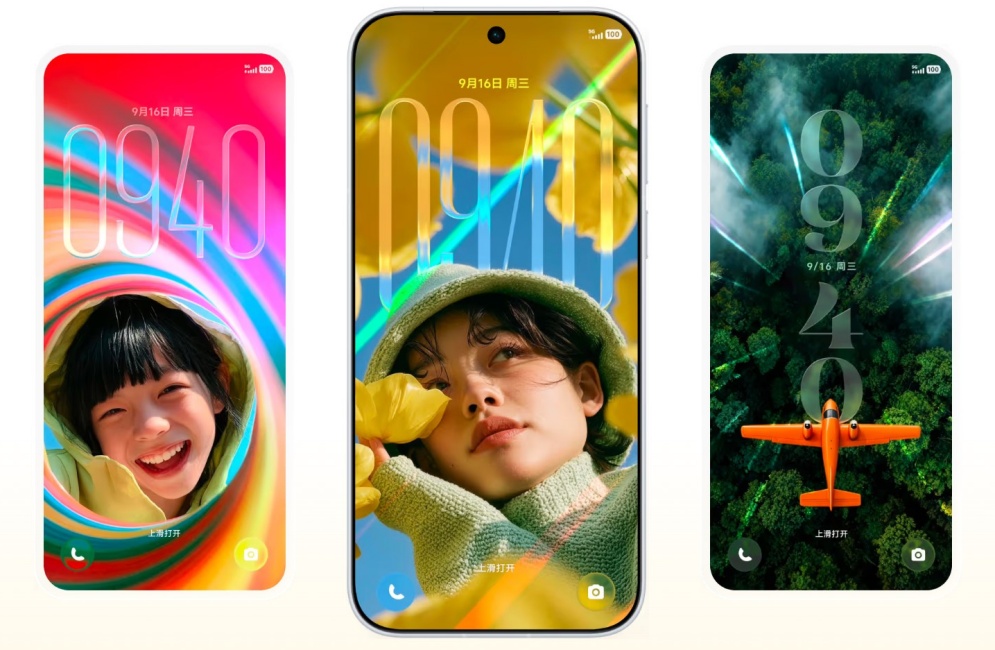
Then, there are Glint themes that come with a cool light effect. Depending on the angle of your phone, you'll see iridescent lights across your lock screen wallpaper as though sunlight were bouncing off a foil.
For animal lovers, there's also a fun AI-based Pet Pals theme that lets you add your furry friend on the lock screen. With just a picture of your pet, the AI generates a dynamic theme that moves as you interact with it.

Unlocking the phone brings the theme to life, while more interaction effects are triggered when you move or get reminders for low battery, charging feedback, music sync, etc. It's quite a playful theme to spruce up your screen, so long as you don't forget to play with your actual pet from time to time.
Related Articles

Improved Multitasking with Origin Workbench
Multitasking gets a much-needed boost on the OriginOS 7. Other than the left-right layout that is now ubiquitous across smartphone interfaces, OriginOS 7 adds a new top-down layout.

Image Credit: Vivo

Image Credit: Vivo
Also called the Origin Workbench, this new layout lets you open and add multiple apps at the top of the screen. These are always visible, even while you work on your main app that covers the rest of the screen. Simply tapping on an app switches to it, which makes it super easy to transfer files and images from one app to another.
Related Articles

Performance Optimisations and Upgrades
Not all upgrades are on the surface. OriginOS 7 has several performance upgrades for faster computation, better memory allocation, and multi-window rendering for display. Vivo says it has developed an advanced scheduling algorithm that delivers precise computing power supply and a memory fusion model for better allocation of memory resources.
Vivo claims these changes improve the rendering efficiency by 14.4%, which translates to smoother sliding and faster switching between apps. As such, cold-starting apps are 10% quicker, and app page switching is 11% faster.
A better storage framework also lets you free up to 25GB of usable space (on 256GB storage) through Storage Compression 2.0 and reclaim memory 60% faster.
Although all these performance gains are claimed by Vivo and will require real-world testing for validation, the advancements are well-warranted, especially considering all the effects and animations that come with OriginOS 7.
Related Articles

Personalised AI and System-Level Improvements
As is the norm nowadays, OriginOS 7 comes with a host of AI features for both personalised intelligence as well as system-level AI.
The OriginOS 7 AI assistant, Jovi, works across devices to automate tasks like document analysis and compilation and send files between PC and your phone. For instance, you can give Jovi a command on the phone, and it will edit the deck on your PC, then send it back.
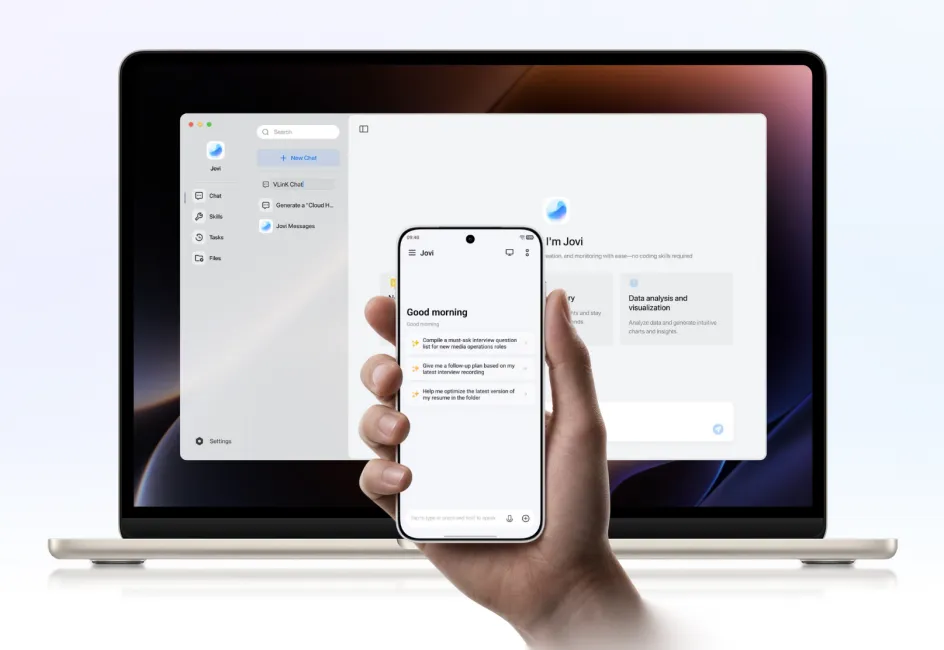
For security, you can clearly see the steps that Jovi takes when it runs a task. This way, important actions are recorded so you can trace back to them.
The AI can also dig through your screenshots for travel tickets and coupon codes and automatically improve photo organisation on the whole.

There's also a new Snap-up engine that makes it easier to buy tickets online. It automatically identifies the ticket purchase scenarios, then tunes network and performance resources helping you snag the tickets faster.

For students, there's a Snap Note feature in the Origin Notes app. When attending lectures, you can simply snap photos of the whiteboard, and the AI will turn it into editable notes. It's a useful feature for students, allowing them to focus on the lecture and leave the note-taking to the AI.

OriginOS 7 also gets a Smart Call Assistant. If you're busy or not particularly interested in picking up a call, you can let the AI answer the call. The call is turned into text in real time so you can read the conversation as it is happening. Once over, an overview is generated in the call logs so you know what the call was about at a glance.

Within the recorder app, the AI cleans up the transcript after a recording ends and separates the speakers, so you know who said what. This is done via the same speech technology that is used on Microsoft Teams cloud services. Additionally, it utilises Google Gemini to summarise and organise your transcripts as well as flag potential risks. It further marks transcript highlights so you can tap and jump directly to that part of the recording.

Image Credit: Vivo

Image Credit: Vivo
Then there's AI Search within File Manager and Origin Notes for when you can't remember the exact name of a document. With a simple description of what you're looking for, the AI finds the right notes and files and even tells you what's inside them.

Similarly, there's an AI Reader Mode which makes it easier to read those pesky PDFs that never seem to align with the display. It automatically adjusts the text size to fill the screen so you can read your PDFs like you would an e-book.

Battery Life Estimate
When your device is running out of juice, instead of showing you the battery percentage, Origin OS 7 indicates how much longer you can continue with the current task in hours and minutes. It also displays how much longer it will take before the battery is fully charged.
In collaboration with Microsoft, Vivo has developed a BlueVolt Smart Engine that reduces power consumption by up to 25% when you're in high-res Teams video calls. The AI further adapts it according to your usage habits.

The OS also dynamically adjusts power consumption and creates a power-saving model based on your usage habits. While this mode is on, the OS reduces power consumption by up to 20% for UI animations, scene rendering, and other background tasks. This also increases standby time by 26% compared to the previous OriginOS version.
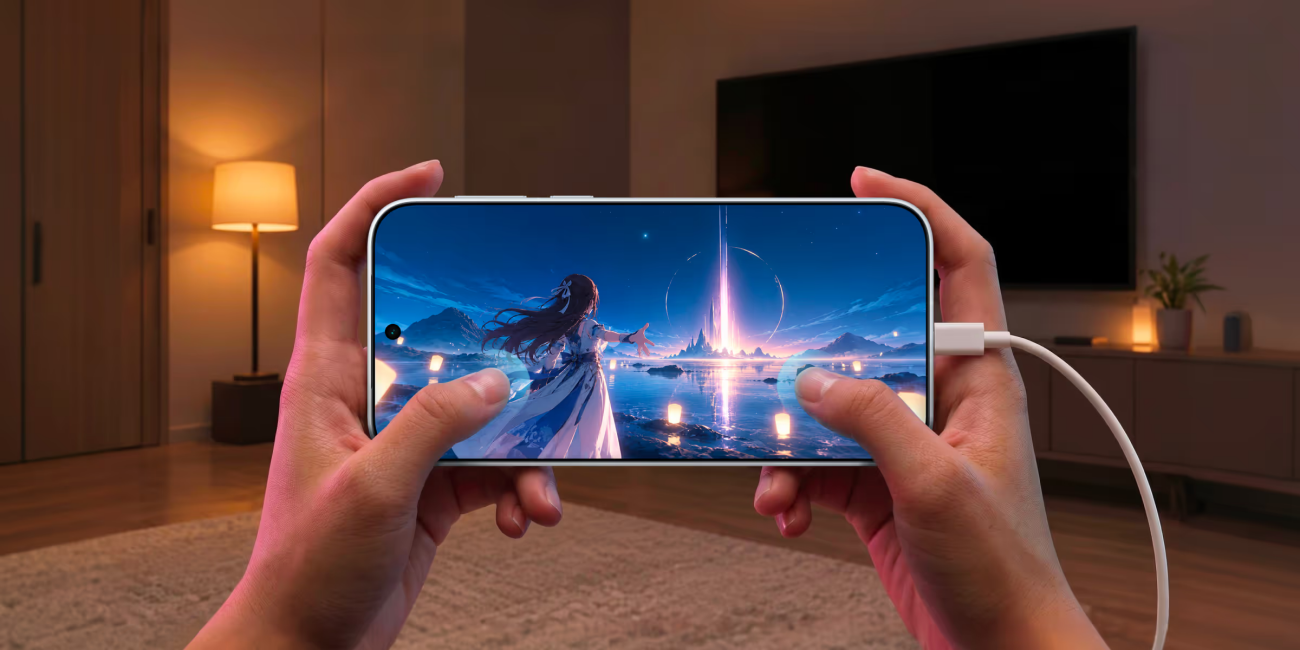
With its Bypass Charging 3.0 feature, Vivo claims to have improved battery charging so your device doesn't get too hot. Not only does it increase battery life by 3%, but it also lets you charge and game simultaneously.
Display and Audio Upgrades
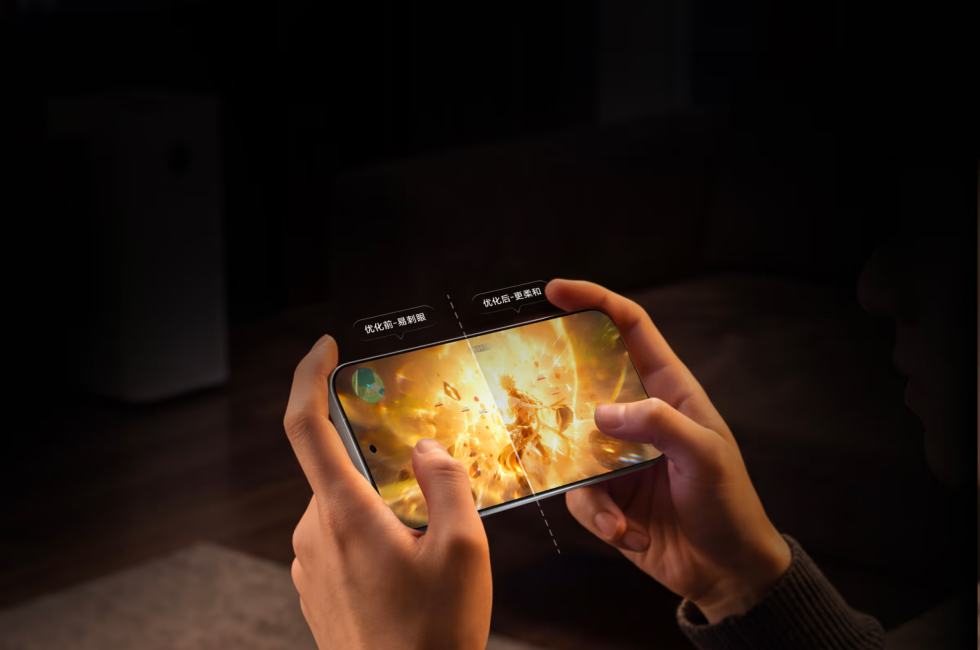
OriginOS 7 makes adjustments based on what's on your screen to reduce glare. When gaming, it automatically identifies highlights and shadows on the display and tones them accordingly.
The new Nighttime Eye Protection 4.0 similarly adjusts the visual effects in low-light environments. As such, your eyes don't get taxed and overstimulated, but you still get to see all the details. This is a highly practical feature for low-light conditions, especially when coming across HDR content that can be uncomfortably bright.
On top of that, the AOD now shows live updates. Without turning it into another lock screen, it lets you see at a glance all the important live updates on things like deliveries and travel. You can even customise to put a sticker on it if you like.

On the audio front, OriginOS 7 introduces one of the more useful audio features on Android. Called Audio Redirect, this dual-path directional audio feature lets you play audio through the phone speakers and a Bluetooth device through two different channels.
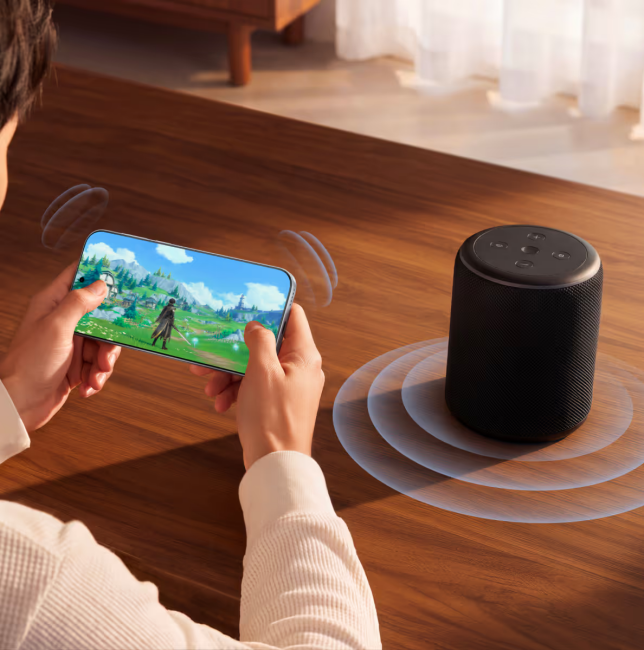
That means you can listen to music on the Bluetooth device while still getting notification sounds or game audio coming through your phone's speakers.
Ultra Game Mode
There's a huge upgrade for gamers too. With the new ultra game mode, now all your game settings, like performance, controls, audio, refresh rate, etc., are available from a single overlay. Settings for the new 4D game vibration feature are also found within the ultra game mode.

Better Cross-Ecosystem Compatibility
OriginOS 7 significantly improves device compatibility between Android and Apple's iPadOS and macOS.
The camera on your OriginOS 7 smartphone can be used for video calls on a MacBook. You can also capture screenshots and capture photos and send them to a compatible iPad straight away.

Along with it, there's better connectivity with Apple Watch so you can check your notifications and messages on your Apple Watch. Similarly, AirPod connectivity lets you see battery level and connection status on your OriginOS 7 device.
OriginOS 7 is also compatible with iCloud for web, so you can use your vivo File Manager to view, upload, and download files.
Faster Photo Sharing with Shake and Share
Like Android's Tap and Share, OriginOS 7 has a new 'Shake and Share' feature that lets devices share photos quickly with a simple gesture. By shaking the phones together, a group is created that can be used to send multiple high-res photos at once.

So, these are all the major features and upgrades arriving on Vivo's OriginOS 7.
The update will first arrive on the iQOO 15, the Vivo X Fold 6, and the Vivo X300 series, starting October 9, 2026, in China. Older devices like the Vivo X Fold 3 and the Vivo X200 series will get the update starting October 29, 2026. The update will roll out to the rest of the OriginOS 7 eligible devices afterward.


