





Google is now rolling out its December Android 16 update along with the Android 16 QPR2 to eligible Pixel smartphones. While the December rollout is focused on introducing new features and AI capabilities, the QPR2 update is more focused towards enhancing the user experience and providing developer support. Here is a quick rundown of what the new updates bring to the table.
Android 16 QPR2 is all about under-the-hood enhancements
Starting with the Android 16 QPR2 release, this is more developer-focused and brings internal fixes to the Android subsystem. The biggest update the new Android 16 beta build has brought is the official introduction of the minor SDK release. Developers can now push minor updates to Android without depending on the major release cycle.
With minor SDK release, additive updates are now possible, which do not rely on app compatibility. Behaviour changes like SMS OTPs and expanded dark theme can now be implemented faster and efficiently. Moreover, using the new build class fields SDK_INT_FULL and VERSION_CODES_FULL, developers can easily track updated APIs.

Also, with the new update, Google has pushed app development enhancements and performance boost. The Linux Development Environment now supports GUI applications within the terminal. The Generational Concurrent Mark-Compact (CMC) Garbage Collector can now focus on newly allocated objects to reduce the CPU and battery load.
With new Widget Enhancement Metrics, developers can track vital data like clicks, scrolls and impressions. Also, there will now be early warning dialogues for those apps that don't comply with the 16 KB page size.

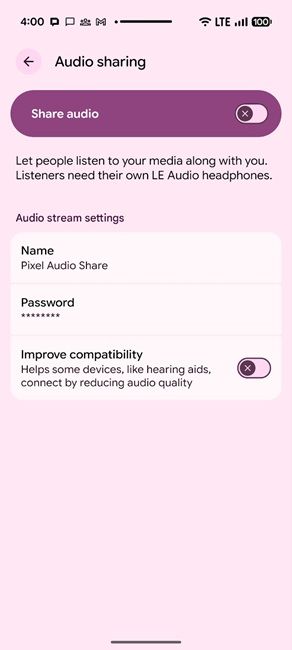
Moving on, Android 16 QPR2 has also added support for improved media and health features. There's a new Immersive Audio Model and Formats (IAMF) which supports software decoding of spatial audio. Personal Audio Sharing is now integrated with the system Output Switcher for Bluetooth LE Audio.
Health Connect can now automatically track steps, collect weight, set index and Rate of Perceived Exertion (RPE) data and enable data accessibility to apps with READ_STEPS permission.
Moving on, developers now have new options with QPR2 to improve user experience and better accessibility. App developers can now integrate an expanded dark theme into their apps for better visibility and contrast, make their apps compatible with the new Android 16 icon shapes and incorporate Interactive Chooser Sessions to ensure sharing UI remains dynamic for real-time sharing.

Lastly, the Android 16 QPR2 update has also brought several privacy and security enhancements. APIs and ADB commands which allow app verification can now be bypassed for testing. There are now SMS OTP protection and Secure Lock Device security checks as well.
Related Articles

Android 16 December update adds smarter features and better child safety
Now, moving on, the first big change that Google has pushed via the Android 16 December release is in the form of AI-powered notifications. Android 16 can now summarise and condense long messages into bite-sized, at-a-glance notifications using AI.
It can even automatically group and silence low-priority notifications by making use of the Notification Cooldown feature. These new features will help Pixel smartphones keep the notification clutter away and make sure the user gets priority messages at the top with ease.

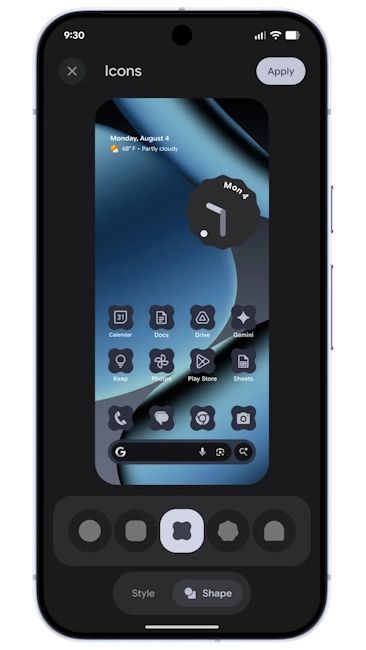
The next new update has landed in the form of customisation. Google is taking the stock Android experience of Pixels to the next level with custom icon shapes and themed icons. Aside from the circular and squircle options, there are now three new icon shapes available with Android 16.
Also, Material You theming is now more cohesive and consistent thanks to better implementation of themed icons. There is also a new, expanded dark theme option, which can intelligently darken most light apps in Dark Mode. It even enforces dark mode for those third-party apps that don't support it natively.
The last leg of the Android 16 December update has arrived in the form of enhanced Parental Controls. The Settings menu now contains a list of all the Parental Control options compiled within a single easy-to-access menu page.

Using that, parents can set screen time limits, schedule downtimes, app usage control and the ability to add extra time to scheduled downtimes with ease. The new Parental Control menu is PIN-protected to ensure that teens and children cannot access and override set protocols.
That said, users with eligible Android 16 Pixel phones should get these new updates any moment now. So, keep an eye out for the latest Android 16 updates.
Related Articles


