


Google is finally rolling out a native app lock to Google Pixel smartphones in the Android Canary 2608 build. Initially spotted in Android 17 QPR1 Beta, the highly anticipated tool is now fully functional, allowing users to lock apps behind a PIN, password, or Biometrics.
Native App Lock Arrives on Pixels
Spotted first by Android Authority, a Native App Lock is now rolling out in the latest Android Canary 2608 build (Sagnik, link). We updated our Pixel 8a to the latest Canary build to confirm the same.
Pixel users can now secure individual applications by going to Settings > Security & privacy > App lock, eliminating the need to rely on third-party software to lock apps on Android.
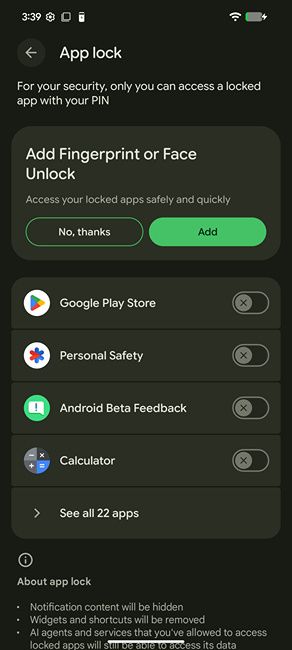
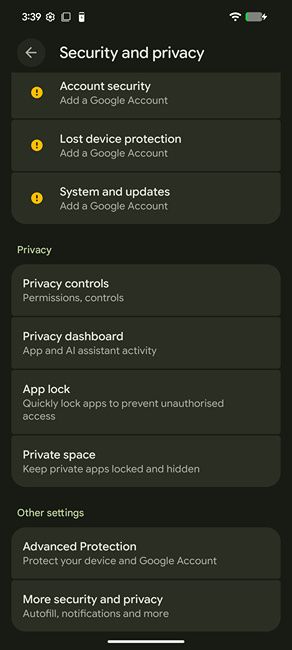
When configuring, the feature allows you to select multiple applications simultaneously, which is much better than the one-by-one setup seen in older developer previews. To use the feature, a Pixel must have an active lock screen PIN, password, or biometric pattern set.
Within the main dashboard, users can filter their applications by "recent" or "All," and optionally pin locked apps to the top of their list for quick management. Additionally, the locked apps are completely hidden from the recent apps menu.
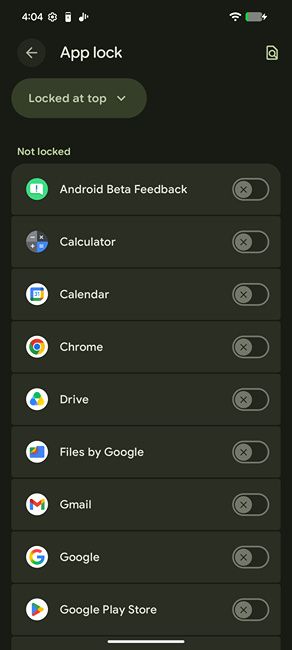
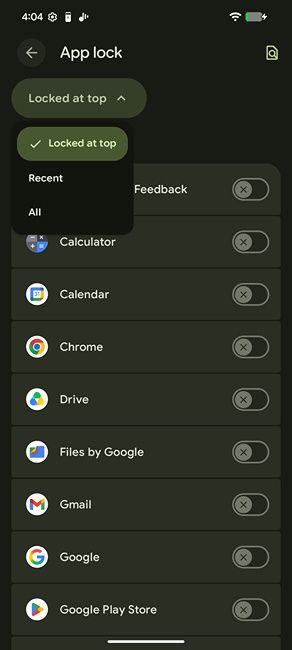
That said, the feature currently has some caveats. For starters, locking a specific platform like Files by Google will actively warn you that other gallery apps can still view your media. Besides, previously authorised AI services can bypass the lock to access the locked app's internal data.
Besides, secured applications will no longer broadcast notification content, and their associated home screen widgets or shortcuts are automatically disabled. From what we've seen in other Android app lock implementations, this is usually the norm.
That said, Android has always had a workaround for app lock disguised as Private Space. Users can pretty much get rid of their main apps on their personal profile and install the app they want to hide in the Private Space profile. Interestingly, the system actively suggests the same if users just want to hide apps on Android instead of locking them.
Since the app lock feature is currently in Canary, it may take quite some time to show up in quarterly Android builds. There is a chance that it may not show up at all, but considering App Lock is a highly anticipated feature, we expect Google to finally bring it to Android once and for all.
We should hear more developments about the feature soon in the upcoming builds, and it could potentially arrive in one of the upcoming feature drops, so stay tuned.
Related Articles


