




WhatsApp continues developing new features for its apps across Android, iOS and desktop, especially for Channels. It has rolled out several new Channel-specific features in the past, including a reply to own post by Channel admin update. Now, it is rolling out a new Channel Status feature which will help admis share member-only content easily.
WhatsApp Rolls out Members-Only Status Updates to Channel Admins
As reported by WABetaInfo, WhatsApp is now letting Channel admins share status updates that can only be viewed by Channel members. It is intended to behave like a temporary broadcast rather than being a full-fledged channel updates.
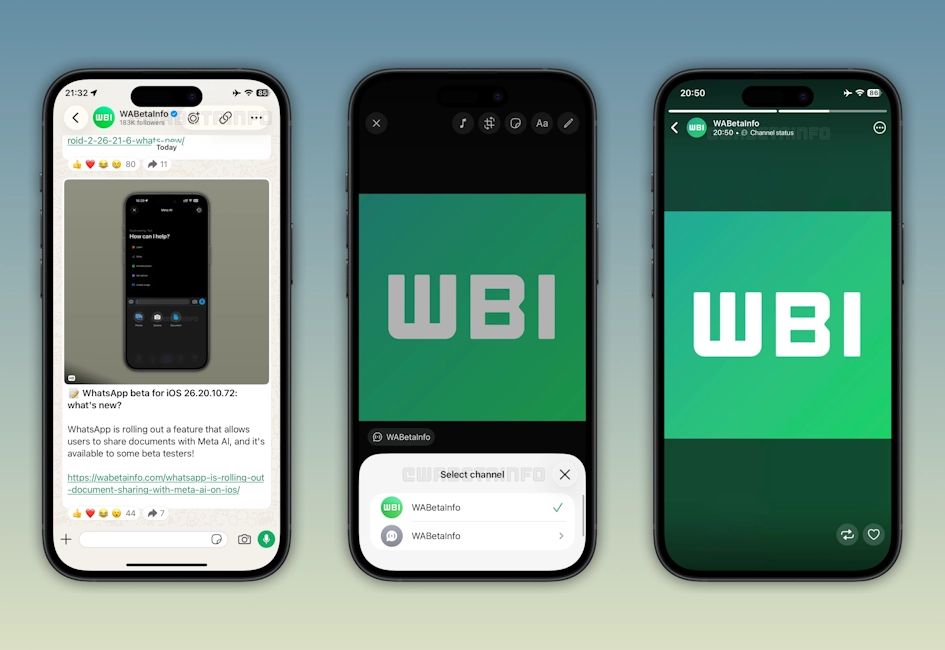
Admins can use this feature to share photos, videos, layouts and text through Channel Status which will be visible to Channel members for up to 24 hours. To share a Channel Status update, admins will need to open the relevant channel and tap on the "create status" option.
This will allow them to choose the content to publish, customise the media via the status editor to add text, stickers and other edits, before making the final post. It even lets then verify the channel for update, allowing admins to choose if they want to keep it a single Channel specific or make it a community update.
Once shared, the update will go live for all Channel members and can be viewed directly from the Status tray, within the Updates tab. It will be shown alongside other status updates, but will carry a "Channel Status" label at the top to help users understand.
Users will also gain the option to interact with the Channel Status like reacting to it, sending replies and even resharing as a regular Status update to let their contact list know about the update. That said, Channel Status updates is currently rolling out to limited Android and iOS users via the Play Store and App Store. It should see a wider release in the coming weeks.
Related Articles


