


Every Android smartphone has a unique 15-digit number called the IMEI (International Mobile Equipment Identity) number, including Vivo. It can come in handy when you're buying a used phone and need to verify it's not stolen. Besides, a quick Vivo IMEI check can also help you check how many months of warranty you have left. Here's how to find the IMEI number of your Vivo phone.
1 Check a Vivo phone's IMEI number via Settings
The easiest way to check your Vivo phone's IMEI number is from the Settings app. Here's how to go about it:
- Head over to Settings > About phone and tap on Status Info.

- If your Vivo phone has dual SIM card slots, you will see two IMEI numbers.
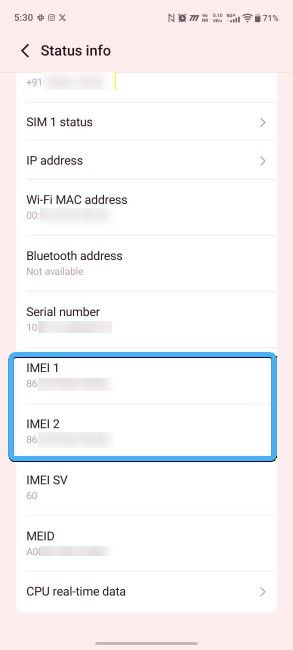
- Long-press on the IMEI section to copy the number to your clipboard and paste it when you want to check warranty of Vivo phone.
2 Check Vivo IMEI via the Phone app
Another common way to check the IMEI of a phone, regardless of the manufacturer, is by using a code in the phone app. It's the same across all Android smartphones, and here's how to use it:
- Open your Phone app and enter this code *#06#.
- Once you type the last hash, a pop-up will immediately appear showing the IMEI numbers of your phone.

- You can write them down or take a screenshot and then copy the numbers to check for your phone's warranty.
3 Look for a Vivo phone's IMEI from its original packaging box
If your Vivo phone no longer turns on, there are still ways to check the IMEI and one of them is from its original retail packaging, if you still have it. Here's where to find the IMEI:
- Grab the phone's original retail box and look for a sticker on the back of the box. It will list the IMEI number in text as well as barcodes alongside the model number and colour variant.

- Besides, you may also check the insides of the box and look for a sticker that you may have removed when you got the phone.
- A sticker is usually stuck to the back panels of some new Vivo phones and consists of both the IMEI and model number.
If you've tried all the methods to no avail, you can check your Vivo phone's IMEI from the Google Find Hub. All you need to do is sign in with the Google account where the Vivo phone is registered and tap on the cogwheel icon beside the phone's listing. You should then see the IMEI of the device.
And those are all the ways to check IMEI. It's fairly simple and can save you from buying a fake device or help you claim a free repair before your warranty expires. We recommend taking a screenshot of your IMEI number and saving it in your email so that you can track your phone if it is ever lost or stolen.
Related Articles


