


A common challenge that has existed in the Indian telecom space is the misuse of SIM cards. It's when bad actors purchase SIM cards in someone else's name and proceed with their scammer shenanigans. While the duplicacy issues have gone down significantly after the strengthened verification process, they still remain a prominent challenge. Thankfully, necessary steps are being taken to counter it.
One of the solutions arrives from the Department of Telecommunications in the form of the Sanchar Saathi portal and app. Here's how to find out if someone is using a SIM card in your name, alongside other common ways to do the same.
1 Check if someone is using a SIM card in your name using Sanchar Saathi
Among the services the Sanchar Saathi app offers is TAPCOF, an acronym for Telecom Analytics for Fraud Management and Consumer Protection. It allows users to view all mobile connections currently active under your name. Here's how to do it:
- Install the Sanchar Saathi app on your iPhone or Android phone from the App Store or Play Store.

- Launch the app and sign in with your number.
- Now, select Know Mobile Connections in Your Name and you should see all the numbers registered in your name.
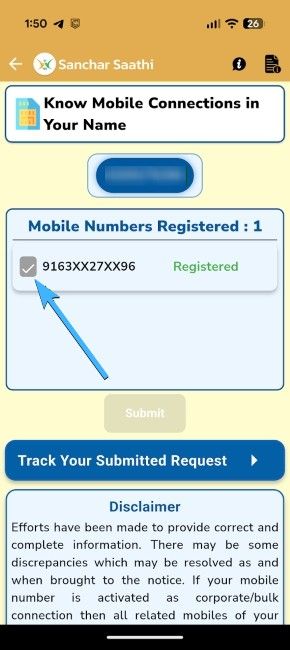
- You can review the list carefully. If you find a number that you don't remember purchasing, select it and choose Not my Number.
- Tap on the Report button to receive a tracking ID. Save it to check on the same page later for the progress of your request.
It could take 30 to 60 working days to suspend the reported numbers. If the reverification fails, the number will be fully detached from your documents.
2 Find out if someone is using a SIM card in your name using Aadhaar Authentication History
Another easy way to check if someone is using a SIM card in your name is by checking the Aadhaar Authentication History. Every time a new SIM card is authenticated via your Aadhaar card, a confirmation appears on the Aadhaar authentication history. If you believe someone has just authenticated, here's how to check it and take action:
- Head over to the myAadhaar portal on a web browser, log in with your registered mobile number and select Authentication History.
- Look for Telecom transactions, and if you find some that you don't remember making, you have multiple SIM cards running on your Aadhaar.
You can then download the Sanchar Saathi app and register a complaint, and shut down the number. However, if that doesn't work for any reason, the better alternative is to look for Telecom transactions.
If you are suspicious but can't access both the Sanchar Saathi portal or app, you can visit the nearest store of your telecom operator (Jio, Airtel, Vi) with your ID proof. They can check their internal database for active connections under your specific ID, though they may not be able to see connections from other operators, like Sanchar Saathi can.
Your digital identity is precious, and proactive monitoring is the best defence against fraud. We highly recommend logging into the Sanchar Saathi portal at least once every few months to ensure your list of registered numbers is clear.
Related Articles


