


-1120w630h.webp "Google Pixel smartphone from the front on the home screen")

Google Pixel fans have been eating well this Android 17 season with back-to-back updates bringing great additions and improvements. After rolling out Android 17 Beta 4.1 recently, Google has now shifted its attention to Android Canary and is rolling out Canary 2606 update with a host of new UI improvements and features.
Android Canary 2606 Features and Updates
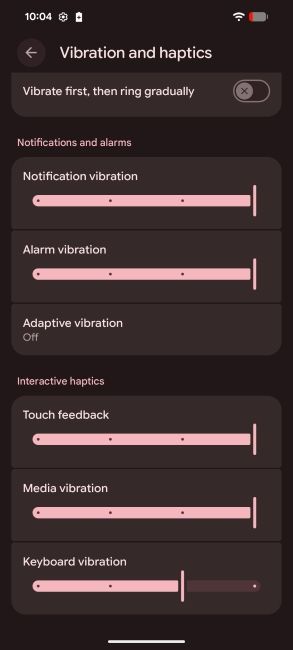
The announcement arrives from Android's community manager, Mishaal Rahman, who posted on X that a new Android Canary is now available. He posted screenshots that show all the major changes rolling out in the build, including expanded theming options, new effects and more.

Starting with the user interface, Canary 2606 brings a new suite of theming options to customise Android on Google phones. The update introduces a new slider, which makes it easier for users to set the dominant colour for their themes. It is paired with a set of four style buttons to quickly toggle between different looks and choose which looks the best.
This is flanked by a subtle tweak to the lock screen UI, where the fingerprint scanner icon now receives the same Blur treatment as the rest of the system assets. Additionally, the Quick Settings panel includes a handy shortcut to switch keyboards on the go.

On top of this, there's a new option in settings which allows users to change the keyboard vibration intensity. This has been one of the most requested features, and it's great to see it's finally here in Android.
As for the availability, Android Canary 2606 is now available for Pixel 6 and above smartphones and can be installed using the Android Flash Tool. It's worth noting that regardless of what Android build users are currently on, installing a Canary update will wipe all data, so it's wise to take a backup beforehand.
With Android 17 features about to exit Beta stages and the stable update expected to arrive later this month, these features might not make it to the stable build yet. However, they should arrive in one of the future Pixel Feature Drops, if Google decides the features are worth keeping, that is.
Related Articles


