


Motorola has officially begun rolling out its Android 17 update in India, bringing new features and improvements. The upgrade is rolling out first to the brand's premium Motorola Signature smartphone, with a phased expansion planned for other eligible devices in the coming weeks.
What’s New with Android 17 on the Motorola Signature
The brand has announced the same in a new press release while also highlighting all the new features arriving on the Motorola Signature. The update carries a build number A171WVH.21-16-1-3-4 and weighs a hefty 5.75 GB in total.
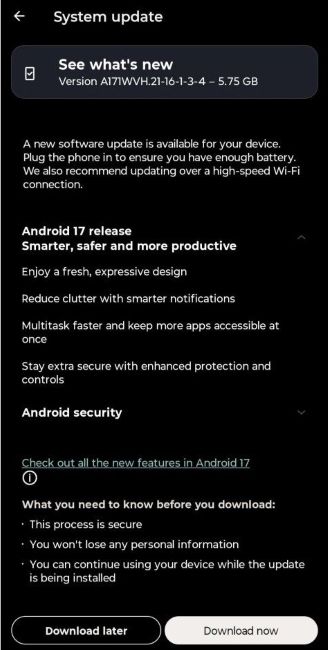
Starting with the features, the Android 17-based Hello UI update brings a refreshed Quick Settings layout with larger touch targets and streamlined settings menus.
The update adds enhanced personalisation options for the home screen with updated display layouts and improved HDR brightness management. Speaking of which, the Home screen widgets now support richer touch interactions, including snap scrolling.
Google's Circle to Search on the Moto Signature receives real-time text translation features. It's worth noting that this isn't exactly an Android 17-specific feature, but rather one that will eventually roll out to all Circle to Search-supported smartphones.

That said, the Android 17-based Hello UI update also focuses on cross-platform sharing and Scam detection. For starters, the update now allows the Motorola Signature to share and receive files using Quick Share to/from the Apple ecosystem.
Besides, there's a new diagnostic menu that allows users to inspect health and review system diagnostics. And there's now a Google Pixel-like Failed Authentication Lock feature alongside stronger PIN shields, Notification Summaries and obscured lock-screen alerts for sensitive apps.

We're also pretty certain that most of the other Android 17 features will also make their way to the smartphone, including Bubble Anything, Native Controller Remapping, Contact Picker, and other security improvements such as a better Advanced Protection Mode and Live Updates support.
Users with eligible Signature handsets can check for the OTA update via the system settings menu. To see which other phones are due to receive an update, check out the list of eligible Motorola Android 17 phones.
Motorola should release the Android 17 update to its Razr series next, followed by the latest Moto Edge 70 Max smartphone and trickling down to the G series.
Related Articles


