


Google recently pushed Android 17 Beta 4, making it the last platform stability release before the stable update rolls out in the next few months. While the update did not bring anything major to the surface, recent findings suggest it did bring some quality-of-life improvements across the UI to appeal to mouse users.
Android 17 Beta 4 Simplifies Split Screen and System Navigation
Mishaal Rahman, Community Engagement Manager at Google, took to X to post that the tech giant has quietly implemented a handful of behavioural changes in the Android 17 Beta 4 update that recently rolled out. These changes make navigation much easier for users who use a mouse or a trackpad. Besides, there has been a notable change in how the OS handles split-screen multitasking.

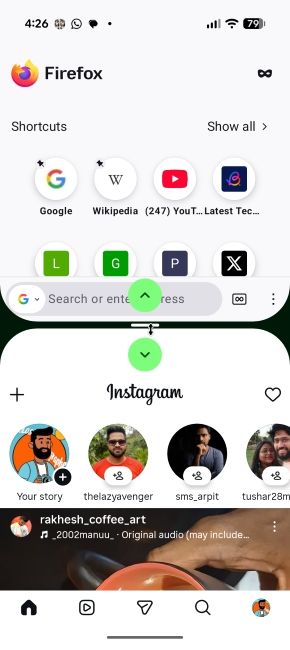
In the new beta, tapping or clicking the grab handle dividing the two open applications now reveals two distinct directional arrows. By clicking them, the layout switches between 50:50, 70:30 and 90:10. Users can still manually drag the handle to adjust the ratio.
The main changes for mouse or trackpad users are that the biometric authentication dialogue box has gained an "X" button. These clickable elements can provide a more intuitive way to exit the biometric prompt, rather than furiously clicking outside to close it. We tried it out on our Pixel 10 with a Logitech G502 connected, and here's how it appeared.
Alongside the navigation tweaks, another aesthetic change comes to the clipboard, where the copied text displayed within the keyboard overlay is previewed in White rather than Black. It's a welcome contrast adjustment that should make the experience more seamless, improving legibility.
Google did not directly mention these changes in its official changelog, presumably due to their minor importance. However, the difference they make to the overall experience is quite significant. While we don't know if they will survive the final cut when the stable Android 17 comes out, we are hopeful.
Related Articles


