


Samsung is once again building on top of a stock Android feature instead of directly shipping Google's implementation. With One UI 9 Beta 2, the company has added a toggle that lets you switch off Android 17's new background audio restrictions. This level of control is not available even on Pixel devices.
One UI 9 Has a Killswitch for Android 17's Strict Background Audio
The feature was spotted by Android Authority and it points to Samsung's implementation which is a little more granular. For those who are unaware, Android 17 is bringing something called Background Audio Hardening and it's already live in Beta 4. With this feature, apps should not be able to suddenly blast audio when they are not actually on your screen.
So going forward, an app needs to be either visible on the screen or run a proper foreground service for things like music, navigation or calls. If it does not meet those conditions, Android 17 will block the audio. Alarms and timers are also exempt and legitimate music and podcast apps that follow Google's framework will work as normal.
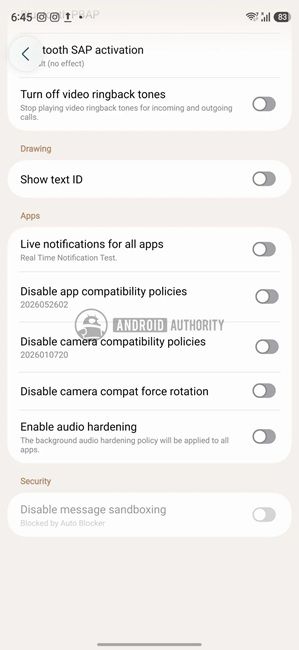
While it's a good addition, this restriction can break background playback like streaming music through a web browser. Interestingly, it also affects the popular trick of using certain Android browsers to play YouTube in the background without paying for a Premium subscription. In fact, Samsung's own Internet browser uses this trick.
So with One UI 9 Beta 2 update, Samsung has added a switch that simply turns off Audio Hardening. You will find it under Settings > Developer options > More settings. On Pixel devices or other phones running Android 17, you need to run the below ADB command to disable Audio Hardening.
adb shell cmd audio set-enable-hardening disableThat said, note that the option is buried under developer options right now and it's part of the beta build. There is no guarantee whether it will make it to the stable build.
Apart from that, Samsung is bringing a productivity tool that can block internet access to distracting apps on One UI 9 at the network level. The code suggests that Samsung phones could automatically add all web browsers, games, social media apps and streaming apps to the restricted list.
All these features are coming from the One UI 9 beta that recently rolled out to Galaxy S26 series users in India and other regions. If you want to know whether your phone will get the update, go ahead and check out our list of One UI 9 eligible devices.
Related Articles


