


Nothing has unveiled a new AI-powered feature called Essential Voice to transform how users interact with voice input on smartphones. The tool focuses on converting spoken words into clean, structured text in real time, going beyond traditional voice typing systems.
Nothing Essential Voice Feature: How Does It Work?
Essential Voice is designed to bridge the gap between speaking and typing efficiency. While users typically type at around 30 to 40 words per minute, speech can reach speeds of up to 150 words per minute, making voice input significantly faster. However, conventional dictation tools often capture raw speech with filler words and errors, limiting usability.
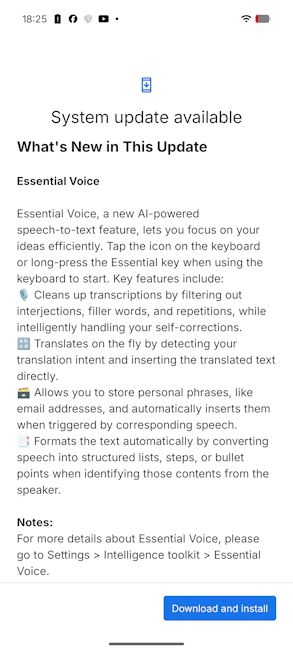
The new Nothing Essential Voice feature addresses these limitations by not only transcribing speech but also refining it. It removes filler words, corrects sentence structure and formats the output into readable formats such as notes or lists. This allows users to generate content that is immediately usable for messages, emails or documentation without manual editing.
Powered by AI, Essential Voice can automatically clean up stutters, fix misstatements and produce clutter-free text output. Nothing also gives it support multilingual input with automatic language detection and translation in over a 100 languages, making it more versatile. Moreover, it's very easy to summon via just the Essential Key on Nothing Phones.

Nothing says the feature is built with contextual awareness, meaning it can adapt its output depending on where the text is being used, from messaging apps and emails to search queries. Users can activate it via the keyboard or a dedicated shortcut and even create custom voice commands for frequently used phrases.
Additionally, the brand has also highlighted privacy measures, noting that audio is encrypted during processing and not stored after use. The transparency is much-needed, especially since the Nothing Warp tool came under a lot of fire for the same.

Initially, Essential Voice is rolling out to the Nothing Phone (3) and Nothing Phone (4a) now and the Nothing Phone (4a) is expected to receive it soon. Users can check for the update by heading over to Settings -> System -> System Updates -> Check for update.
Related Articles


