


If you have lost your Samsung phone, there are still ways to find your mobile via online tools. Every modern Samsung phone ships with a free Find My Mobile service (now called SmartThings Find) and if you set it up in advance, finding a phone is pretty easy. The tool you want is Samsung's Find My Mobile and it can ring your phone, show its location on a map, lock it down or wipe it clean remotely. On that note, let's begin.
How to Use Find My Mobile to Locate Your Samsung Phone (SmartThings Find)
First off, go ahead and find any other device, a laptop, a tablet or a friend's phone and follow these steps.
- Open a web browser like Chrome and go to smartthingsfind.samsung.com.
- Sign in with the same Samsung account that is active on your lost phone.
- Now, pick the missing device from the list on the left.
- If it has any kind of connection, Samsung Find My Mobile will find its location on a map within seconds.
- Choose an action from the panel. These are your options.

- Ring: It blasts your phone at maximum volume for one minute even if it was on silent or vibrate.
- Lost mode: This option locks the screen, displays an emergency message and contact number and freezes Samsung Pass, Samsung Wallet and Digital Key. The phone can't be switched off either and removing the lockdown mode needs a separate PIN.
- Track location: It sends you an updated location roughly every 15 minutes and keeps the tracking history for seven days.
- Erase data: It factory resets your Samsung phone remotely so your data can't be accessed. Note that you also lose Find My Mobile access once you do this, so treat this option as the last resort.
- Extend battery life: It remotely moves the phone into power-saving mode.
Related Articles

Find Samsung Phone Using Google's Find Hub
If you never set up Samsung's Find My Mobile service or your 2FA has locked you out of your Samsung account, you can still rely on Google's Find My Device service to find your Android phone. Every Galaxy phone signed into a Google account is covered by Google's Find My Device (now called Find Hub) including Samsung phones. Here is how to use it.
- On any device, open a browser and go to google.com/android/find and sign in with the Google account that was logged in on your lost phone.
- Now, your Samsung phone will show up with its current or last known location on a map.
- You can now Play sound to ring it for five minutes, Mark as lost to lock it with a message and contact info and Factory reset wipes it entirely.

While the Samsung Find My Device experience through Google offers fewer controls than Samsung's own tool, but it needs zero setup and works across every Android phone you own.
Related Articles

Ring Your Samsung Phone Straight From a Galaxy Watch
If you own a Galaxy Watch, you have the fastest method to find your Samsung phone. You don't even need to open Find My Mobile Samsung on another device.
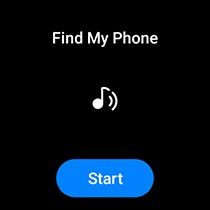
On the watch, press the Home button, open the Apps Tray, tap on Find my Phone and tap on the Ring icon. Your phone will sound off for one minute even if it's on mute or vibrate. If the phone is dead or out of Bluetooth range, the watch will instead show its last known location, which is still useful to find your Samsung mobile.
Related Articles

How to Set Up the Find My Mobile Samsung Tool
You can't locate your Samsung phone that was never registered, so this is the step you should not skip. Setting up Find My Mobile on Samsung phones take barely a few minutes, so go ahead and enable everything now. Note that you must have Samsung account signed in on your Galaxy phone.
- Open the Settings app on your Samsung phone and tap on Security and privacy.
- Here, select Lost device protection and then tap on Find My Mobile.

- Now, turn on Allow this phone to be found and sign in with your Samsung account if you have not already.
- Finally, turn on the extra toggles too including Send last location and Offline finding.
- Similarly, go to Theft protection and enable all the toggles including Theft detection lock, Offline device lock, Failed authentication lock and Remote lock.

Each of these options will help you find your Samsung mobile. For instance, Send last location pings your phone's location to Samsung's servers when the battery gets low (around 20%), so you get a final location before it dies. Offline finding lets the Find My Mobile Samsung network locate your phone even when it has no internet. And Remote unlock lets you reset your screen lock from the web if you ever forget your PIN.
One important note, though. If your two-factor authentication sends a code to the phone you have just lost, you can lock yourself out of your own Samsung account. So head into your Samsung account's Two-step verification settings and add a backup method like an authenticator app and generate offline backup codes and store it somewhere safe.
Related Articles

Lost or Stolen Samsung Mobile in India? Block the IMEI Through CEIR
If your Samsung phone has been stolen rather than misplaced, in India, you can block the phone from functioning and kill its resale value. You can block your Samsung phone's IMEI through the government's CEIR portal at ceir.gov.in (now part of the Sanchar Saathi platform).
But before that, file a police complaint or FIR about your stolen phone. Then visit the CEIR portal, fill in the device details, your IMEI, the place and date of loss and the police complaint number. Now, submit the block request.

Once approved, the phone is blocked across every mobile network in India within 24 hours and can't be used with any Indian SIM. You will also get a Request ID, which you can later use to unblock the device if you recover it.
If you forgot to note down your IMEI earlier, your purchase invoice or the retail box has it printed. You can also learn how to check the IMEI number on your Samsung phone in our dedicated guide.
Related Articles

How Offline Finding Tracks a Samsung Mobile That Has No Internet
This is the feature that makes Find My Mobile on Samsung phones a helpful tool. Offline finding works even when your lost phone has no Wi-Fi or mobile data, but it must have some charge.
Your phone quietly broadcasts an encrypted Bluetooth Low Energy (BLE) signal and any nearby Galaxy device that has opted into the network, picks it up and relays the location back to you. It's the same crowd-sourced idea behind Apple's Find My tool.

That said, the problem is density. In a busy Indian city like Delhi, Mumbai or Kolkata, Galaxy phones are everywhere, so the network works brilliantly and updates fast. However, in rural areas with few Samsung devices around, you may get nothing until someone walks past your device.
And to be clear, if the phone is completely switched off, offline finding can't help, since the Bluetooth radio needs power to broadcast. In that case, the best you get is the last known location of the phone.
Finally, the Google Maps Timeline method to find lost Samsung phones no longer works in 2026. Google shut down the web version of Timeline in June 2025 and moved all location history to on-device storage. In plain terms, that data now lives only on the missing phone itself, so you can't find it from your laptop or a friend's phone.
The one exception is that if you had earlier turned on encrypted Timeline backup to your Google account, you can restore it on a new device. For everyone else, Samsung's Find My Mobile and Google's Find Hub are your real options here.


