


When Samsung rolled out One UI 8 to supported smartphones, the brand more than made up for its One UI 7 delay, exceeding expectations and delivering a feature-rich, stable software experience. The brand has officially released One UI 8.5 stable with the Galaxy S26 series launch, with the beta well underway for its older smartphones. It's an incremental update, bringing new features, quality-of-life changes and other much-needed improvements. Here's everything you need to know about One UI 8.5, its features, supported devices and release date.
One UI 8.5 release date
Samsung's release strategy for One UI 8.5 mirrors what the brand learnt from its previous lessons. With the One UI 8.5 Beta 4 already en route to the Galaxy S25 series, there's another Beta left before the stable release. While the official stable rollout date is currently unknown, we expect Samsung to push it starting in April 2026.

Related Articles

One UI 8.5 supported devices
Since there's supposed to be only a 4-month gap between One UI 8 and One UI 8.5, we expect most One UI 8-supported devices to be eligible for the One UI 8.5 update as well. The update could first roll out to the Galaxy S25, S25+ and Galaxy S25 Ultra and the Galaxy Z Fold 7 and Galaxy Z Flip 7. Older One UI 8.5 eligible devices like previous Galaxy S series phones will follow, and then upper-mid-range, mid-range and budget smartphones.

Related Articles

One UI 8.5 expected features
One UI 8.5 is based on Android 16 QPR2, and it combines the latest from Google with the best and improved features from Samsung. Some of the headline features include forced themed icons and more lock screen customisation. Here are all the One UI 8.5 features:
Related Articles

1. New Galaxy AI features
The One UI 8.5 stable update is expected to expand Galaxy AI features, but the current beta brings only one feature: Photo Assist. It lets you generate AI images using different Photo Assist features without needing to save each iteration. Once done creating, you can check the creation history and save the pictures you like the most while discarding others.

The update also brings enhancements to Bixby with Smarter device control, Ask anything anytime and Conversational history. All of them are pretty self-explanatory, but the Smarter device control feature could come in extremely handy for older folks and could make the phone-using experience a bit easier.

As for other AI features that are expected to eventually make their way to One UI 8.5, they include – Meeting Assist, Touch Assistant, Social Composer and Smart Clipboard. Here's what each feature could do:
- Meeting Assist: Translating meeting and presentations in real-time.
- Touch Assistant: Could improve reading efficiency by processing the text on the screen.
- Social Composer: Generates text based on what you upload to social media or generate reviews on shopping apps.
- Smart Clipboard: Gives you suggestions for the content you copy, such as correct, summarise, search, translate and more.
Related Articles

2. Connectivity features
One UI 8.5 beta brings four new connectivity features and improvements – Storage share, Quick connect to Smart view, Enhanced Auracast and Voice broadcasts. Storage share distributes your storage across the Samsung ecosystem, making it easier to access your files from anywhere.

Besides, improvements to Smart View make it quicker to connect your displays faster, with the ability to add a shortcut on your home screen to make it easier to connect your Samsung phone to a TV or display. Auracast now gives you options for both broadcasting and listening, while voice broadcasts can help you broadcast your voice to people around you.
Related Articles

3. A fully-customisable Quick Settings panel
One of the significant features that Samsung has introduced in One UI 8.5 is a fully customisable Quick Settings panel. And with that, we mean users will have the total freedom for where they can move toggles.
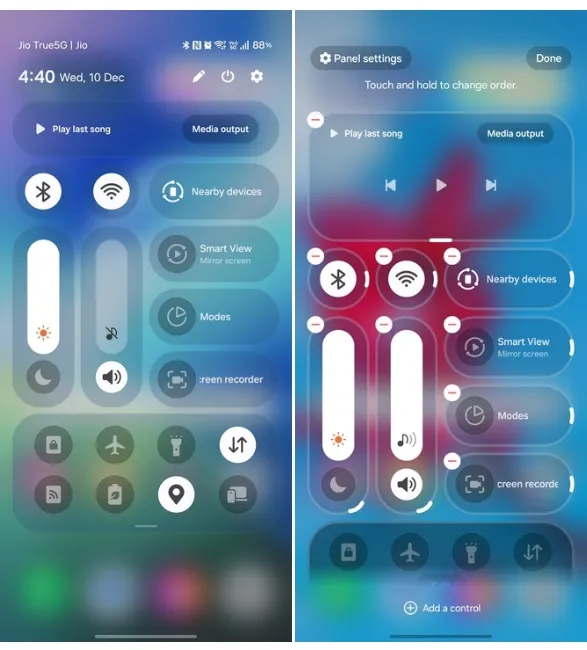
With support for vertical and horizontal layouts for sliders and certain tiles, users can ensure no space is wasted, achieving a cleaner look.
4. Privacy Protection
One UI 8.5 includes a handy feature called Privacy Protection, where a Samsung device will automatically blur out sensitive parts of a document or a card when sharing it with others. The feature will throw a "May contain sensitive information" toast and show users a Privacy protection icon in Android's share sheet.

Once users tap on the feature, Privacy Protection leverages the on-device Gemini Nano model to identify and blur sensitive parts of the image. No more editing required. One UI 8.5 is also bringing Android 16's Theft Protection to protect your data if someone steals your phone.

Besides, the release also brings Partial screen recording to include only the region you want to record. This way, you can focus on recording what you need rather than recording the whole screen, which might not be great for privacy.
5. Additions to Battery and Power menus
Starting with the revamped battery info page, One UI 8.5 now lets you check your battery usage a bit more clearly. The battery settings pages have been redesigned to include things like current charge status, remaining charging time and usage over the past week.

Besides, One UI 8.5 also improves Power Saving mode. Although Samsung doesn't highlight how, users can choose the Standard mode to restrict and customise how they want to limit or use the Maximum mode to turn off all the features to make the battery last as long as possible.
6. Lock screen customisations and redesigned app icons
One UI 8.5 introduces a blurred background effect on the lock screen upon receiving notifications to enhance readability. Besides, while One UI 8 brought new lock screen clock styles and customisations, One UI 8.5 will expand on that by bringing more lock screen clock styles.

Besides, Samsung is making a slight change to app icons by adding a subtle 3D effect to them. This could make them appear slightly more prominent, enhancing the home screen's look and users' ability to easily spot them. Wallpapers with pictures will fit perfectly every time, and the layout automatically adjusts so that the elements do not cover the important parts of the image.
7. Changes and improvements to One UI system apps
Samsung introduced a lot of changes to system apps in One UI 8.0, and it looks like the brand was only scratching the surface. One UI 8.5 brings a lot more changes to Samsung's default system apps, refreshing their UIs, making them easy to use and feature-rich.

These include improvements to the Phone, Quick Share and Gallery apps that get an iOS 26-like pill-shaped navigation bar. Besides, the latter will support NFC file transfers and a new family sharing feature. Samsung Routines introduces an "Ask Gemini" routine. Auto Blocker, which restricts app sideloading, can be temporarily paused for 30 minutes on One UI 8.5.

The Weather app now includes new parameters, such as pollen tracking with a new interface, besides featuring a slightly cleaner UI design. Lastly, One UI 8.5 will also add Driving Mode, which should help minimise distractions when driving. One UI 8.5 features a lot more smaller changes in apps that we could mention here, and this guide would never end. Some of the most prominent changes can be found in the Clock, Calculator, Settings, Now Bar, Notes app and Quick Share.
8. Notification summaries
Google Pixel devices are getting the Notification Summaries feature, and One UI 8.5 follows suit on Samsung devices. The feature is now live in One UI 8.5 on Galaxy S26 series, and will expand to more One UI 8.5 supported phones.

For starters, the feature will use Gemini Nano to summarise notifications and text messages from apps. It could help convey a summary of everything that's going on in a chat or a notification from an app. This way, users won't have to expand the notification to know what's going on and minimise interactions with their devices.
And that's everything you need to know about One UI 8.5. All in all, One UI 8.5 is a mild but still a crucial update that will definitely improve the overall experience. With Gemini Nano features and lots of user interface changes across system UI and apps, it brings new aesthetics and refreshes the design.
To reiterate, One UI 8.5 is available on the Galaxy S26 series and is expected to roll out to Galaxy S25 and older smartphones starting April 2026. The One UI 8.5 beta 4 is now seeding to the Samsung Galaxy S25 series, and we expect Samsung to expand its beta to more phones in the future.


