


Google is rolling out several new security features to keep Android phones safe. The new additions focus on upgrading the Live Threat Detection system that the brand introduced back in 2024. Besides, Google is also strengthening Chrome security and adding new rules to Android Advanced Protection mode.
Google Live Threat Detection Feature Enhanced
Google announced during The Android Show 2026 I/O edition that it is updating Live Threat Detection to catch two specific scams. First, it will alert you if an app starts secretly forwarding your SMS's to another number. The other feature will look for apps with accessibility overlays that trick users into tapping things they don't mean to.
For those unaware, Live Threat Detection uses the on-device Gemini Nano model to watch for apps acting strangely and report them to users. With reports of apps secretly forwarding messages amidst rising scams in countries like India, the feature should help users spot the trojans early and take the necessary action.
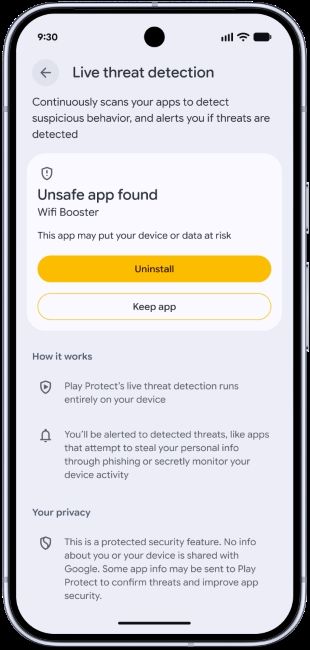
With Android 17, Google will also add a feature called Dynamic Signal Monitoring to let Android phones capture apps that try to hide their icons, run quietly in the background, or abuse system tools. Google can also update these rules on the fly to block new types of malware as they are discovered. This also answers the question about if you should use anti-virus on Android smartphones or not.
Besides Live Threat Detection enhancements, Google is also doubling down on its efforts to stop malware in Chrome. Users who have Android's Safe Browsing feature enabled and try downloading an APK will stumble upon an evaluation prompt. Chrome will first check the APK for malware and stop the download before the file downloads on your phone.
Additionally, there are improvements to Android's Advanced Protection Mode. For those unaware, Advanced Protection Mode was introduced with Android 15 as a strict security mode designed for people who are highly targeted by hackers. Google recently added USB protection for Pixel phones and intrusion logging to help navigate phones if they get hacked.
Advanced Protection Mode can now stop apps from using accessibility tools unless it's an accessibility feature. Besides, it can disable device-to-device unlocking, Chrome WebGPU support and turn on Scam detection for chat notifications. Google will also let businesses force Advanced Protection mode onto company-managed work phones using Android Enterprise later this year.
Related Articles


