





It has been a while since Samsung released the One UI 9 Beta for Galaxy S26 series and several other phones, including the Galaxy S25 lineup, are set to receive the update soon. While the latest One UI release is not a major feature galore, it does bring some minor, yet significant changes, including the ability to now add network speed on the status bar.
Galaxy Phones Running One UI 9 Will Finally See Network Speeds on Status Bar
First spotted and reported by SammyGuru, the updated QuickStar Good Lock module in One UI 9 will now let users view their internet speed right on the status bar. This has been a long time coming since almost every Android brand has been offering this functionality for years, and Samsung fans have been asking for the same.
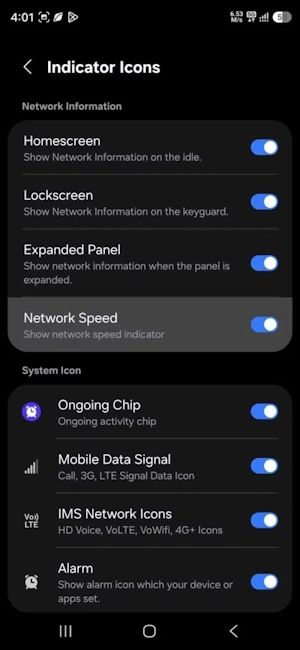
As it is evident from the above image, the 'Indicator Icons' menu inside QuickStar Good Lock has been updated to reflect a new 'Network Speed' toggle inside. Once turned on, users will be able to monitor the real-time network speed right from the status bar.
This, although minor, is a useful addition since currently, if users need to know their internet speed, they will either have to rely on third-party apps like NetVelocity or head over to Google to do a real-time speed analysis.
That said, aside from the network indicator, One UI 9 has also added the ability to disable 'Ongoing Chip', which is primarily used to show Android 17's Live Activity updates on apps for calls, timers, countdowns and more. Both the features are exclusive to One UI 9, and to know when your Galaxy phone will receive the One UI 9 update, check out our dedicated One UI 9 eligible device list.
Related Articles


