





Alongside the new Galaxy S26 series and the Galaxy Buds 4 lineup, Samsung has also made the stable build of One UI 8.5 official. The Android 16-based OS skin has brought forth several new features and under-the-hood improvements, including new Galaxy AI and Bixby features.
One UI 8.5 Stable Update Now Live with Galaxy S26 Series
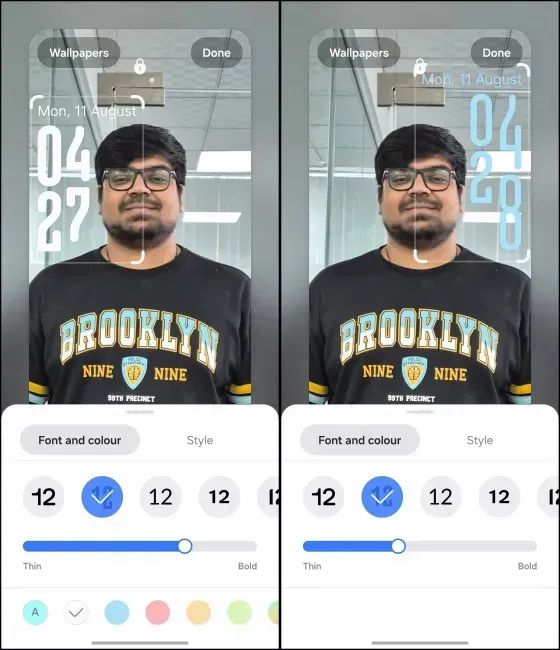
Starting with personalisation, One UI 8.5 includes a new blurred background effect on the lock screen. It is intended to enhance readability and make incoming notifications stand out. There are also new lock screen clock styles and customisation options, which make use of depth effects and background blur.
Moreover, app icons in One UI 8.5 now carry a 3D effect to make them appear slightly more prominent. It enhances the UI and improves legibility. Users can also choose from multiple app icon effects from Samsung's Good Lock module.
Also, another significant change introduced with the new OS update is the ability to fully customise the Quick Settings panel. From vertical and horizontal layouts to expandable and adjustable quick setting tiles, users now have the full freedom to choose their own quick settings panel look.
Now, with an improved and much more customisable UI, One UI 8.5 also brings several new changes and features to Samsung's first-party apps. For instance, there is a new iOS 26-like pill-shaped navigation bar inside the Phone, Quick Share and Gallery apps. Similarly, there are several tweaks to the Clock, Calculator, Settings, Now Bar and Notes app.
.webp "OneUI 8.5 fully customisable Quick Settings panel")
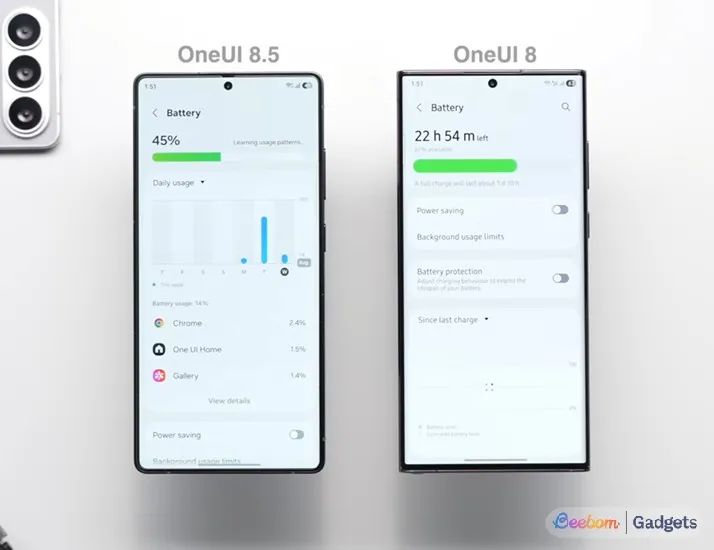
Another area where One UI 8.5 brings significant changes is inside the Battery Info page. It now stands revamped to display device usage more clearly. It has been redesigned to include details like current charge status, remaining charging time and usage over the past week.
Moreover, One UI 8.5 eligible devices can also make use of an improved Power Saving mode. Users can now choose the Standard mode to restrict and customise battery usage or use the Maximum mode to turn off all the features to make the battery last as long as possible.
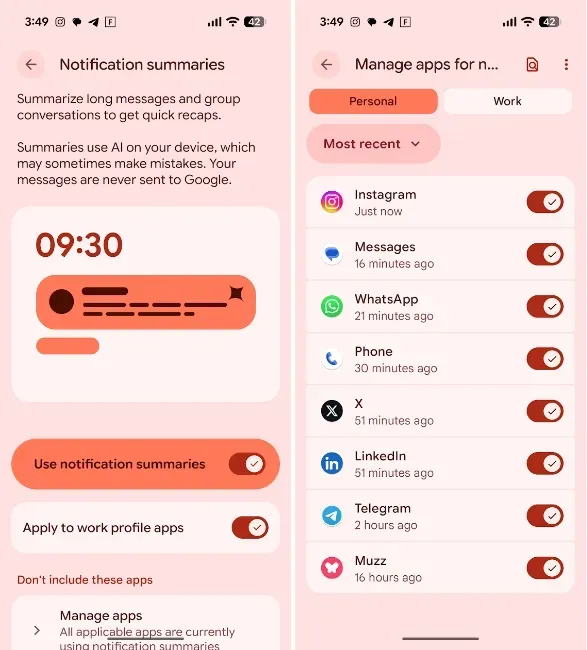
Also, the stable One UI 8.5 build has finally unlocked the Notification Summaries feature that automatically prioritises important notifications and summarises long or busy notifications. It uses Gemini Nano features along with Galaxy AI features to provide a bite-sized summary of notifications.
Moving on, another handy feature that One UI 8.5 brings is Privacy Protection. This is intended to warn users of potential sensitive data before sharing media like images and documents. It uses on-device Gemini Nano model to identify and blur sensitive parts and display a "May contain sensitive information" warning inside Android's share sheet.
Similarly, One UI 8.5 is filled to the brim with new and exciting Galaxy AI features. The very first is an all-new Now Nudge Galaxy AI-powered feature, which acts as an on-screen guide for Galaxy phones. It works similarly in nature to Google's Magic Cue, by reading the on-screen contents and suggesting real-time actions.

Image Credit: Samsung

Image Credit: Samsung
For example, if a user is chatting with someone and the person on the other end asks when he/she will be available, Now Nudge can show an ‘Open Calendar‘ button above the keyboard or check the user's calendar, find the next available time and suggest the same. It is an intelligent AI companion and is aimed at simplifying the smartphone usage experience.
Another interesting Galaxy AI feature is the introduction of the Plex agent with One UI 8.5. It brings the Pexplexity-powered multi-AI agent to Bixby. Samsung's digital assistant will now make use of Perplexity AI to provide web search results and perform on-device AI tasks. It will show off a Perplexity icon just above the sources for searches. Users will be able to activate it by simply saying "Hey, Plex" or long pressing the side button.
Lastly, One UI 8.5 also brings the all-new AI-focused camera experience to Galaxy S26. Samsung has brought three more natural language processing features for photo editing - Generative Restoration, Environmental Alteration and Image Merging. Users will now be able to restore missing elements in photos using generative AI, seamlessly alter and manipulate the image environment and turn styles and types of images.
That said, the stable One UI 8.5 build will first ship with the Samsung Galaxy S26, Galaxy S26+ and Galaxy S26 Ultra. It will then roll out to other Galaxy phones like the Galaxy S25 series and the Galaxy Z Fold 7 and Galaxy Z Flip 7.
Related Articles


