





iOS 27 is here, rolling out to all iPhone 11 and above devices starting September 14. The update introduces the new Siri AI, along with other Apple Intelligence features like Describe a Shortcut, Reframe and Extend in Photos, an improved Clean Up tool and Image Playground, and a round of general enhancements.
Given that the last couple of iOS releases left a trail of bugs behind, I was cautious about what Apple has in store for us this year. But after running iOS 27 on my iPhone Air and iPhone 13 since the first developer beta, I'll answer whether the effort paid off or is it better to leave your iPhone where it's at in this iOS 27 review.
Siri AI in iOS 27 Is Finally Living Up to Apple's Promise
With iOS 27, Siri finally gets promoted to Siri AI, a more intelligent version that can understand the context of the conversation, answer open-ended questions and be a little expressive while doing so.
Related Articles

Siri Finally Understands What I Am Asking
For years, it felt like I needed a script before asking Siri to do anything, because it would fumble on the most basic requests. But on iOS 27, Siri AI not only understands what I am asking for but carries it out better than I expected.
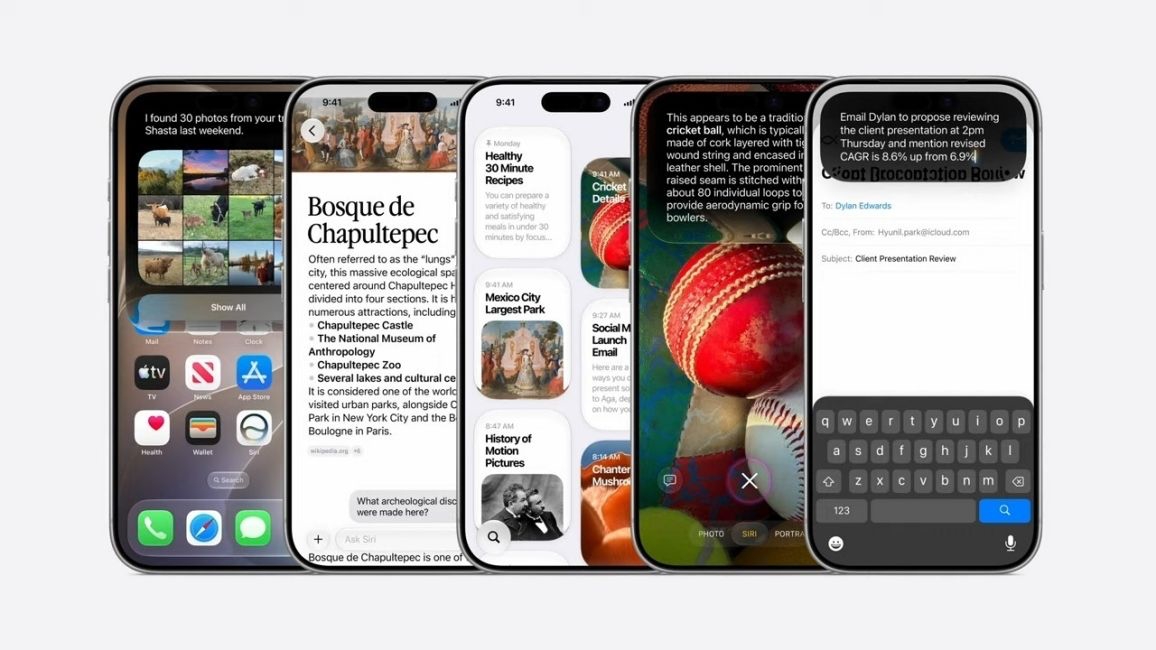
It remembers what I asked 30 seconds ago, it searches the web and comes back with a breakdown instead of a list of links, and I can ask follow-up questions without starting from scratch. This is why I have been using Siri AI a lot more, because for the first time, it doesn't feel like I am talking to a wall.
Where it really clicks is personal context. Siri can pull from your Messages, Mail and Notes, which, in my case, are synced with my Mac, where I do most of my note-taking. So it could bring up conversations I had forgotten about.
Related Articles

Siri Now Lives Everywhere on the iPhone
What excites me more is how deeply Apple has wired Siri into the rest of iOS. Swipe down from the top to bring up Search or Ask, which is Siri built into Spotlight, and you can summon it literally inside any app on the phone. So I don't have to press the side key, as Siri is at my service with a simple gesture.
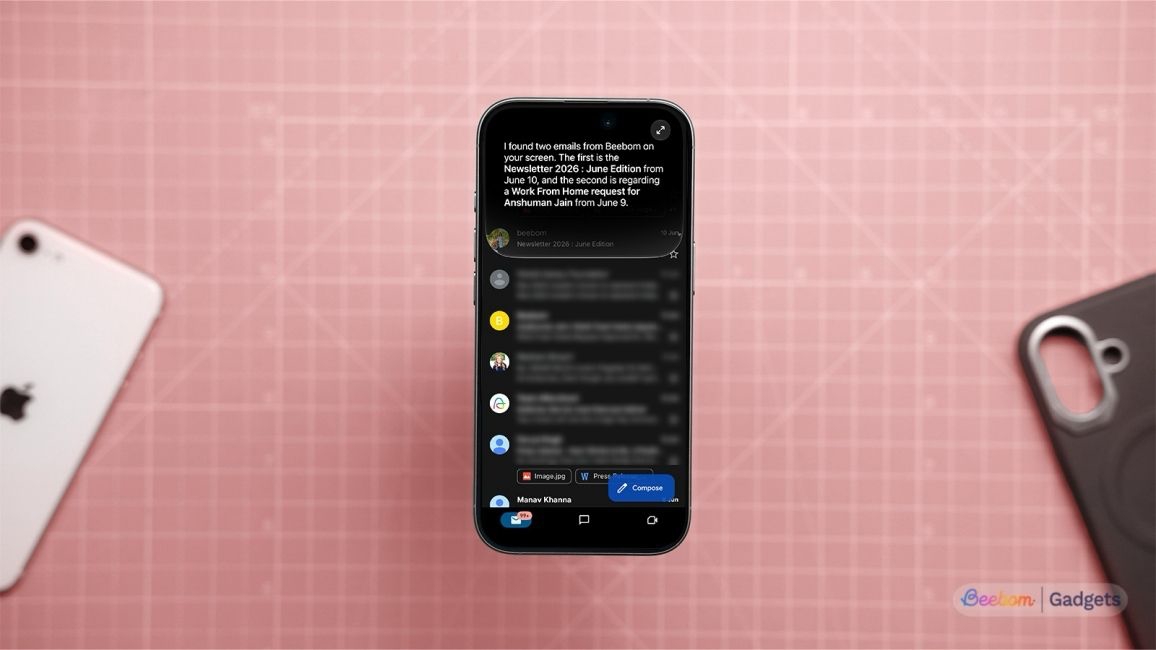
Plus, it has on-screen awareness, so I could ask Siri AI about the name of an actor in the middle of a movie or fact-check a claim in an Instagram reel without leaving the app I was in.
Related Articles

Siri in Camera App Is Apple's Google Lens Moment
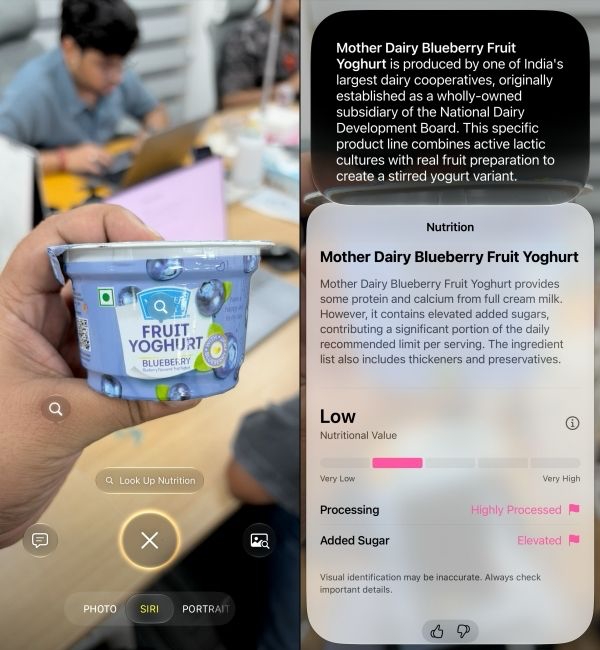
Siri also sits inside the Camera app under its own dedicated mode. It can scan objects and answer your questions about them. Point it at a plant, a dog or a cat, and it tells you the species; point it to a poster and it will translate its contents.
Siri in the Camera app can also scan a food nutrition label and paint a picture of how healthy it is. And that's what I used it for most of the time. It is not 100% effective, and I ran into a few hits and misses along the way when I scanned my meals with Siri AI.
And if none of that is enough, there is a dedicated Siri app where you can go and have a one-to-one with Siri, similar to the ChatGPT app. This is honestly my least-used feature in iOS 27, because Siri was already available wherever I needed it without me having to look for it.
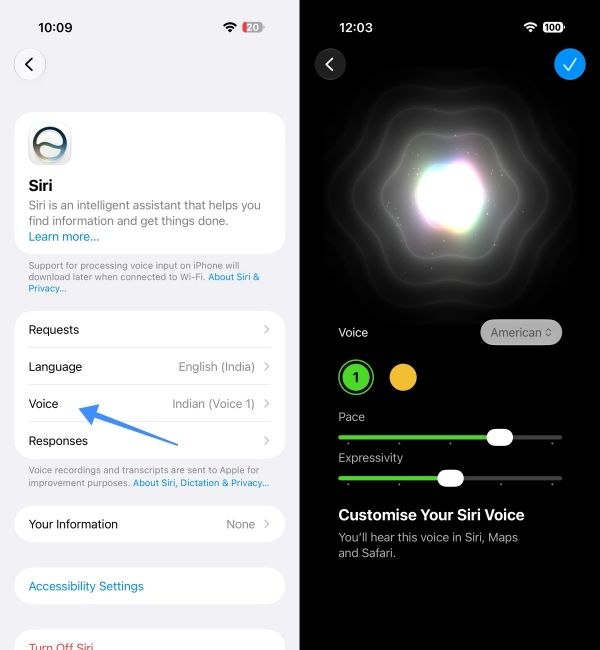
Apple has also added a Pace and Expressivity slider to let you customise Siri AI's voice. This allowed me to change the flat, unmistakably robotic delivery of Siri into something closer to a chatty Kathy. But this feature is exclusive to iPhones with 12 GB of RAM, like the iPhone Air and iPhone 17 and iPhone 18 Pro models.
If you are wondering what finally got Siri here, you can thank Google, since Apple is using a custom Gemini model for all these advancements. I don't mind where the smarts come from, because the result is a Siri AI that we have been wanting since it dropped over a decade back.
Related Articles

Apple Intelligence in iOS 27 Goes Well Beyond Siri
Besides Siri AI, Apple Intelligence has also received its much-needed redemption in iOS 27, going from features that no one cared about to something I can't live without on my iPhone.
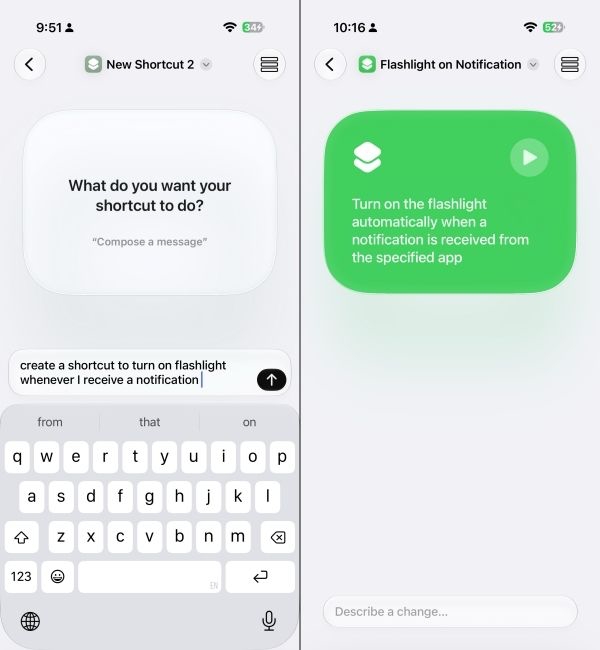
Starting with Describe a Shortcut, a feature that makes Apple's Shortcut app accessible to everyone. It had earlier required you to have existing knowledge about automations, triggers and actions. But after iOS 27, you can simply describe what you want the shortcut to do, and Apple Intelligence assembles it.
Related Articles

Extend and Reframe Are the Tools I Did Not Expect to Use
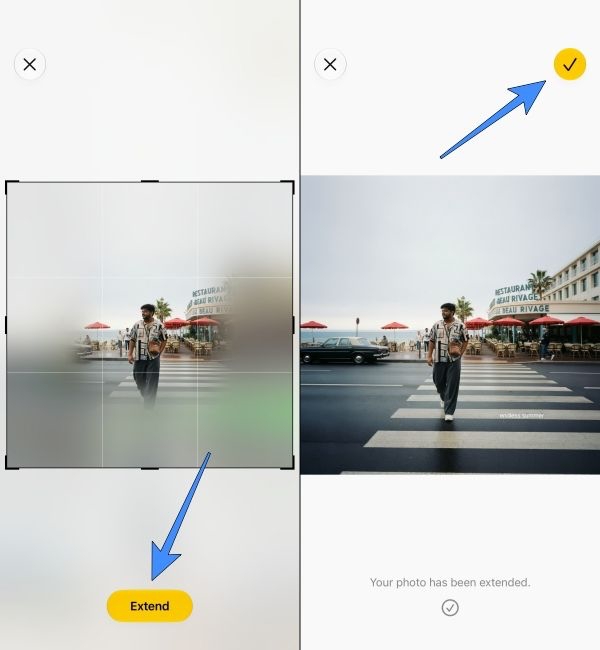
Then there are the new AI tools in the Photos app, called Reframe and Extend. Extend tool pulls the edges of a photo outward and generates whatever should have been there, which sounds like a gimmick that Snapchat did back in 2023.
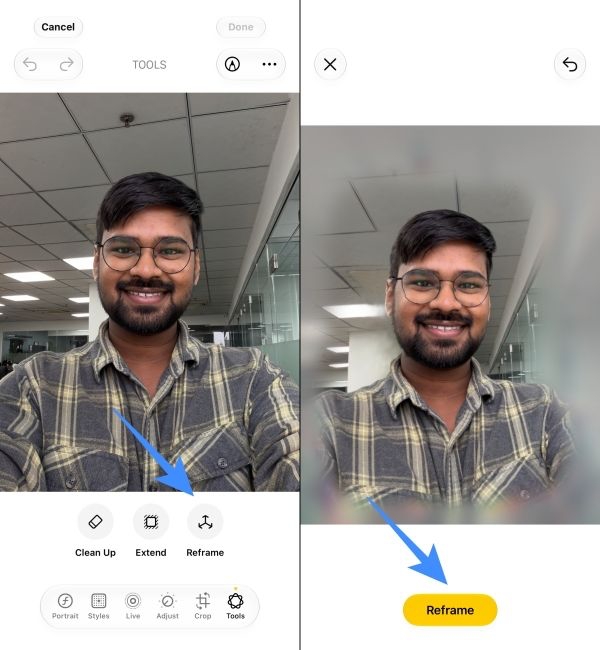
Reframe in iOS 27 is actually interesting, as it lets you readjust the subject in a photo. I brushed it off as a gimmick too until I tried it on one of my photos, where I wasn't facing the camera. The results were pretty good. It did create parts of the scene not in the frame, but the overall shot didn't look explicitly AI-generated.
Finally, iOS 27 also brings iPhones' Clean Up Tool on par with the competition. It can cleverly recreate an object, even if it was hidden behind something. I asked a friend to put his hand across his face and then tried to erase the hand, which is about as unfair a test as you can hand an AI, and it rebuilt his face cleanly underneath.
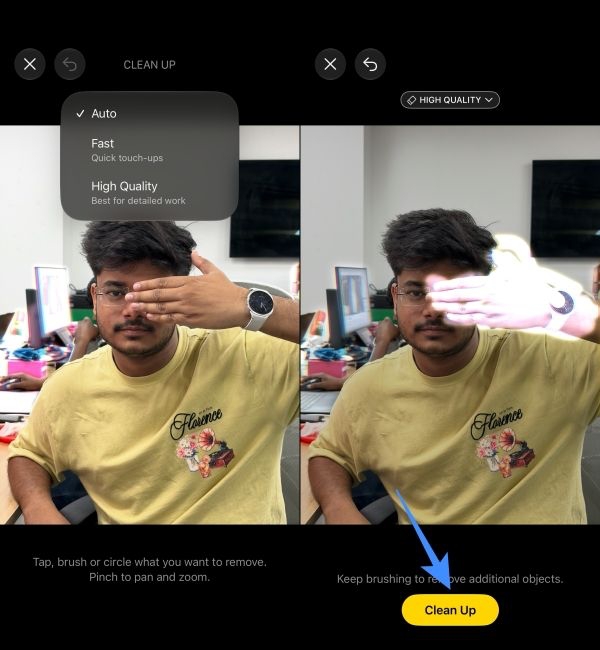
You do need to be on the High Quality mode for results like that, which sends the shot off to Apple's Private Cloud Compute and takes a few seconds longer, but you can't argue with the results.
Image Playground and Genmoji Finally Belong in 2026
Image Playground has been overhauled to the point where it doesn't seem fair to call it the same feature as the one in iOS 26. It generates in any style now, including photorealistic; it can make images of actual people, and you can tweak a result by describing the change or by touch instead of starting over. It also handles different aspect ratios, which allowed me to generate loads of AI wallpapers for my iPhone.
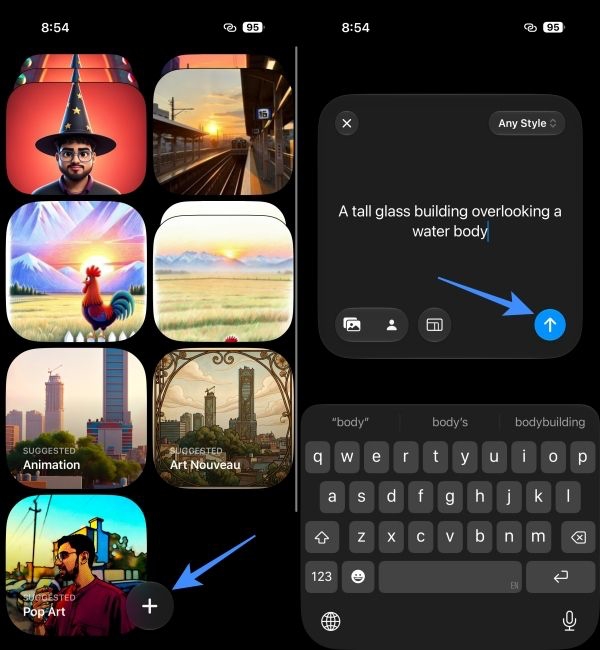
Genmoji got the same treatment, with consistent output that defaults to a 3D cartoonish look. And similar to Image Playground, you can describe what you have already made for more imaginative and creative Genmojis.
Note: Basic tasks like Clean Up and Describe a Shortcut are faster because they work on-device. But advanced tools like the new Image Playground, Extend and Reframe are sent over to cloud servers. And that is why there is a limit to their usage.
I have personally not run into that limit cap yet, but if you feel you would be using these features a lot, then you can get the iCloud+ subscription for more headroom.
Liquid Glass Gets a Much-Needed Polish
Liquid Glass was the most attractive change in iOS history but also the most complained about one too. It not only caused readability issues, as people struggled to see the text on almost transparent menus and icons, but also created performance issues on older iPhones.
iOS 27 sands it down. From what I have noticed throughout my iOS 27 review period, refraction is more uniform, contrast is better, and app icons look sharper.
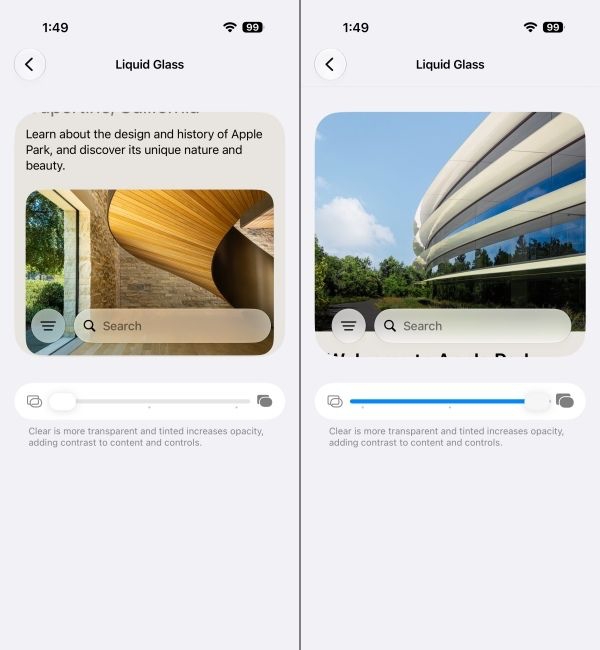
There is a new slider in Settings to adjust Liquid Glass on your iPhone. It runs from ultra-clear all the way to fully tinted, so you can now turn it down to something closer to the flat interface you had before.
Older iPhones Feel Quicker Than Before
As I said, Liquid Glass created performance hiccups in older iOS 27-eligible devices, and it was a big reason why I never updated my iPhone 13 to iOS 26. But when Apple confidently claimed that the new update brings performance improvements of up to 30%, I took the risk of installing the iOS 27 public beta for the sake of this review.
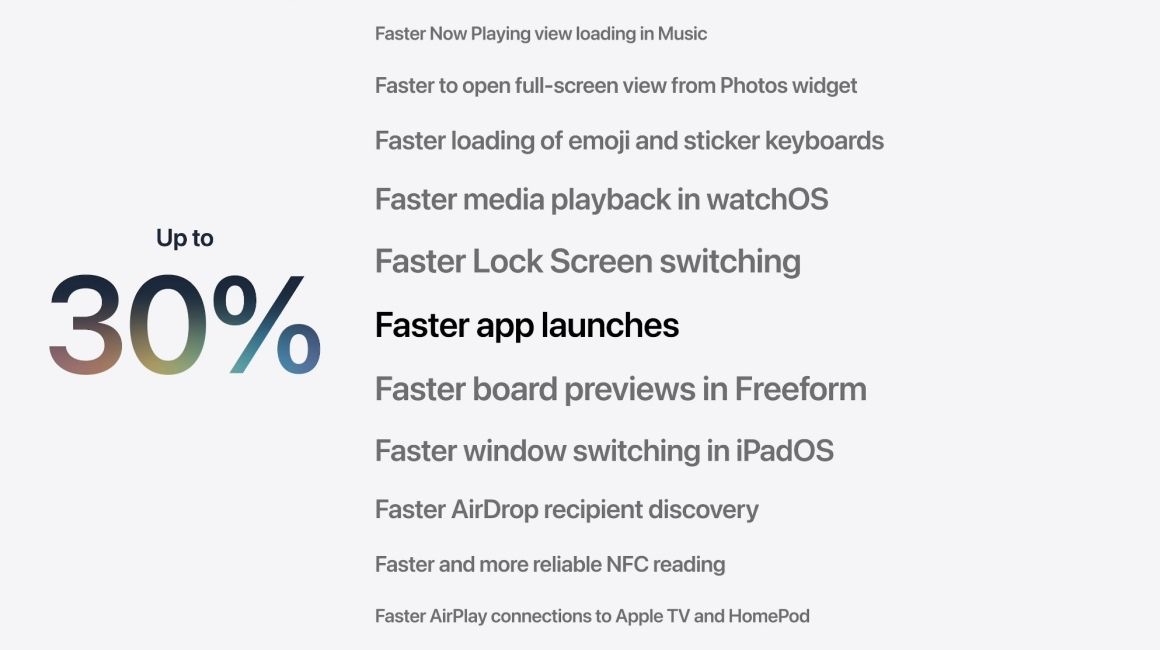
After months of usage, I can say that my iPhone 13 runs a lot smoother on iOS 27. Apps open up quickly, without any stutter or friction, while the rest of the experience remains as good as it was on iOS 18.
However, my iPhone 13 saw none of the Apple Intelligence features I discussed above. That said, it was still worthwhile having iOS 27 installed on it just for the battery life alone. I have noticed that the standby time is much better with this update than with iOS 18. I would leave my iPhone 13 at 80% overnight and wake up with only a 2% drop. However, I didn't notice any such changes on the iPhone Air.
AirDrop has also become more reliable and faster. The connection is more stable, and it does not cancel midway through transfers, something I faced constantly in iOS 26. Sending a 10 GB file only took about 2 minutes, which is considerably quicker than what it used to take.
The Smaller Changes in iOS 27 That Matter
Now that I have covered all the big changes, let's talk about some small ones. Like the Wallet app, which now lets you build a pass by scanning a physical card so it can pull in the number, barcode or QR code.
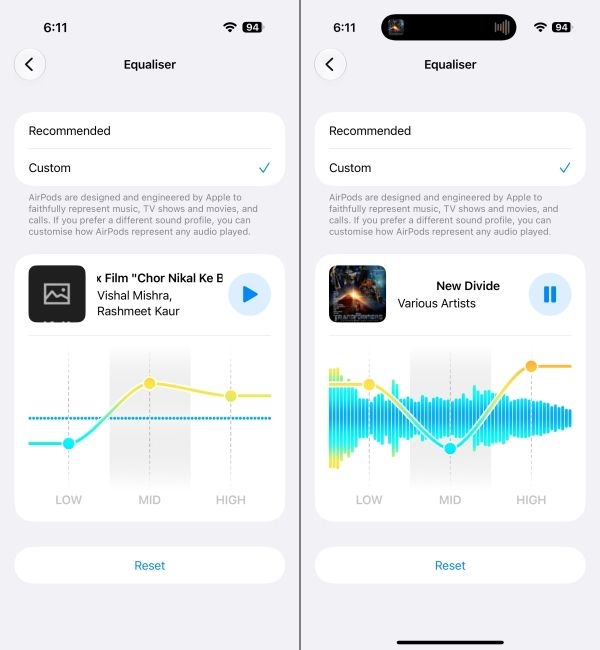
There's now a three-band equaliser to customise audio in AirPods. It is available under Settings > AirPods > Audio and Routing > Equaliser > Custom. Here, you can push bass, mids and treble independently instead of picking a preset. This is by far one of my favourite iOS 27 features since Apple's default AirPods presets never quite matched my style of listening.
Parental controls got separate time allowances for entertainment, games and social media; schedules for different days and times. Alarms and Timers get independent volume controls roughly a decade after everyone started asking. Health app adds GymKit support directly on the iPhone, so gym equipment can sync calories, distance, speed and incline to Fitness without an Apple Watch.
iOS 27 Review Verdict: Should You Hit Update Now?
Pros:
- Siri AI is genuinely an upgrade and works like a real assistant
- Describe a Shortcut turns automation into something anyone can use
- Clean Up in Photos has gone from the worst to convincingly good
- EQ for AirPods finally lets users tweak audio to their liking
- Serious performance improvements for older iPhones
Cons:
- Siri AI is still in Beta and only works in limited regions and languages
- Most new Apple Intelligence features require at least an iPhone 15 Pro or above
- Limits on Siri AI conversations and Image Playground usage
iOS 27 honestly feels like Apple's redemption arc, with the company finally fulfilling its Apple Intelligence promises it showed us a couple of years ago. While also making the latest iOS experience bearable on older iPhones.
It finally brings Siri up to date with current AI assistants, something that has cursed Apple for years. While also delivering on AI features that genuinely feel useful rather than a gimmick. Most of the things I talked about above have been a part of my daily routine, whether it is asking Siri AI for the most mundane things, checking food nutrition, generating wallpapers with Image Playground or tweaking AirPods EQ.
So if you are on the fence about updating your iPhone to iOS 27, then I would say give it a go. It is a much more well-rounded update than the ones that have come before it.


